
Preview


Description
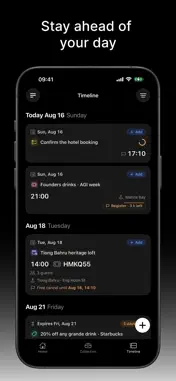
You screenshot things so you will not forget them. A flight at 6:40am. A dentist appointment. A talk that closes registration Friday. A coupon that expires Sunday. Then the folder fills up, and you never open it again. SnapAction reads the time inside the picture. Then the picture comes back to find you, before that time runs out. TIME COMES FIRST SnapAction reads dates and times out of the screenshot itself, including relative ones like "tomorrow 10:00", "this Friday", or "in 3 days", and resolves them against when the screenshot was taken and the time zone you were in. Five kinds of dated card: - Events — talks, concerts, launches, school and sports schedules. Registration deadlines are tracked separately from the event itself, so you are reminded to sign up, not just to show up. - Meetings — invites, calls, interviews. - Travel — flights with departure and arrival times, airports, and flight numbers. - Bookings — hotels, restaurants, clinics, salons, rentals. - To-dos — anything with a due date. Anything else with an expiry — a coupon, a subscription, a document — carries its valid-until date on the card. Then it hands you the action: add to Calendar, send to Reminders, open the place in Maps, or save the contact. IT COMES BACK TO YOU SnapAction does not plan your day and does not ask you to. It waits, and then it comes to find you. Once a card has a date, the app schedules its own reminder: - An event already on your calendar: three hours before it starts. - An event you have not committed to yet: two days ahead, at 9am, with an Add to Calendar button on the notification itself. - A to-do: at the time it is due, with a Mark Done button. Tap the reminder and you land on that card with the original screenshot, not on a list you still have to search. If you would rather not be reminded, turn notifications off and nothing is scheduled. YOU NEVER HAD TO CHOOSE A PHOTO Every card keeps the image it came from, and you never picked it — it is the shot you already took. Tap to see it full-screen, exactly as you captured it, so you can check any extracted date, time, address, or flight number against the source instead of trusting it blind. Nothing is a black box, and nothing is lost when you clear your camera roll. IT HANDLES THE REST TOO - Types what it reads: link, article, repo, video, product, place, receipt, invoice, coupon, contact, or note. - Recovers missing links. When a screenshot shows a title but no URL, SnapAction looks for the canonical link and attaches it. - Builds a library you can search, filter by type, and browse by date. SCAN WITHOUT OPENING THE APP - Action Button: press to scan your newest screenshot. - Control Center: add the SnapAction control and scan from any screen. - Back Tap: double or triple tap the back of your iPhone. - Siri and Shortcuts: "Scan screenshot with SnapAction." Scan progress appears in the Dynamic Island while it runs. WHAT IT COSTS Free includes 30 scans a month — enough to use it properly before deciding anything. One image is one scan, and a batch uses one scan per image. SUBSCRIPTION DETAILS SnapAction Membership raises your quota to 300 scans a month. - Monthly: $14.99 per month - Annual: $149.99 per year Payment is charged to your Apple Account at confirmation of purchase. Your subscription renews automatically unless you turn off auto-renew at least 24 hours before the end of the current period. Manage or cancel your subscription in your Apple Account settings. BEFORE YOU INSTALL The screenshots you choose to scan are uploaded to SnapAction for analysis. The rest of your photo library is never uploaded. SnapAction requires iOS 17 or later and a free SnapAction account (Sign in with Apple or Google). Privacy Policy: https://snapaction.ai/privacy Terms of Use (EULA): https://www.apple.com/legal/internet-services/itunes/dev/stdeula/
What's New
Version 1.15.0 2026-09-03
This update focuses on reliability and accessibility: • Scans now show a clear waiting state when your connection drops, and resume on their own. • Fixed layou...This update focuses on reliability and accessibility: • Scans now show a clear waiting state when your connection drops, and resume on their own. • Fixed layout and tap targets at larger accessibility text sizes. • More reliable saving when a scan is interrupted. • Clearer wording on permission prompts. • Various stability and performance fixes. Thanks for using SnapAction. Technical Analysis
Package Overview Basic metadata
Bundle ID
com.rescience.snapaction Current Version 1.15.0
Minimum iOS 17.0
Package Size App Store Size
Package Metadata 0 / 0 version records
Detailed binary, privacy manifest, framework, and Info.plist results have not been indexed for this package yet. The verified App Store and archive metadata above remains available.
Developer Information
Known Version Records
0 version records with stored package metadata
Stored metadata does not guarantee a package is currently available to download.
| Details | Version / IDs | Version date | Action |
|---|