
Preview





Description
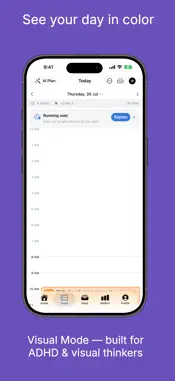
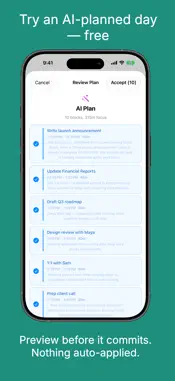
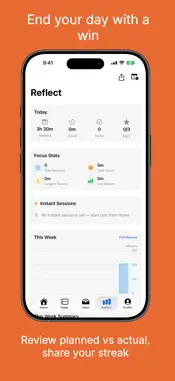
DayBox turns a chaotic to-do list into a clear daily plan you can actually finish. Drag tasks onto a visual timeline around your real calendar, protect time for deep work, focus one block at a time, and end the day knowing what you got done. NEW IN 1.2 - Made for iPhone Duo and iPad: on the big screen, your timeline and Inbox sit side by side — drag tasks straight onto your day. - Desk Mode on iPhone Duo: prop it up mid-block and the timer sits on the top half, every control on the bottom, and the screen stays on until the block ends. - Visual Countdown: a color disk that shrinks as time runs out, so you can see how long you have at a glance. - Wrap-Up Heads-Up: a nudge 5 minutes before a block ends. THE DAYBOX METHOD - 5 STEPS, EVERY DAY 1. Capture tasks into your Inbox 2. Pick your Big 3 priorities for the day 3. Drag tasks onto your daily timeline 4. Start a focus timer for each block 5. Review your wins at the end of the day That's it. Simple enough to actually stick with. PLAN YOUR DAY - Visual daily timeline with drag-and-drop time blocks - Big 3 priorities - anchor your day to what matters most - Calendar integration - see events beside your blocks, with optional two-way Apple Calendar sync - Natural language input - type "Meeting 2pm 30min #work" - Recurring tasks and day templates for your routines - Checklists inside every task - Tags to organize by project or life area - A warning before you overcommit your day - Siri & Shortcuts - add tasks hands-free FOCUS DEEPLY - A focus timer for every block - classic ring or the new Visual Countdown - Live Activity on the Lock Screen and Dynamic Island - Your task's checklist right on the focus screen - Ambient sounds: rain, forest, ocean waves, coffee shop, fireplace, white noise - Pomodoro mode with automatic breaks - Log interruptions without losing your place - Apple Watch app and Home Screen widgets FOCUS-FRIENDLY BY DESIGN Built with ADHD and visual thinkers in mind: - Visual Timeline colors your blocks by tag - Gentle Reminders swap pressure for kind wording - Visual Countdown shows time left as a shrinking disk - Wrap-Up Heads-Up, so a block never ends by surprise REFLECT & GROW - Planned vs. actual focus, tasks done, and Big 3 progress - Weekly review with charts and trends - Streaks for planning, Big 3, and focus - 20 achievement badges - Share your day as a summary card DAYBOX PRO - AI daily planning around your real calendar - always previewed, never auto-applied (try an AI-planned day free) - Adaptive replanning when your day changes - AI time estimates for your tasks - Time Insights: where your time goes by tag, and your best focus hours - CSV time-log export for invoicing and timesheets Choose monthly, yearly (free trial available), or a one-time lifetime purchase. Prices are shown in the app before you buy. Payment is charged to your Apple ID at confirmation of purchase. Subscriptions auto-renew unless cancelled at least 24 hours before the end of the current period. Manage or cancel in Settings > Apple ID > Subscriptions. Terms of Use (EULA): https://www.apple.com/legal/internet-services/itunes/dev/stdeula/ Privacy Policy: https://culi.app/apps/daybox/privacy-policy
What's New
Version 1.2.0 2026-10-20
NEW: Made for iPhone Duo and iPad. On the big screen your timeline and Inbox sit side by side — drag tasks straight onto your day. • Desk Mode (iPhone Duo): pr... Technical Analysis
Package Overview Basic metadata
Bundle ID
com.daybox.app Current Version 1.2.0
Minimum iOS 17.0
Package Size App Store Size
Package Metadata 0 / 7 version records
Detailed binary, privacy manifest, framework, and Info.plist results have not been indexed for this package yet. The verified App Store and archive metadata above remains available.
Developer Information
Known Version Records
0 version records with stored package metadata • 7 known version records
Stored metadata does not guarantee a package is currently available to download.
| Details | Version / IDs | Version date | Action |
|---|---|---|---|
| Not archived | App Store ID: 887282657 | Unknown | Request Version |
| Not archived | App Store ID: 887144647 | Unknown | Request Version |
| Not archived | App Store ID: 885715989 | Unknown | Request Version |
| Not archived | App Store ID: 885659862 | Unknown | Request Version |
| Not archived | App Store ID: 885431193 | Unknown | Request Version |
| Not archived | App Store ID: 884395108 | Unknown | Request Version |
| Not archived | App Store ID: 883803278 | Unknown | Request Version |