Preview


Description
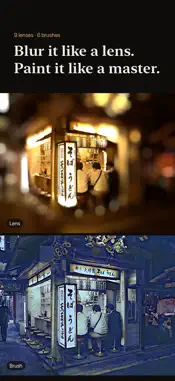
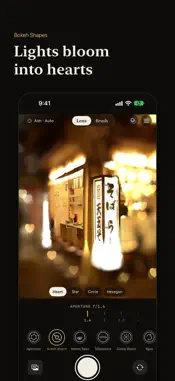
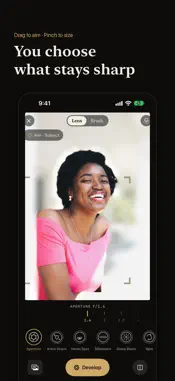
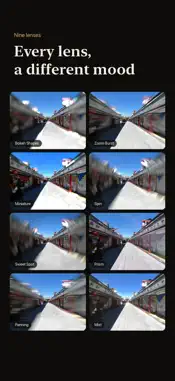
Blur the background like a fast lens, or let your photo paint itself like a masterpiece. AnyLens gives you nine optical lenses and six brushes, all live in the camera. Go beyond colour filters: choose what stays sharp, and the light around it falls into soft bokeh, hearts or stars. Or press the shutter and watch the lines draw themselves and the colour fill in, starting where you tapped. NINE LENSES • Aperture: turn the f-stop dial and the background melts away. Stop down and the bokeh turns hexagonal, the way light passes real aperture blades. • Bokeh Shapes: points of light in the background bloom into hearts, stars, circles or hexagons. • Sweet Spot: a crisp centre with edges that swirl. • Miniature: real streets look like a tabletop model. • Zoom Burst: streaks rush outward from your subject. • Spin: the scene whirls around the point you choose. • Panning: your subject holds still while the background streaks past. • Mist: a soft haze settles over the scene. • Prism: light splits into rainbow fringes. AIM WHERE YOU WANT • Auto finds what stands out in the frame. • Face locks onto faces. • Subject finds the person or object you tap and keeps its outline sharp. • Manual: tap or drag the focus anywhere, and pinch to set how much stays sharp. COLOUR AND FILM Lay one of nine colour looks over any lens: Plain, 4 PM, Dinner Table, Night Walk, Clear, Late Summer, B&W Diary, Film 400 and Disposable, with their own grain, glow and light leaks. Add the orange date stamp of a film camera. The look colours the bokeh too, and goes into the photo you save. LET THE PHOTO DRAW ITSELF Six brushes, each one a picture you'll want to post: • Comic: clean ink lines and flat, cel-shaded colour, like a comic panel. • Pencil Sketch: graphite contours and hatching on paper. • Watercolor: soft washes that bleed at the edges. • After Van Gogh: The Starry Night. • After Hokusai: The Great Wave off Kanagawa. • After Munch: The Scream. Every brush previews live in the viewfinder. Press the shutter and the picture draws itself from where you tapped: the lines first, then the colour. Paintings end up in a frame. Save the finished picture, or the whole drawing process as a video. CAMERA OR LIBRARY Use the front or back camera, or open any photo from your library in the editor and give it a new lens or a new brush. ON YOUR DEVICE Every effect is processed on your iPhone. Your photos are never uploaded. No account, no subscription. WHAT IT ISN'T AnyLens is not an AI image generator. It doesn't invent anything that wasn't in your photo, and it doesn't upload your photos anywhere.
What's New
Version 20261021002 2026-10-30
• Aim at a person or object: the whole subject stays sharp, while even the background right around it melts away. • Works live in the camera and on photos. • Ai... Technical Analysis
Package Overview Basic metadata
Bundle ID
com.rele.LensBrush Current Version 20261021002
Minimum iOS 26.0
Package Size App Store Size
Package Metadata 0 / 0 version records
Detailed binary, privacy manifest, framework, and Info.plist results have not been indexed for this package yet. The verified App Store and archive metadata above remains available.
Developer Information
Known Version Records
0 version records with stored package metadata
Stored metadata does not guarantee a package is currently available to download.
| Details | Version / IDs | Version date | Action |
|---|