Preview





Description
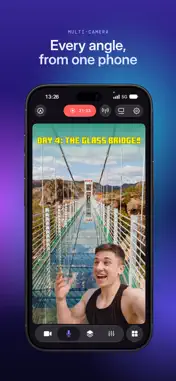
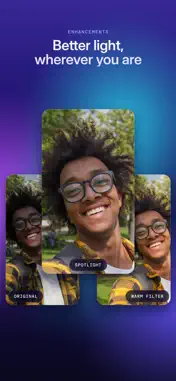
Dive into streaming, or record your next video, in just a few taps – hone your scene, connect your camera, and start creating with ease – all directly from your iPhone or iPad. Camo Studio is free, and a finalist in Apple’s 2025 App Store Awards. STREAM & RECORD FROM ANYWHERE Connect a mic to your iPhone, or cameras and mics to your iPad, and start streaming on the move, and record your video to built-in or connected storage for editing and uploading high-quality content later. SHARE YOUR GAMING MOMENTS On iPad, stream console games with a capture card to Twitch, YouTube, Kick and more. On iPhone, stream your mobile games with a spare phone as your facecam. Set up your scene with tactile controls that make multi-feed and PiP simple to configure. SWITCH UP YOUR SCENES Quickly switch between a collection of built-in or custom scenes with a tap to help engage your audience or show a different shot. Each scene can be configured individually with different cameras, video and audio sources, and output profiles, and layered with text, images, shapes, video and web pages. PRO STREAMS WITH WEB OVERLAYS Imbue your streams with your personal aesthetic, or a professional touch, with support for web overlays from StreamElements, Streamlabs, Uno Overlays and more. Import template or custom web overlays, with live content, alerts, embedded control panels, and a wide array of other widgets. A ONE-APP STREAM CONTROL CENTRE Stay in touch with your chat, trigger in-stream events, and check on your mods, all through Camo Studio’s stream panels. Add exactly the panels you need – each is custom to the streaming service you use, and gives you powerful controls for your livestreams. POWERFUL VIDEO ENHANCEMENTS & ADJUSTMENTS Camo Studio comes loaded with functionality that helps you stand out. Easily apply a subtle “Bokeh” effect to your background, or replace it or remove it entirely! Adjust the framing and orientation of each input feed, including Auto-framing modes that help you stay in-shot. MAKE THE MOST OF YOUR IPHONE Your iPhone becomes a complete live studio: use your front and rear cameras at once, flick the controls away for a clean view, and when your phone warms up, Camo Studio eases the frame rate instead of dropping your stream. MAKE THE MOST OF YOUR IPAD Your iPad supports connecting a breadth of peripherals, external devices and cameras, with every panel in view on the bigger screen. Use it as a bigger, sharper screen for your Nintendo Switch, or as a video monitor for your camera. M1 and later iPads can even run Camo Studio in the background while streaming or recording, capturing the device’s screen, and can integrate with your Stream Deck. SECURITY AND PRIVACY FIRST Camo Studio transmits your video directly to the streaming services of your choosing, and all recordings are entirely local to your iPhone or iPad, connected storage device or selected storage service. Your data is your business, not ours. NOT ONLY BUT ALSO! - Pro-quality video in a range of resolutions, including 4K UHD, 1080p HD, and 720p - Built-in galleries come preloaded with backgrounds and filters to try in your videos - Work in landscape, portrait or square orientations, great for TikTok-style shots at 9:16 aspect ratio - Use your device’s front and back cameras as part of your scene - Add any spare phone or tablet running Camo Camera as another angle over Wi-Fi - Plug in a USB mic, or connect a Bluetooth mic like AirPods, and sound as good as you look - Looks great in light and dark mode - No ads in the app, ever WE’RE HERE TO HELP We’re fanatical about supporting our users, and we’d love to help you make the most of Camo Studio on your iPhone or iPad. Reach out to us any time: https://camo.com/support LEARN MORE About us: https://camo.com/studio/iphone https://camo.com/studio/ipad How to use Camo: https://camo.com/support/camo-ipad/how-to-use-camo-ipad FAQ: https://camo.com/support/camo-ipad/camo-ipad-faq
What's New
Version 2.6.1 2026-10-27
Camo Studio now runs on iPhone, with the same scenes, layers and effects as on iPad, in a layout built for a phone screen. Let us know what you think via camo.c... Technical Analysis
Package Overview Basic metadata
Bundle ID
com.reincubate.ipados.camo Current Version 2.6.1
Minimum iOS 18.0
Package Size App Store Size
Package Metadata 1 / 14 version records
4.6 / 5.0 (1,339 ratings)
Detailed binary, privacy manifest, framework, and Info.plist results have not been indexed for this package yet. The verified App Store and archive metadata above remains available.
Developer Information
Known Version Records
1 version record with stored package metadata • 14 known version records
Stored metadata does not guarantee a package is currently available to download.
| Details | Version / IDs | Version date | Action |
|---|---|---|---|
| 133.61 MB | v2.5.2 App Store ID: 886529329Build: 2.5.2 | 2026-06-08 09:01:08 | Get Version |
| Not archived | App Store ID: 885858006 | Unknown | Request Version |
| Not archived | App Store ID: 885064183 | Unknown | Request Version |
| Not archived | App Store ID: 881349536 | Unknown | Request Version |
| Not archived | App Store ID: 880846149 | Unknown | Request Version |
| Not archived | App Store ID: 876680199 | Unknown | Request Version |
| Not archived | App Store ID: 875664378 | Unknown | Request Version |
| Not archived | App Store ID: 875282481 | Unknown | Request Version |
| Not archived | App Store ID: 872383928 | Unknown | Request Version |
| Not archived | App Store ID: 867430030 | Unknown | Request Version |
| Not archived | App Store ID: 867224286 | Unknown | Request Version |
| Not archived | App Store ID: 862322599 | Unknown | Request Version |
| Not archived | App Store ID: 860344778 | Unknown | Request Version |
| Not archived | App Store ID: 857863285 | Unknown | Request Version |