
Preview






Description
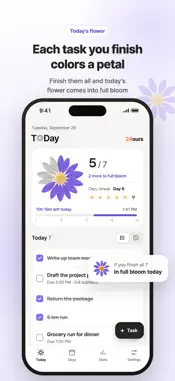
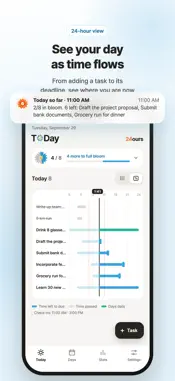
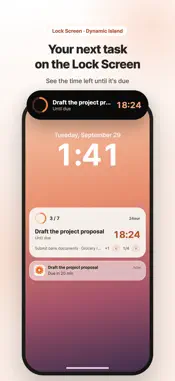
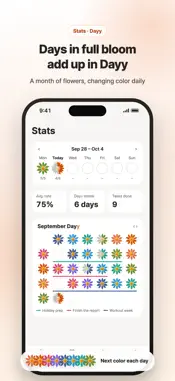
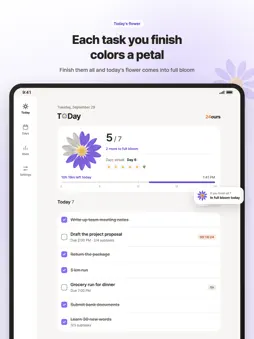
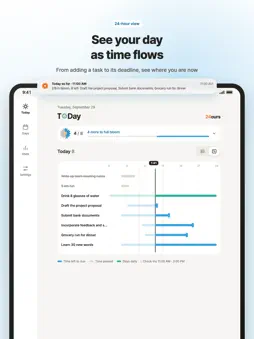
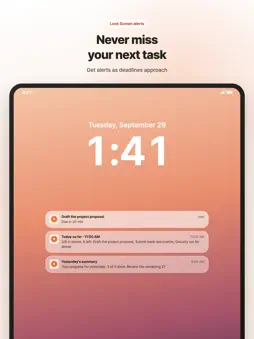
Plan today's tasks in a daily planner and to-do list that makes progress visible. Each finished task colors a daisy petal; complete them all and the flower blooms. See your day in a 24-hour view, with time passed and time left until tasks are due. • Switch between the 24-hour view and a list. See finished tasks and progress check-ins alongside what's still ahead. • Use Days to group a goal and its tasks across up to seven days. Adjust the date range, and add tasks that appear every day with a count to reach, such as eight glasses of water. • Add subtasks and due times. Move tasks to tomorrow or turn a subtask into its own task. On iPhone and iPad, swipe a task to edit, move, or delete it; on Mac, right-click it. • After finishing a task, add a note about how it went and create a follow-up for today, tomorrow, or Days, or add one as a subtask. View linked tasks as a flow. • Each morning, review yesterday's unfinished tasks. Move them to today or Days, or mark them complete if you finished them. • Set reminders to plan an empty day, check the next task due, review Days, and track progress up to three times a day. Turn them on or off; with 24ours Pro, customize reminder times and intervals. • On iPhone, see the next task due on the Lock Screen and in the Dynamic Island with Live Activities. On Mac, use the menu bar to see the next task due, today's progress, or a time-left gauge, and to add or finish tasks. • See weekly daisies, average completion rate, completed task count, a monthly Dayy view, and your Dayy streak for days when every task is done. Restore deleted items for up to 30 days. Choose from eight flower colors, light or dark appearance, and ten app languages. On iPhone, iPad, and Mac, tasks sync through iCloud with the same Apple ID and remain available offline. No app account is needed; tasks are stored on your device and in your iCloud. Free and 24ours Pro • Free: 5 tasks a day, 1 Days (with 1 daily task), and this week's and month's stats. On iPhone and iPad, full-screen ads may appear when you open or return to the app, and banner ads appear at the bottom. • 24ours Pro: unlimited tasks, Days and daily tasks, all past stats, flower colors and daily color changes, Mac menu bar styles, custom reminder times and intervals, and no ads. One subscription works on iPhone, iPad and Mac with the same Apple ID. • Monthly or yearly auto-renewing subscription with a one-week free trial. It renews automatically unless canceled at least 24 hours before the end of the current period and is charged to your Apple ID. Manage or cancel anytime in your App Store account settings. Terms of Use: https://www.apple.com/legal/internet-services/itunes/dev/stdeula/ Privacy Policy: https://ref979factor.com/24ours/privacy.html Same 24 hours for all of us.
What's New
Version 1.0.4 2026-11-20
The add button now sits at the bottom right, easier to reach with one hand. Undo notices after deleting or moving a task now disappear on their own after a few ...The add button now sits at the bottom right, easier to reach with one hand. Undo notices after deleting or moving a task now disappear on their own after a few seconds. Technical Analysis
Package Overview Basic metadata
Bundle ID
com.ssamonim.twentyFourOurs Current Version 1.0.4
Minimum iOS 15.0
Package Size App Store Size
Package Metadata 0 / 0 version records
Detailed binary, privacy manifest, framework, and Info.plist results have not been indexed for this package yet. The verified App Store and archive metadata above remains available.
Developer Information
Known Version Records
0 version records with stored package metadata
Stored metadata does not guarantee a package is currently available to download.
| Details | Version / IDs | Version date | Action |
|---|