

Meme Catcher App Icon

Meme Catcher

Entertainment • Recognica, LLC
4+ v2.0.0 Recorded price: $0.99 App Store →
IPA Analysis
Technical Specs
Bundle ID com.recognica.memecatcher.MemeCatcher
Version 2.0.0
App Store Size 15.2 MB
Minimum iOS 26.2
Devices iPhone, iPad, iPod touch
Catalog release date 2026-02-22
Latest recorded version date 2026-10-26
Features & Support
Advisory 4+
Languages (1)
EN
Top In App Purchases
No In App Purchases Listed

Preview

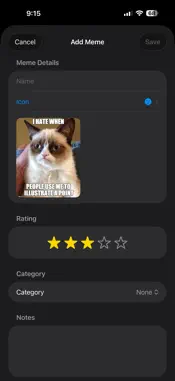
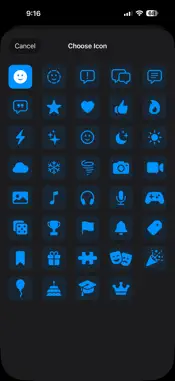
Meme Catcher screenshot 1 Meme Catcher screenshot 2 Meme Catcher screenshot 3 Meme Catcher screenshot 4 Meme Catcher screenshot 5 Meme Catcher screenshot 6 Meme Catcher screenshot 7 Meme Catcher screenshot 8 Meme Catcher screenshot 9 Meme Catcher screenshot 10 Meme Catcher screenshot 11 Meme Catcher screenshot 12

Description

Meme Catcher — Your Ultimate Meme Vault Never lose a great meme again. Meme Catcher is the easiest way to save, organize, and manage your entire meme collection — all in one place, right on your device. WHETHER YOU'RE A CASUAL SCROLLER OR A MEME CONNOISSEUR Meme Catcher is built for everyone who's ever wanted to save a meme and actually find it later. No more digging through your camera roll. No more losing the perfect reaction image. Your memes, organized your way. POWERFUL ORGANIZATION Sort your memes into 20 built-in categories right out of the box — from Classic Memes and Reaction Memes to Gaming, Wholesome, Dank, Cursed, and more. Don't like the defaults? Create your own custom categories, pick your own colors and icons, and organize everything exactly the way you want. RATE YOUR FAVORITES Give every meme a star rating so your best ones are always easy to find. Add personal notes and tags to remember where a meme came from or why it made you laugh. EXPORT YOUR COLLECTION Take your memes with you. Export your entire collection — or just selected categories — as a ZIP file packed with full-quality images and a detailed metadata file. Share via AirDrop, save to Files, send over Messages, or upload to iCloud Drive. Your collection is always yours. ICLOUD SYNC Keep your meme library in sync across all your devices with iCloud. Enable iCloud Sync in Settings and your entire collection — every meme, every category, every rating — follows you wherever you go. PRIVATE BY DEFAULT Everything stays on your device. Meme Catcher never uploads your content to any server. Your memes are stored locally using SwiftData, with optional iCloud sync entirely in your control. FEATURES AT A GLANCE • Save and organize memes in one place • 20 built-in categories, fully customizable • Custom colors and icons for every category • Star ratings and personal notes • Export full collection as a ZIP archive • Filter exports by category • iCloud sync across devices • Clean, fast SwiftUI interface • No ads. No accounts. No nonsense. Download Meme Catcher today and finally give your meme collection the home it deserves.

What's New

Version 2.0.0 2026-10-26
Meme Catcher now supports iPhone Duo, plus a set of fixes that make the app easier to use on every iPhone and iPad. NEW: IPHONE DUO SUPPORT Meme Catcher has be...Meme Catcher now supports iPhone Duo, plus a set of fixes that make the app easier to use on every iPhone and iPad. NEW: IPHONE DUO SUPPORT Meme Catcher has been updated for the new foldable iPhone Duo. The app now adapts to the narrow outer display, where the system places the clock, Wi-Fi status, and toolbar buttons in a vertical strip along the edge of the screen. Menus, sheets, and forms now fit neatly beside that strip, and nothing is cut off or hidden behind it. The layout also adjusts when you rotate the device, so the controls stay easy to reach in portrait and in landscape. CLEANER BUTTONS ON THE DUO On the Duo outer display, text buttons such as Done, Cancel, Save, and Export now appear as simple icons that line up with the other buttons in the system strip. A checkmark confirms or saves, and an X cancels. These buttons keep their full names for VoiceOver, so they remain easy to find and use with assistive technology. On every other device, you will still see the same familiar text buttons you are used to. KEYBOARD CONTROLS THAT STAY OUT OF THE WAY When you type a meme name, a category name, or your notes on the Duo outer display, the button that hides the keyboard now appears right under the Save button instead of floating above the keyboard. Save stays where it is, so you never tap the wrong button while the keyboard opens or closes. On other devices, the button remains above the keyboard as before. FILTER AND SORT MENUS NOW RESPOND TO TAPS We fixed a problem where tapping the rating, view, or sort buttons above your memes could open the first meme instead of the menu you wanted. Those buttons now respond every time, so you can filter by rating, switch between grid and compact views, and change the sort order without any surprises. Tapping a meme card still opens its details exactly as before. A TIDIER SORT BUTTON On narrow screens, the sort button no longer wraps onto two lines or looks taller than its neighbors. It now adjusts to the space available, showing the full label when there is room and a compact version when there is not. EVERYTHING YOU LOVE ABOUT MEME CATCHER Meme Catcher is still the simplest way to keep every meme you love in one place. - Save memes from your photos and give each one a name, an icon, notes, a published date, and a star rating. - Organize your collection with categories, and show or hide categories whenever you like. - Filter by category or minimum star rating, and search by name or notes. - Sort by date added, rating, or name, and choose a grid or compact view. - See your highest rated memes together on the Popular screen. - Share memes with friends or save them back to your photo library. - Create your own memes with the optional Meme Creator, including text layers, fonts, and cropping with rotation. - Export and import your whole collection so your memes are always backed up. - Sync across your devices with iCloud. A NOTE FOR EVERYONE ELSE These changes were designed so that iPhone and iPad look and behave just as they did before. If you are not using an iPhone Duo, you will mainly notice that the filter, view, and sort buttons are more reliable. Thank you for using Meme Catcher. If you enjoy the app, a rating or review on the App Store helps other meme lovers find it. Have a suggestion or run into a problem? Contact us from the More Apps screen in the app and let us know. We read every message and keep improving the app because of your feedback.

Technical Analysis

Package Overview Basic metadata
Bundle ID com.recognica.memecatcher.MemeCatcher
Current Version 2.0.0
Minimum iOS 26.2
Package Size App Store Size
Package Metadata 0 / 4 version records
Detailed binary, privacy manifest, framework, and Info.plist results have not been indexed for this package yet. The verified App Store and archive metadata above remains available.

Developer Information

Known Version Records

0 version records with stored package metadata • 4 known version records

Stored metadata does not guarantee a package is currently available to download.

Details Version / IDs Version date Action
Meme Catcher icon
Not archived
App Store ID: 883901746 Unknown Paid / Arcade
Meme Catcher icon
Not archived
App Store ID: 883520550 Unknown Paid / Arcade
Meme Catcher icon
Not archived
App Store ID: 883131760 Unknown Paid / Arcade
Meme Catcher icon
Not archived
App Store ID: 882217212 Unknown Paid / Arcade