Preview





Description
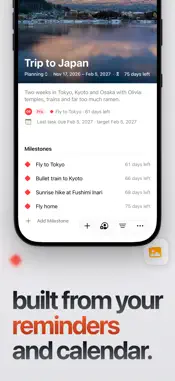
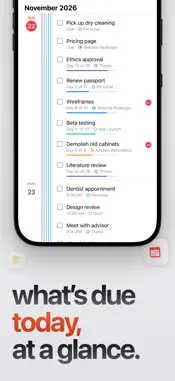
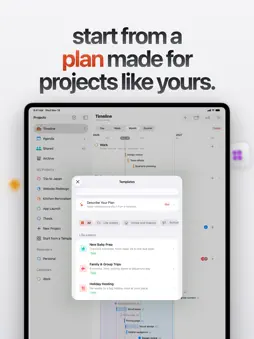
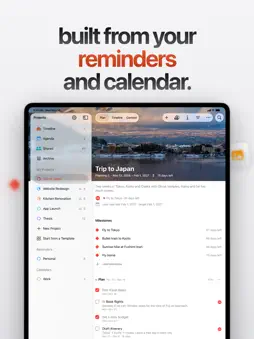
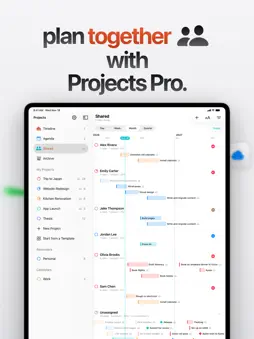
Projects turns the Reminders lists and Calendar events you already have into projects on one Gantt-style timeline, so you can see what’s coming and what’s running late, weeks or months ahead. There’s no new system to learn: plan a move, a wedding, a renovation, or a thesis with the apps you already use. Your reminders and events stay in Reminders and Calendar, synced both ways. No account, no ads, and free to start. Works on iPhone, iPad, Mac, and Apple Vision Pro. REMINDERS AND CALENDAR • Your Reminders lists become projects. Change a date in either app and the other updates. • Calendar events appear next to your tasks. • Works with iCloud, Google, and Exchange accounts. • Add any milestone to Calendar as a one-time copy. TEMPLATES • Start from a free template for every kind of project, from a wedding or a move to a dissertation, with phases, tasks, and milestones in place. • Choose a start date or the day it’s due, and Projects sets the dates. Templates come in 30 languages. TIMELINE • See every project side by side, or open one on its own. • Zoom from days to weeks, months, or quarters. • Break work into phases, milestones, and subtasks. • Touch and hold a task to move it a day or a week, or to change when it starts or ends. • See each project’s last due date next to your target date. ADDING TASKS • End a task with a day, like “Order tiles Friday,” and it’s due Friday. • Save links from Instagram, Pinterest, TikTok, and the web. Their images appear on the timeline on the day you choose. AGENDA AND ALERTS • Agenda lists what starts, ends, or reaches a milestone each day. • Smart Alerts cover tasks that are only in Projects, and follow up on reminders and events when there’s more to know. WIDGETS, SIRI, AND SHORTCUTS • Today and Project widgets show today’s tasks and a project’s progress. Check off tasks from the widget. • Add a task from Control Center, or touch and hold the app icon. • Ask Siri “What’s due in Projects?” or “Add a task in Projects.” • Export a timeline as a PDF or an image. PROJECTS PRO Projects Pro is for plans with a date to hit, alone or with others. • Link tasks so one starts after another. When a task slips, the tasks after it move too. • See a forecast of your real finish date and which tasks set it. Catch Up re-plans the tasks after a late one. • Get more than 170 extra templates, and fit any template to the time you have. • Count down to the big day on the Home Screen, Lock Screen, and StandBy with Countdown widgets, and in the Dynamic Island on iPhone. • On iPhone and iPad models that support Apple Intelligence, draft a plan from one sentence or break a task into steps. • Add your own photos and color swatches to moodboards. • Share a project over iCloud, assign tasks to people, and plan together on FaceTime with SharePlay. People you invite join free. • Share Yearly or Monthly with up to five family members. The timeline, Reminders and Calendar sync, a template for every kind of project, the Today and Project widgets, and export stay free. Nothing that was free became part of Pro. PRIVACY Your plans stay on your devices and in your iCloud. Projects collects anonymous usage data, and you can turn it off in Settings. ABOUT PROJECTS PRO Projects Pro is available as a monthly or yearly auto-renewing subscription, or as Lifetime, a one-time purchase. Yearly and Monthly include a one-month free trial. Lifetime isn’t shared through Family Sharing. Payment is charged to your Apple Account when you confirm the purchase, or when the free trial ends. A subscription renews automatically unless it’s canceled at least 24 hours before the end of the current period, and your account is charged for the renewal within 24 hours before the period ends. Manage or cancel it in your Apple Account settings. Terms of Use: https://www.apple.com/legal/internet-services/itunes/dev/stdeula/ Privacy Policy: https://waked.dev/privacy/
What's New
Version 1.3.1 2026-11-25
• Fixed a crash in Agenda that could happen when an overdue task was deleted on another device. • Fixed a crash that could happen when you deleted a project or ...• Fixed a crash in Agenda that could happen when an overdue task was deleted on another device. • Fixed a crash that could happen when you deleted a project or example while it was open. • Shared projects and syncing with Reminders and Calendar are more reliable. • The timeline scrolls faster, and the project you're looking at stays put as you move through time. • To change a task's dates, touch and hold its bar and choose Move. On Mac, use Move Task in the Project menu. With Pro, the linked tasks after it move too. • The welcome now starts by bringing in your Reminders and Calendar, and the timeline suggests templates for your first plan. • The Projects Pro offer shows the dates of your free month: when we'll remind you and when billing starts. You can turn the reminder off in Settings. Technical Analysis
Package Overview Basic metadata
Bundle ID
waked.Projects Current Version 1.3.1
Minimum iOS 26.0
Package Size App Store Size
Package Metadata 0 / 0 version records
Detailed binary, privacy manifest, framework, and Info.plist results have not been indexed for this package yet. The verified App Store and archive metadata above remains available.
Developer Information
Known Version Records
0 version records with stored package metadata
Stored metadata does not guarantee a package is currently available to download.
| Details | Version / IDs | Version date | Action |
|---|