Preview


Description
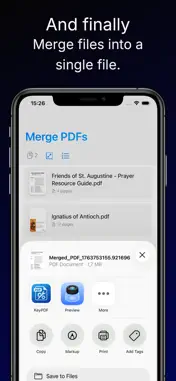
You know that feeling when you've got a stack of documents that need scanning, organizing, and editing, but the process is just... tedious? You're stuck jumping between three different apps, dealing with poor quality scans, and somehow your PDFs end up in a total mess anyway. Yeah, we get it. That's exactly why we built this. Meet your new go-to app for everything PDF. Whether you're capturing receipts and invoices, scanning contracts, digitizing handwritten notes, or just trying to organize your life, we've packed all the tools you actually need into one clean, intuitive app. No bloat. No confusion. Just solid functionality that actually works the way you'd want it to. - Here's what makes this app different: • Professional-Quality Scanning — Forget struggling with basic camera apps or hunting for a physical scanner. Just open our app, point your iPhone at any document, and snap. We handle the heavy lifting—automatic edge detection, perspective correction, and image optimization all happen instantly. Your scans look like they came from a professional scanner, seriously. • Powerful Editing Tools — Once you've got your PDF, you can actually do something with it. Need to add a quick sketch or annotation? Done. Want to type notes directly onto the page? Easy. Need to highlight important passages to make them stand out? Just a tap away. Every edit is smooth and responsive, and everything stays exactly where you put it. • Rearrange Pages in Seconds — Got a PDF with pages all jumbled up? Stop exporting and importing between apps. Just open the page manager, see all your pages as thumbnails, and drag them around to reorganize. Takes literally seconds and keeps everything in one place. You can also delete pages you don't need while you're at it. • Merge Multiple PDFs Effortlessly — Combining documents shouldn't require a PhD in file management. Whether you're consolidating scans into one master file, merging receipts, or pulling together multi-document applications, just select the files you want and merge them into a single, clean PDF. No fussing around with complicated steps. • AI-Powered Summaries — Sometimes you're staring at a massive document and just need the key points. That's where our smart summarization comes in. Let the app analyze your PDF text and give you an intelligent summary of the important stuff. Perfect for quickly understanding contracts, reports, articles, or any text-heavy document without reading through every single word. - Designed for Real Life This app was built because we were tired of the same frustrations you probably are. We wanted something that handles all the annoying document tasks in one place, without making you feel like you're wrestling with the software. That's why everything is streamlined and intuitive—whether you're tech-savvy or just want things to work without overthinking it. The interface is clean and straightforward. Your workflow stays fast. And most importantly, your documents actually look good and stay organized the way you want them. - Perfect for Whether you're a busy professional managing contracts and reports, a student organizing research and notes, someone handling personal paperwork and receipts, or just someone who wants to go digital and stop drowning in physical documents—this app adapts to how you actually work. - Licensed Application End User License Agreement (EULA): https://www.apple.com/legal/internet-services/itunes/dev/stdeula.
What's New
Version 1.0.2 2025-12-06
- Few fixes. Technical Analysis
Package Overview Basic metadata
Bundle ID
com.ramonteiro.KeyPDF Current Version 1.0.2
Minimum iOS 26.0
Package Size App Store Size
Package Metadata 0 / 3 version records
Detailed binary, privacy manifest, framework, and Info.plist results have not been indexed for this package yet. The verified App Store and archive metadata above remains available.
Developer Information
Known Version Records
0 version records with stored package metadata • 3 known version records
Stored metadata does not guarantee a package is currently available to download.
| Details | Version / IDs | Version date | Action |
|---|---|---|---|
| Not archived | App Store ID: 880396367 | Unknown | Request Version |
| Not archived | App Store ID: 880161733 | Unknown | Request Version |
| Not archived | App Store ID: 879422895 | Unknown | Request Version |