Preview





Description
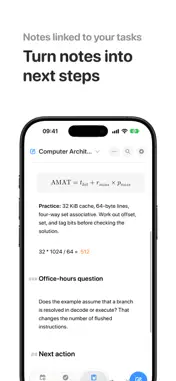
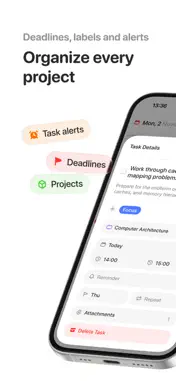
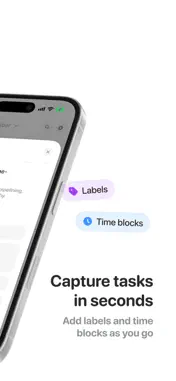
Your to-do list shows what needs doing. Your calendar shows where your time goes. Flick brings them together so you can build a day that actually fits. Capture tasks in seconds, organize them into projects, and plan them beside your Apple and Google Calendar events. Turn important work into time blocks, adjust your schedule when life changes, and keep unfinished tasks from getting lost. BUILD A REALISTIC PLAN • See tasks and calendar events in one clear daily view • Schedule tasks around meetings, classes, appointments, and life • Move and resize time blocks as your day changes • Keep planned time, deadlines, and reminders distinct ORGANIZE WHAT MATTERS • Group tasks into areas, projects, and sections • Add priorities, notes, deadlines, reminders, and attachments • Create flexible recurring tasks • Capture dates naturally as you type on iPhone KEEP YOUR PLAN CLOSE • Continue across iPhone, iPad, Mac, and Apple Watch • Check what is next with widgets • Add and find tasks with Shortcuts and Siri PRIVATE BY DESIGN Your task and project data is end-to-end encrypted when cloud sync is enabled. Calendar data stays on your devices by default. FLICK PRO Plan unlimited tasks on your calendar, create more projects, sync securely across devices, set reminders, receive intelligent follow-ups, and view completion stats and trends. Download Flick and turn your next to-do list into a plan you can actually follow. Privacy Policy: https://www.flickplanner.com/privacy Terms of Use: https://www.flickplanner.com/terms
What's New
Version 3.0.1 2026-11-20
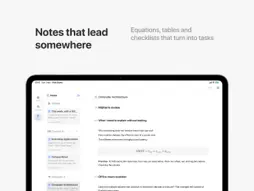
Flick 3.0 brings Notes into Flick, right next to your tasks and calendar. Write it down, pick the next step, and give it time in your week, all in one app. MEE...Flick 3.0 brings Notes into Flick, right next to your tasks and calendar. Write it down, pick the next step, and give it time in your week, all in one app. MEET NOTES A full notes app inside Flick, made for meetings, lectures, plans, and ideas. Type Markdown or use the formatting bar, keep notes in folders, and find any of them in seconds with search. Notes are free. Sync them across your devices with Flick Pro. MORE THAN PLAIN TEXT • Tables for comparisons and plans • Equations written the way you would write them • Quick calculations with units, like "2 hr in min =" • Code blocks that keep their formatting • Images, and links that show the page title and icon • Linked notes, so related ideas stay together FROM A NOTE TO YOUR CALENDAR Turn on Create tasks in Inbox in Settings > Notes, and pressing Return after a new checklist item creates a linked task in your Inbox. Then drag it onto your calendar beside everything else. ANY TWO, SIDE BY SIDE Put any two of Tasks, Calendar, and Notes together. On iPhone they stack; on iPad they sit side by side. Drag the divider to give either one more room, or double-tap it to even them out. MADE FOR IPHONE DUO Folded, Flick gives you the full iPhone workspace on the cover display. Open it, and your panes line up with the fold, with your actions in the side rail. Stand it in a tent, and Flick becomes a desk calendar with today's date, a daily illustration, and the month. ALSO IN THIS RELEASE • A new view of your whole year, and smoother month scrolling • Your daily overview can now arrive the night before, with a look at tomorrow • Hold plus to start talking, then tap send when you are done • A refreshed onboarding and a new set of project icons • Plenty of smaller fixes and refinements throughout Flick Technical Analysis
Package Overview Basic metadata
Bundle ID
com.pawtask Current Version 3.0.1
Minimum iOS 18.0
Package Size App Store Size
Package Metadata 0 / 28 version records
Detailed binary, privacy manifest, framework, and Info.plist results have not been indexed for this package yet. The verified App Store and archive metadata above remains available.
Developer Information
Known Version Records
0 version records with stored package metadata • 28 known version records
Stored metadata does not guarantee a package is currently available to download.
| Details | Version / IDs | Version date | Action |
|---|---|---|---|
| Not archived | App Store ID: 889203577 | Unknown | Request Version |
| Not archived | App Store ID: 889119022 | Unknown | Request Version |
| Not archived | App Store ID: 888710520 | Unknown | Request Version |
| Not archived | App Store ID: 888156217 | Unknown | Request Version |
| Not archived | App Store ID: 886610355 | Unknown | Request Version |
| Not archived | App Store ID: 885885895 | Unknown | Request Version |
| Not archived | App Store ID: 885549430 | Unknown | Request Version |
| Not archived | App Store ID: 884522651 | Unknown | Request Version |
| Not archived | App Store ID: 883951743 | Unknown | Request Version |
| Not archived | App Store ID: 882570338 | Unknown | Request Version |
| Not archived | App Store ID: 882133892 | Unknown | Request Version |
| Not archived | App Store ID: 882073823 | Unknown | Request Version |
| Not archived | App Store ID: 881316757 | Unknown | Request Version |
| Not archived | App Store ID: 880825041 | Unknown | Request Version |
| Not archived | App Store ID: 880427043 | Unknown | Request Version |
| Not archived | App Store ID: 880005069 | Unknown | Request Version |
| Not archived | App Store ID: 879483273 | Unknown | Request Version |
| Not archived | App Store ID: 877837751 | Unknown | Request Version |
| Not archived | App Store ID: 876924952 | Unknown | Request Version |
| Not archived | App Store ID: 876681912 | Unknown | Request Version |
| Not archived | App Store ID: 876343086 | Unknown | Request Version |
| Not archived | App Store ID: 876130536 | Unknown | Request Version |
| Not archived | App Store ID: 874662514 | Unknown | Request Version |
| Not archived | App Store ID: 874452807 | Unknown | Request Version |
| Not archived | App Store ID: 873916110 | Unknown | Request Version |
| Not archived | App Store ID: 873797916 | Unknown | Request Version |
| Not archived | App Store ID: 873082528 | Unknown | Request Version |
| Not archived | App Store ID: 867324768 | Unknown | Request Version |