Preview


Description
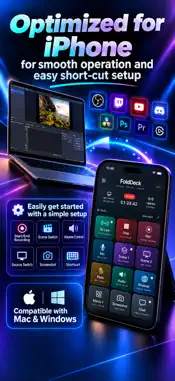
Turn your iPhone into a control deck for streaming and everyday PC tasks. Switch OBS Studio scenes, control recording, mute your microphone and adjust audio from buttons within reach. Pair with FoldDeck Companion to run computer shortcuts and launch apps with a tap. STREAMING CONTROLS AT YOUR FINGERTIPS • Start and stop OBS streaming; toggle recording. • Switch scenes and toggle source visibility. • Mute inputs and adjust levels in the audio mixer. • Monitor stream status, frame rate, CPU usage and audio levels. • Save source or scene screenshots on your OBS computer. BUILD YOUR OWN DECK Customize button names, colors, icons and images. Press and drag to rearrange controls, then organize your workflows into pages and profiles. Combine actions and delays into a macro to run a sequence from one button. COMPUTER SHORTCUTS AND APP LAUNCHES Register allowed actions in FoldDeck Companion for Mac or Windows and assign them to your iPhone buttons. Scan the pairing QR code and control your computer over the same local network. LAYOUTS OPTIMIZED FOR IPHONE DUO Choose the layout that fits your setup. FoldDeck adapts to available screen space and folding state, with Book and Tabletop layout options. It also works on a regular iPhone. A NEW FILE FOR EVERY SCREENSHOT Choose a save folder on your OBS computer. FoldDeck automatically generates PNG filenames using the capture date, time and a unique ID. LOCAL CONNECTIONS, SIMPLE SETUP No FoldDeck cloud account is required. OBS passwords and Companion tokens are stored in the iPhone Keychain. The app contains no advertising or usage analytics SDKs. Available in English and Japanese. REQUIREMENTS • OBS controls require OBS Studio running on your computer with an obs-websocket 5.x-compatible server enabled. • Computer shortcuts and app launches require the separate FoldDeck Companion app. Visit the official website for supported operating systems and requirements.(https://folddeck-official.ranranweb.com/en/#download) • Connect your iPhone and computer to the same local network and grant the required permissions. • Screenshots are saved on the OBS computer, not in your iPhone photo library. FoldDeck is an independent app and is not an official OBS Project product.
Technical Analysis
Package Overview Basic metadata
Bundle ID
com.ranranweb.folddeck Current Version 1.0
Minimum iOS 18.0
Package Size App Store Size
Package Metadata 0 / 0 version records
Detailed binary, privacy manifest, framework, and Info.plist results have not been indexed for this package yet. The verified App Store and archive metadata above remains available.
Developer Information
Known Version Records
0 version records with stored package metadata
Stored metadata does not guarantee a package is currently available to download.
| Details | Version / IDs | Version date | Action |
|---|