
Preview





Description
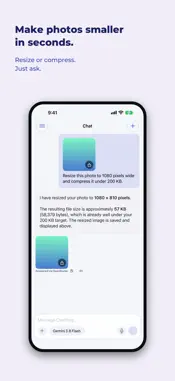
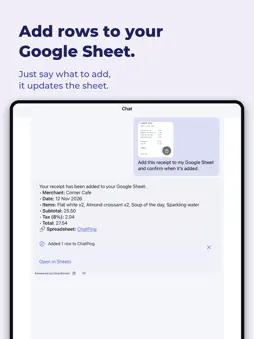
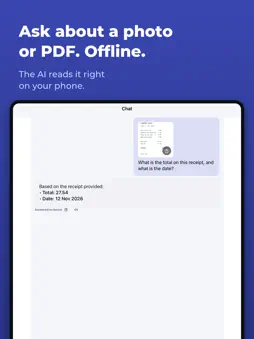
A form portal rejects your photo for being too big. Three bills need to become one PDF. You need to WhatsApp a courier without saving his number. Or you want quick answers while traveling with no mobile signal at all. ChatPing is an AI chat app with a smart on-device model, your offline AI on your iPhone. It reads, analyzes and pulls information out of your images and PDFs. You can switch freely between the on-device model and cloud models via OpenRouter. OFFLINE AI CHAT ON YOUR IPHONE A recommended on-device model downloads automatically when the app is installed, so chat is ready from the start: • No quota or message limits: talk to the offline AI as much as you like, with no data, Wi-Fi or signal. • Offline AI chatbot for a flight, while traveling, or when off the grid. • Share images and PDFs to ask questions without uploading them; the model reads and analyzes them on your iPhone. • Choose from on-device models like Gemma, Llama and Qwen based on your iPhone storage. If you need web research or tools, add your OpenRouter key and switch to a cloud model in one tap. Private: your chats stay on your iPhone. Pick a cloud model and only the chats you have with it go to it. SMART TOOLS IN YOUR CHAT • Google Sheets and data: talk to it to create sheets directly in Google Sheets. Fetch, read and analyze them, update rows from chat, and export to PDF, Excel (XLSX) and CSV. • WhatsApp unsaved number: type the number and ask ChatPing to open WhatsApp. You get a WhatsApp chat link, and one tap opens the chat with that unsaved number. No contact saved. • Image to PDF: turn receipts, recipe photos or study notes into a PDF. Put several photos in a grid on one page. • Create PDF: ask for a PDF from chat with any text or tables. • Merge PDF files: combine PDF bills, receipts, or school forms into one document. Done in seconds. Or start from photos with image to PDF. • Resize or compress image size: shrink family photos or document scans to fit portal upload limits. Compress image files without losing visible clarity. • Split PDF documents: take a multipage file and split PDF pages to pull out the single sheet, receipt, or certificate you need. • Web research: ask your cloud AI chat to search the web, check live sources, read links, and summarize articles. EVERYDAY EXAMPLES • Google Sheets: track household spending, plan budgets, or log tasks directly from chat. • WhatsApp unsaved number with click to chat: message a courier, driver, or seller without saving a contact. • Photo of a bill or table into Google Sheets rows: snap an invoice or receipt and add the data automatically. • Image to PDF: convert recipes, receipts, or study notes into clean PDF pages ready to share. • Merge PDF records: combine receipts, statements, and forms into a single file to keep things tidy. • Portal uploads: compress image files so an application photo meets strict upload limits. • Split PDF pages: share just one certificate, receipt, or form page from a multi-page document. • Homework and study help: ask your AI chat for a simple explanation, a practice quiz, or a summary of your notes. • Plan a trip: map out a three-day weekend itinerary, packing checklist, and dining spots. • Write a polite email: draft a friendly reply, an inquiry, or a warm note in seconds. • Cook and shop: turn a list of ingredients into a dinner plan and a shopping list. FAST AND FLEXIBLE • Streamed answers with clean formatting and structured tables. • Speak naturally using voice dictation. • No sign-up required. • Your chat history is stored locally on your iPhone. ABOUT ADS AND DATA The app is free. Chats with an on-device model stay on your device. Cloud chats and tool requests go to your chosen provider when you add your OpenRouter key. See our privacy policy for details. Privacy policy: https://pingappslab.com/chatping/privacy/ ChatPing is not affiliated with WhatsApp.
What's New
Version 1.0.14 2026-11-14
What to test in this build: • Ask for several images as one PDF with a grid (for example "4 per page"): the PDF should lay the images out in a grid on each page...What to test in this build: • Ask for several images as one PDF with a grid (for example "4 per page"): the PDF should lay the images out in a grid on each page. • After a tool finishes successfully (WhatsApp link, PDF, compress), the transcript should show only the reply, without the tool card. • Ask to open WhatsApp for a number without a country code (for example 0300 1234567): it should use your region's country code. A number that already has one (for example 91 98765 43210) must stay unchanged. Technical Analysis
Package Overview Basic metadata
Bundle ID
com.plannedping.chatping Current Version 1.0.14
Minimum iOS 18.0
Package Size App Store Size
Package Metadata 0 / 0 version records
Detailed binary, privacy manifest, framework, and Info.plist results have not been indexed for this package yet. The verified App Store and archive metadata above remains available.
Developer Information
Known Version Records
0 version records with stored package metadata
Stored metadata does not guarantee a package is currently available to download.
| Details | Version / IDs | Version date | Action |
|---|