Preview







Description
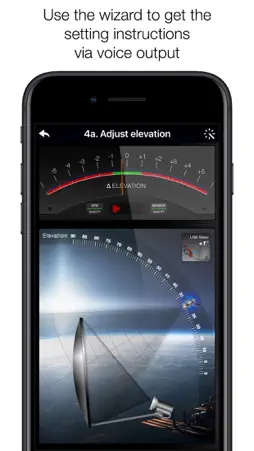
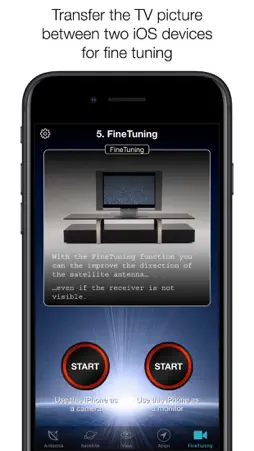
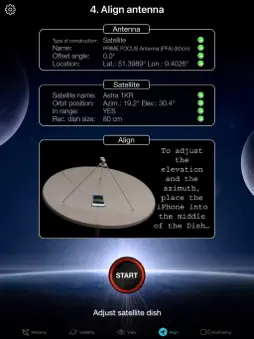
With SatFinder you can adjust your satellite antenna in a few seconds and with 4 simple steps: STEP 1 - CHOOSE YOUR ANTENNA Choose one of the four different antenna designs: - Offset antennas (the most common, is slightly oval, the LNB is not in the center). - Special design (e.g. Oblong shaped Offset antenna, Multifeed antenna) - Parabolic antenna (LNB is located in the center of the reflector, usually larger than 100cm) - Flat or planar antenna (small, camping antennas) If you have an offset antenna, enter the height and width of the antenna. If your antenna has a special shape, enter the offset angle and the size of the satellite antenna. You can find the offset angle in the manual of your satellite antenna. For parabolic antennas it is sufficient to enter the antenna diameter. With a flat antenna you do not have to set anything. If you know the exact antenna name, check if your antenna is already in the database. Tip: Press the wizard button to measure the size of the satellite antenna using the iPhone camera and LiDAR scanner. STEP 2 - CHOOSE YOUR SATELLITE To quickly and easily select a suitable satellite, simply press the "AUTO" button. The SatFinder will now automatically search for satellites that are in your reception area and that offer TV or radio stations in your language (the language setting of your iPhone will be selected). The stars (1-10) shown in the table result from the number of radio and TV channels offered and the reception strength at your location. If you want to receive a special satellite, switch off "AUTO": Now you can simply scroll through the table and select the satellite. Faster is the search function - just enter the name of the satellite, the channel or the orbit position. You can also reduce the number of table entries by hiding satellites that are not available at your location or do not broadcast in your language. With the button "Channel Info" you can check which channels the selected satellite is currently broadcasting - including all channel parameters for your satellite receiver. STEP 3 - CHECK OBSTACLES For a smooth satellite reception, there must not be any obstacles between the satellite and your satellite antenna. You can check this with the "View" function. Simply aim at the satellite and watch the signs (GREEN - no obstacle, RED - caution, free view may not be given). Tip: Press the button for the assistant to activate the voice output. STEP 4 - ADJUST ANTENNA In the menu item "Align" different graphics appear depending on the selected antenna type. If you use an offset antenna, you have to adjust the azimuth and elevation separately. With planar or parabolic antennas the adjustment of the angles is done together. Before you press the "Start" button, a video clip shows how to position your iPhone at the antenna. Tip: Press the button for the assistant to activate the voice output. STEP 5 - FINE TUNING If necessary, you can optimize the reception of your satellite system. The SatFinder provides you with the function "FineTuning". To use this function, you need a second iOS device. One device serves as a camera; the second device as a monitor. Simply place an iPhone in front of your reception screen and observe changes in picture quality while slightly rotating or tilting your satellite antenna. With the FineTuning feature, you'll have visual contact with your TV even when you're out of sight. THAT'S IT. YOU SHOULD NOW BE ABLE TO ENJOY INTERFERENCE-FREE SATELLITE RECEPTION... Note: Satellite antenna tuning is only available on iOS devices with LiDAR sensor (e.g. iPhone 12 Pro).
What's New
Version 5.0.4 2024-06-06
- Customizations for iOS 17 Technical Analysis
Package Overview Basic metadata
Bundle ID
AYM8AR77H3.com.domainname.SatFinder Current Version 5.0.4
Minimum iOS 14.0
Package Size App Store Size
Package Metadata 1 / 32 version records
Detailed binary, privacy manifest, framework, and Info.plist results have not been indexed for this package yet. The verified App Store and archive metadata above remains available.
Price History (USA store)
3 recorded price change points. These are historical observations, not a guarantee of the current price.
| Recorded at | Price | Currency |
|---|---|---|
| 5.99 | USD | |
| 49.0 | USD | |
| 5.99 | USD |
Developer Information
Known Version Records
1 version record with stored package metadata • 32 known version records
Stored metadata does not guarantee a package is currently available to download.
| Details | Version / IDs | Version date | Action |
|---|---|---|---|
| 56.53 MB | v5.0.4 App Store ID: 866501343Build: 5.0.4 | 2024-06-06 16:36:16 | Paid / Arcade |
| Not archived | App Store ID: 852269959 | Unknown | Paid / Arcade |
| Not archived | App Store ID: 850087402 | Unknown | Paid / Arcade |
| Not archived | App Store ID: 849782362 | Unknown | Paid / Arcade |
| Not archived | App Store ID: 841390434 | Unknown | Paid / Arcade |
| Not archived | App Store ID: 841390433 | Unknown | Paid / Arcade |
| Not archived | App Store ID: 824378192 | Unknown | Paid / Arcade |
| Not archived | App Store ID: 824111314 | Unknown | Paid / Arcade |
| Not archived | App Store ID: 822233612 | Unknown | Paid / Arcade |
| Not archived | App Store ID: 821680264 | Unknown | Paid / Arcade |
| Not archived | App Store ID: 821560915 | Unknown | Paid / Arcade |
| Not archived | App Store ID: 820948631 | Unknown | Paid / Arcade |
| Not archived | App Store ID: 13984008 | Unknown | Paid / Arcade |
| Not archived | App Store ID: 11877239 | Unknown | Paid / Arcade |
| Not archived | App Store ID: 10753032 | Unknown | Paid / Arcade |
| Not archived | App Store ID: 8491639 | Unknown | Paid / Arcade |
| Not archived | App Store ID: 7610330 | Unknown | Paid / Arcade |
| Not archived | App Store ID: 7499156 | Unknown | Paid / Arcade |
| Not archived | App Store ID: 7206663 | Unknown | Paid / Arcade |
| Not archived | App Store ID: 7034657 | Unknown | Paid / Arcade |
| Not archived | App Store ID: 6627161 | Unknown | Paid / Arcade |
| Not archived | App Store ID: 5366998 | Unknown | Paid / Arcade |
| Not archived | App Store ID: 4152057 | Unknown | Paid / Arcade |
| Not archived | App Store ID: 3832559 | Unknown | Paid / Arcade |
| Not archived | App Store ID: 3716102 | Unknown | Paid / Arcade |
| Not archived | App Store ID: 3667983 | Unknown | Paid / Arcade |
| Not archived | App Store ID: 3369036 | Unknown | Paid / Arcade |
| Not archived | App Store ID: 3330553 | Unknown | Paid / Arcade |
| Not archived | App Store ID: 3223414 | Unknown | Paid / Arcade |
| Not archived | App Store ID: 3187448 | Unknown | Paid / Arcade |
| Not archived | App Store ID: 3155045 | Unknown | Paid / Arcade |
| Not archived | App Store ID: 3066496 | Unknown | Paid / Arcade |