
Preview








Description
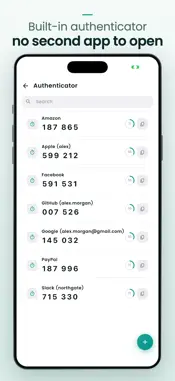
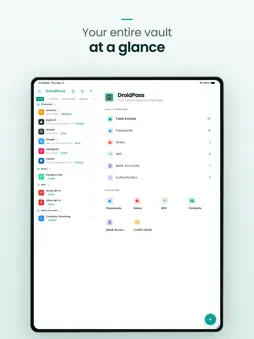
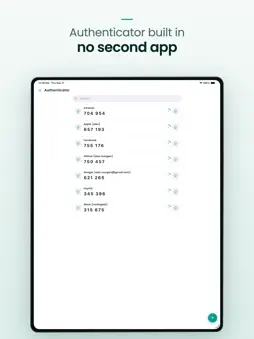
Fill your passwords instead of typing them, use passkeys where sites support them, and keep everything in a vault that opens with your Master PIN. DroidPass is a straightforward password manager for iPhone and iPad. Passwords, passkeys, credit cards, bank details, Wi-Fi logins, secure notes and contacts all live in one place, encrypted with AES-256 on your device. SIGN IN WITHOUT A PASSWORD Use passkeys to sign in without a password on supported sites and apps. Save a passkey once, then sign in with Face ID, Touch ID or your Master PIN — there is nothing to type and nothing to remember. Your passkeys sit beside your passwords in the same vault and sync with it; a new device opens them once you enter your Secret Key from your Emergency Kit. MOVING FROM ANOTHER PASSWORD MANAGER Bring your saved logins straight across from another password manager, with no file to export and no CSV to clean up. Your other app hands them over through the system transfer sheet and DroidPass files them in your vault. This needs iOS 26 or later, and the app you are leaving has to support credential transfer — if it does not, you can still import a CSV file the usual way. FILL PASSWORDS. SKIP THE TYPING. Switch DroidPass on as an AutoFill provider — from inside the app on iOS 18 and later, or in Settings › General › AutoFill & Passwords. Your saved logins then appear above the keyboard in apps and in Safari. Tap one, confirm with Face ID or your device passcode, and DroidPass fills in the username and the password. When a login has a two-factor secret saved with it, DroidPass can hand over the current one-time code the same way. EVERYTHING IN ONE VAULT • Passwords and passkeys, organized by category, tag and favorites • Credit cards, bank details and Wi-Fi passwords • Secure notes and contacts • A built-in two-factor authenticator with live, rotating codes • A password generator that builds long, unguessable passwords in one tap • A password audit that flags weak, reused and short passwords • Search that finds an entry in a second BUILT TO STAY PRIVATE • AES-256 encryption, applied on your device before anything is stored • A Master PIN that opens the vault — set it once, keep it to yourself • Works offline: your vault opens without a connection • No ads, and no tracking of what you save WHAT'S FREE AND WHAT'S PRO Free: six items in total across every category, one of which can be a two-factor code, plus the password generator and AutoFill. DroidPass Pro: unlimited items, unlimited two-factor codes, Face ID / Touch ID unlock for the app itself, the password audit, custom themes, and priority support. Get your logins out of your head and into DroidPass. — — — DroidPass Pro (Subscription) Subscription length and price are shown in the app before you buy. The yearly plan includes a 3-day free trial for new subscribers. • Payment is charged to your Apple ID at confirmation of purchase. • Subscriptions renew automatically unless auto-renew is turned off at least 24 hours before the end of the current period. • Your account is charged for renewal within 24 hours before the period ends. • Manage or cancel anytime in your App Store account settings. • Any unused portion of a free trial is forfeited when you buy a subscription. Privacy Policy: https://droidpass.app/privacy Terms of Use (EULA): https://droidpass.app/terms
What's New
Version 1.7.0 2026-09-29
• New: passkeys. Use passkeys to sign in without a password on supported sites and apps — save one, then sign in with Face ID, Touch ID or your Master PIN • Pas... Technical Analysis
Package Overview Basic metadata
Bundle ID
com.passwordmanager.droidpass Current Version 1.7.0
Minimum iOS 15.5
Package Size App Store Size
Package Metadata 1 / 16 version records
Detailed binary, privacy manifest, framework, and Info.plist results have not been indexed for this package yet. The verified App Store and archive metadata above remains available.
Developer Information
Known Version Records
1 version record with stored package metadata • 16 known version records
Stored metadata does not guarantee a package is currently available to download.
| Details | Version / IDs | Version date | Action |
|---|---|---|---|
 Not archived | App Store ID: 888362299 | Unknown | Request Version |
| Not archived | App Store ID: 887075281 | Unknown | Request Version |
| 40.21 MB | v1.4.9 App Store ID: 878524869Build: 126 | 2025-09-30 04:47:38 | Get Version |
| Not archived | App Store ID: 847681043 | Unknown | Request Version |
| Not archived | App Store ID: 843183177 | Unknown | Request Version |
| Not archived | App Store ID: 842295067 | Unknown | Request Version |
| Not archived | App Store ID: 842014152 | Unknown | Request Version |
| Not archived | App Store ID: 838385119 | Unknown | Request Version |
| Not archived | App Store ID: 838138749 | Unknown | Request Version |
| Not archived | App Store ID: 838027453 | Unknown | Request Version |
| Not archived | App Store ID: 835511102 | Unknown | Request Version |
| Not archived | App Store ID: 835499908 | Unknown | Request Version |
| Not archived | App Store ID: 835307916 | Unknown | Request Version |
| Not archived | App Store ID: 835232168 | Unknown | Request Version |
| Not archived | App Store ID: 834977868 | Unknown | Request Version |
| Not archived | App Store ID: 833909471 | Unknown | Request Version |