
Preview




Description
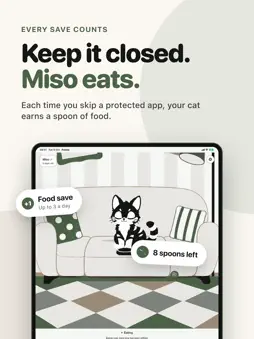
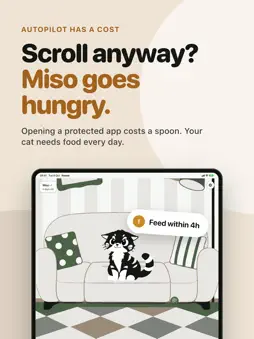
Pawse Pawse helps you pause before opening distracting apps on autopilot. When you reach for Instagram, YouTube, Reddit, X, Safari, games, or another distracting app without thinking, Pawse adds a short moment to stop and choose. How Pawse works 1. Choose the apps, websites, or categories you want to protect. 2. Turn on Screen Time protection. 3. When a protected app opens, Pawse gives you a brief pause. 4. Notice why you reached for your phone. 5. Keep it blocked or open intentionally for three minutes. Pawse is designed for the moments when boredom, stress, tiredness, or habit turns into an automatic scroll. Build phone control one interruption at a time - Choose routines for bedtime, mornings, work or study, idle moments, anxiety, and procrastination. - Record whether you avoided an autopilot open or chose a brief intentional open. - See your daily and weekly saves, protected time, current streak, and common triggers. - Use prompts to identify whether you were bored, tired, anxious, lonely, procrastinating, or acting from habit. - Keep protection active with a simple stop challenge instead of turning it off automatically. - Optionally use movement and focus goals when they are configured for a protected app. Care for your cat Pawse gives your phone-control practice a small, living consequence: a cat that needs care. - Food arrives daily and is measured in spoons. - Feed your cat to extend its care window. - If your cat goes 24 hours without food, it dies and you can adopt a new cat. - Opening a protected app uses one spoon when food is available. - You can still open a protected app when the pantry is empty. - If you open with no food to deduct, the next day’s food grant is reduced by 30%. Repeated empty-food opens compound the reduction. You can buy optional food packs in the Pawse shop through the App Store: 1, 6, or 24 cans. One can equals six spoons. Screen Time Pawse uses Apple’s Screen Time and Family Controls features to protect the apps, websites, and categories you select. Who Pawse is for Pawse is for people who: - Open apps without thinking - Scroll when bored, anxious, or tired - Lose time before sleep - Want a calmer way to reduce social media use - Want more control over their attention - Prefer a quiet pause instead of another feed or focus timer Pawse helps you replace: urge → open app → scroll → regret with: urge → pause → choose → regain control Start with one pause today. Legal Privacy Policy: https://www.freeprivacypolicy.com/live/c6b3b553-b590-4632-a2f3-1ae51cf6367a Terms of Use: https://www.apple.com/legal/internet-services/itunes/dev/stdeula/
What's New
Version 2.0.2 2026-10-07
Bug fixes and improvements. Technical Analysis
Package Overview Basic metadata
Bundle ID
com.rajeshbudhiraja.AnIsland Current Version 2.0.2
Minimum iOS 17.6
Package Size App Store Size
Package Metadata 0 / 12 version records
Detailed binary, privacy manifest, framework, and Info.plist results have not been indexed for this package yet. The verified App Store and archive metadata above remains available.
Known Version Records
0 version records with stored package metadata • 12 known version records
Stored metadata does not guarantee a package is currently available to download.
| Details | Version / IDs | Version date | Action |
|---|---|---|---|
| Not archived | App Store ID: 887659258 | Unknown | Request Version |
| Not archived | App Store ID: 887166224 | Unknown | Request Version |
| Not archived | App Store ID: 886333234 | Unknown | Request Version |
| Not archived | App Store ID: 886115233 | Unknown | Request Version |
| Not archived | App Store ID: 886057986 | Unknown | Request Version |
| Not archived | App Store ID: 885982049 | Unknown | Request Version |
| Not archived | App Store ID: 885674031 | Unknown | Request Version |
| Not archived | App Store ID: 885588833 | Unknown | Request Version |
| Not archived | App Store ID: 885497467 | Unknown | Request Version |
| Not archived | App Store ID: 882041766 | Unknown | Request Version |
| Not archived | App Store ID: 881957840 | Unknown | Request Version |
| Not archived | App Store ID: 881815437 | Unknown | Request Version |