
Preview










Description
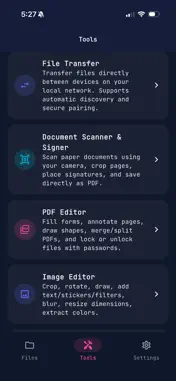
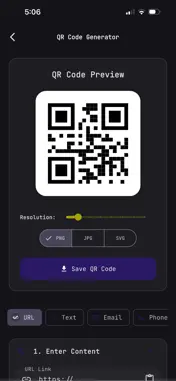
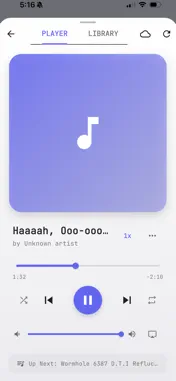
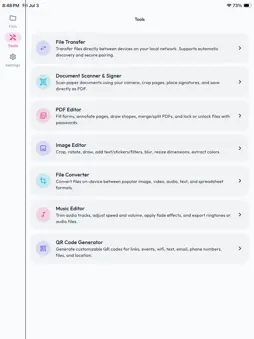
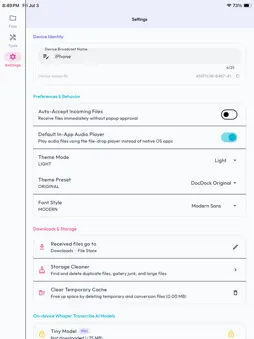
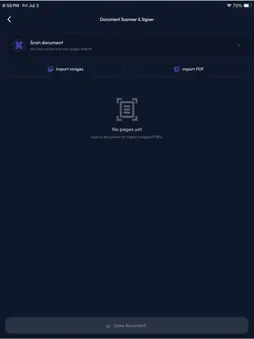
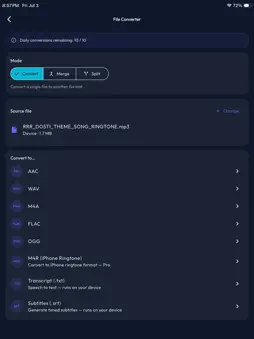
Core features of DocDock Connect are completely free to use. Advanced power tools are available via an optional DocDock Pro subscription (details below). FREE FEATURES (INCLUDED BELOW) MANAGE & ORGANIZE FILES • Ultimate Sandbox: Manage files in a secure local directory with list and grid layouts. • ZIP Archives: Compress files/folders into .zip packages, or unzip archives. • Keep Storage Clean: Clean up temporary conversion files and player caches anytime. TRANSFER & SHARE • P2P Local Sharing: Transfer files and folders between devices (Phone-to-Phone, Phone-to-PC/Mac) over Wi-Fi or local hotspot. • Easy Pairing: Connect devices securely using simple, on-screen verification PINs. • QR Code Generator: Create custom QR codes to easily share text, links, or contact details. • Cloud Sync: Connect and sync your files to Google Drive, Dropbox, or OneDrive (internet required). READ & EDIT PDFs & IMAGES • Image Editor: Crop, rotate, draw, apply filters, and add text to your images and photos. • Annotate & View: Open PDFs, highlight text, draw, search/replace, rotate, and add notes. • Fill out Forms: Complete interactive PDF forms (text fields, dates, dropdowns, checkboxes). • Sign Documents: Draw your signature and place it anywhere on PDFs. • Password Protection: Encrypt PDFs with AES-256 or decrypt secure files. WATCH, LISTEN & PLAY MEDIA • Offline Music Player: Listen to local audio tracks with a dynamic queue and playlists. • CarPlay & Bluetooth: Plays seamlessly over CarPlay, USB, or Bluetooth with full media controls. • Audio Trimming: Trim tracks and export to MP3, M4A, or WAV. MOBILE SCANNING & CONVERSION • Document Scanner: Use your camera to scan physical papers into clean, multi-page PDFs. • Daily Conversions: Convert up to 10 files per day offline between common formats. DOCDOCK PRO (PAID FEATURES BELOW) Upgrade to DocDock Pro to unlock the full potential of your workspace: • Unlimited File Conversions: Convert files offline across every format with no daily limits. • Batch Actions: Select multiple files at once to move, copy, rename, convert, or delete them in a single tap. • Extract Text from Images (OCR): Scan and convert photos, screenshots, and images into editable text (.txt) files. • Advanced Audio & Ringtones: Export .m4r ringtones and apply studio effects (fade, speed, volume, bass). • Advanced PDF Editing: Merge and split PDF documents, export specific pages, and flatten forms. • On-Device PDF OCR (mobile only): Recognize text in scanned or image-only PDF pages locally to search, select, and copy text. • Offline Transcription & Subtitles (iOS only): Transcribe audio/video speech into plain text (.txt) or timestamped subtitles (.srt) offline using local Whisper AI. SUBSCRIPTION INFORMATION DocDock Pro is available as an optional monthly or yearly auto-renewable subscription: • Monthly Plan: 2.99 / month • Yearly Plan: 24.99 / year (includes a 7-day free trial) Payment will be charged to your Apple ID account at confirmation of purchase. Subscriptions automatically renew unless they are canceled at least 24 hours before the end of the current period. Your account will be charged for renewal within 24 hours prior to the end of the current period. You can manage and cancel your subscriptions by going to your App Store account settings after purchase. • Privacy Policy: https://aerobrid.github.io/docdock-docs/privacy.html • Terms of Use (EULA): https://aerobrid.github.io/docdock-docs/eula.html
What's New
Version 1.0.5 2026-07-20
• Google Drive service changes and verification Technical Analysis
Package Overview Basic metadata
Bundle ID
com.rajpatel.filedrop Current Version 1.0.5
Minimum iOS 15.5
Package Size App Store Size
Package Metadata 0 / 0 version records
Detailed binary, privacy manifest, framework, and Info.plist results have not been indexed for this package yet. The verified App Store and archive metadata above remains available.
Developer Information
Known Version Records
0 version records with stored package metadata
Stored metadata does not guarantee a package is currently available to download.
| Details | Version / IDs | Version date | Action |
|---|