
Preview




Description
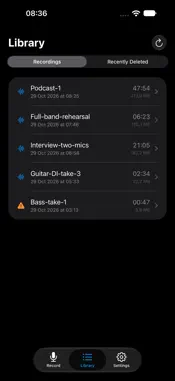
AudioRecorder turns your iPhone or iPad into a clean, no-nonsense recorder for your USB audio interface - in the studio, at home, or on stage. Plug in your interface, choose your inputs, and capture uncompressed 24-bit WAV at your hardware's native sample rate. No conversion, no color - just your signal. Built for musicians and home studios who want a dependable capture tool without launching a full DAW. RECORD • Works with any class-compliant USB audio interface • Uncompressed 24-bit PCM WAV at the interface's native sample rate - never resampled • Mono, stereo, or mono-sum capture • Choose exactly which inputs feed Left and Right, so a multi-input interface lets you pick any two • Live level meters with a peak readout and clip indicator for dialing in gain • Preview the input before you commit to a take • A big, unmissable record button and elapsed timer STAY IN CONTROL • Live "time remaining" estimate from your free space, with a low-space warning • The screen stays awake while recording, so the meters never dim • Interrupted takes - a phone call, an unplugged cable - are saved as partial recordings, not lost LIBRARY • Play back with scrubbing • Rename, delete and organize your takes • Share via AirDrop or Files, or export straight to a USB drive SETUP HELP • A built-in connection guide shows exactly how to wire things up, with diagrams for both USB-C and Lightning devices WHAT YOU NEED • A class-compliant USB audio interface • If your iPhone or iPad has a USB-C port, then the Audio Interface will work without external power • On Lightning devices, an Apple Lightning to USB Camera Adapter is needed and the Audio interface needs a source of external power AudioRecorder does one thing and does it cleanly: get the signal from your interface onto your device, uncompressed and intact.
What's New
Version 1.1.0 2026-10-31
A fresh new look and a safety net for your recordings. NEW: Recently Deleted Deleted a take by accident? It now goes to Recently Deleted, where you can restore...A fresh new look and a safety net for your recordings. NEW: Recently Deleted Deleted a take by accident? It now goes to Recently Deleted, where you can restore it. Choose how long deleted recordings are kept (1 day, 7 days, 30 days or until you empty it), or turn it off in Settings. REDESIGNED - Three clear tabs: Record, Library and Settings - Library switches between your Recordings and Recently Deleted - A dark look by default, with Light and System options in Settings - Skip back or forward 15 seconds during playback - Setup help now lives in Settings under "Connecting your gear" - A cleaner, more focused layout on iPad Thanks for recording with this app. If you enjoy it, a rating or review helps a lot! Technical Analysis
Package Overview Basic metadata
Bundle ID
raimondsblums.AudioRecorder Current Version 1.1.0
Minimum iOS 17.6
Package Size App Store Size
Package Metadata 0 / 2 version records
Detailed binary, privacy manifest, framework, and Info.plist results have not been indexed for this package yet. The verified App Store and archive metadata above remains available.
Developer Information
Known Version Records
0 version records with stored package metadata • 2 known version records
Stored metadata does not guarantee a package is currently available to download.
| Details | Version / IDs | Version date | Action |
|---|---|---|---|
| Not archived | App Store ID: 888188306 | Unknown | Request Version |
| Not archived | App Store ID: 887752756 | Unknown | Request Version |