
Preview


Description
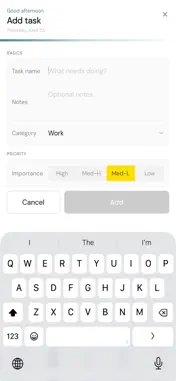
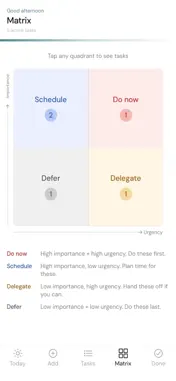
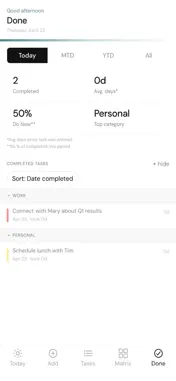
Queued is a task manager built around one idea: not everything deserves the same attention. Most task apps give every item equal weight. Queued doesn't. Every task you add gets two ratings — Importance and Urgency — across four levels. That two-dimensional view changes how you see your work. A task can be important without being urgent. A task can feel urgent without actually mattering. Queued helps you tell the difference. Your tasks, organized your way Add tasks in seconds. Set Importance and Urgency, pick a category, choose a status, and Queued places it in the right context. Tasks are grouped by category by default — Work, Personal, Travel, Community, and more — but you can sort and view them any way you want. Matrix — your focus view The Matrix screen shows all your active tasks on a 2×2 matrix of Importance vs Urgency. Four quadrants: Do Now, Schedule, Delegate, Defer. One glance tells you what actually deserves your attention today. Tap any quadrant to see the tasks inside it. Today — your daily commitment list At the start of each day, decide which tasks you're actually going to work on. Tag them for Today and they appear in a focused, distraction-free list. Drag to reorder them in the sequence you'll tackle them. Every morning, Queued asks what to do with yesterday's unfinished items — keep them, clear them, or decide one by one. Done — your track record Every completed task tells a story. The Done screen shows you how long tasks sat before you started them, how long they took to finish, and which categories you're most productive in. Filter by today, this month, year to date, or all time. Designed to get out of your way Queued is built with one visual principle: color carries meaning, not decoration. The four importance levels — High, Med-H, Med-L, Low — each have a distinct color that appears consistently throughout the app. Red means act. Green means it can wait. Everything in between has its place. No accounts. No subscriptions. No sync fees. Your tasks live on your device, backed up automatically with your phone.
Technical Analysis
Package Overview Basic metadata
Bundle ID
com.usequeued.app Current Version 1.0
Minimum iOS 15.1
Package Size App Store Size
Package Metadata 0 / 1 version records
Detailed binary, privacy manifest, framework, and Info.plist results have not been indexed for this package yet. The verified App Store and archive metadata above remains available.
Developer Information
Known Version Records
0 version records with stored package metadata • 1 known version records
Stored metadata does not guarantee a package is currently available to download.
| Details | Version / IDs | Version date | Action |
|---|---|---|---|
| Not archived | App Store ID: 884861102 | Unknown | Request Version |