Preview


Description
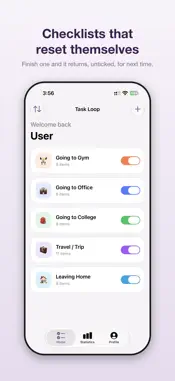
A to-do list is used up as you tick it off. Task Loop is built the other way round: your list comes back, unticked, every time you need it. Set up a checklist once for a routine you repeat — leaving for work, packing for the gym, heading off on a trip — and run it whenever that moment comes around. Finish it and it resets itself, ready for next time. HOW IT WORKS Each checklist has two sections, because "take my charger" and "switch off the AC" are different jobs when you are halfway out the door. Items to take sit in one list, things to do before leaving in another. Tick items off as you go. Finishing the checklist resets it. An unfinished checklist stays exactly where you left it for 12 hours, then resets on its own, so a list you abandoned yesterday morning is clean again today. You can finish a checklist with items still unticked. That is recorded on purpose — it is what the statistics are built from. REMINDERS • Scheduled reminders — choose the days of the week and the time. • Location reminders — pin a place and get the checklist as you leave it, or as you arrive. • Set both on the same checklist if you want. • A switch on the home screen silences a checklist's reminders without deleting anything. Your days, time and pinned place are kept exactly as they were, ready for when you switch it back on. STATISTICS • Current streak and longest streak. • How many checklists you have finished. • The share of items you tick on average. • Activity across the last seven days. • Frequently missed — the specific items you skip most often, ranked, with the checklist each one belongs to. The last one is the point. A to-do app cannot tell you what you forget, because forgetting looks identical to not-done-yet. A checklist you finish can. MAKE IT YOURS • Start from a ready-made checklist for the gym, the office, college, travel or leaving home — or build one from scratch. • Give each checklist a name, an emoji and a colour. • Reorder items, reorder checklists, and duplicate a checklist you want to vary. • Light, dark, or follow your device setting. YOUR DATA Task Loop has no account. There is nothing to sign up for and nothing to sign in to. Your checklists are stored on your iPhone and are not uploaded anywhere. No one else can read them. Location is matched against your pinned places on the device itself and is never transmitted. Your checklists are included in your iPhone backup, so restoring a backup to a new device brings them with it. A single control in Profile erases everything, permanently. Everything except searching for a place by name works without a connection. PERMISSIONS Notifications are needed for scheduled reminders. Location set to "Always" is needed for location reminders, because the checklist has to reach you when the app is closed — which is the only moment it is useful.
Technical Analysis
Package Overview Basic metadata
Bundle ID
com.rahil.TaskLoop Current Version 1.0
Minimum iOS 17.0
Package Size App Store Size
Package Metadata 0 / 0 version records
Detailed binary, privacy manifest, framework, and Info.plist results have not been indexed for this package yet. The verified App Store and archive metadata above remains available.
Known Version Records
0 version records with stored package metadata
Stored metadata does not guarantee a package is currently available to download.
| Details | Version / IDs | Version date | Action |
|---|