
Preview




Description
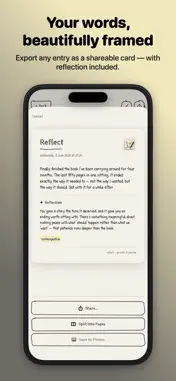
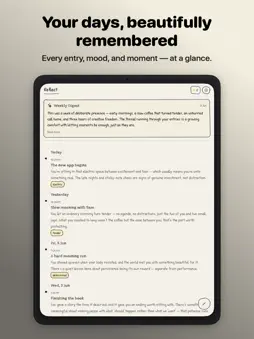
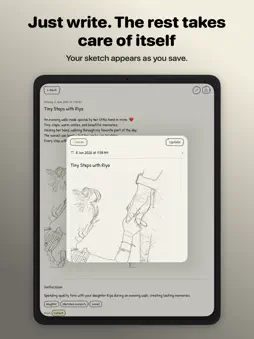
Reflect is a private, distraction-free journal for people who want to write more honestly and understand themselves better. Write freely. When you finish, Reflect generates a warm, personal reflection on your entry — a title, a summary, your mood, recurring themes, and a follow-up question worth sitting with. The AI runs entirely on your device, and your journal lives in your own private iCloud — synced across your devices and readable only by you. PRIVATE, AND YOURS There's no account to create and no server of ours. Your entries sync through your own private iCloud, so only you can ever read them — we never see your writing. Prefer to keep everything on a single device? Turn iCloud sync off anytime in Settings. No tracking, no ads. ON-DEVICE AI REFLECTIONS After saving, Reflect privately reads your entry and writes a personalised reflection — a mood tag, key themes, a summary in your voice, and a gentle question to deepen your thinking. Powered by Apple Intelligence on iOS 26; the reflection itself never needs a connection. iCLOUD SYNC Start an entry on your iPhone and pick it up on your iPad. Your entries, sketches, and weekly digests stay in sync across your devices through your private iCloud — automatically. YOUR YEARS, AS BOOKS A hand-drawn year tag hangs beneath the title and greets you when you open the app. Pull it down and your shelf of journals drops in — each year becomes a book you can open and flip through like a memoir. RICH TEXT EDITOR Format your thoughts with bold, italic, strikethrough, and bullet lists. The ruled-paper editor keeps your writing grounded and focused. Undo and redo cover everything you do — words, drawings, photos — in the order you did it. APPLE PENCIL ON iPAD Write and draw straight onto the page with Apple Pencil. Your handwriting and sketches sit inline with your words, exactly where you drew them — tap a drawing to move or resize it, and rub out just the part you want. Double-tap your Pencil to switch between pen and eraser, and pick a stroke weight from the pencil button. The page keeps extending as you draw. SKETCHES & DRAWINGS Draw directly in your entry with the built-in sketch tool. Insert sketches inline or attach them below your text — and see them previewed right in your timeline. Three drawing styles to match your mood. PHOTOS Attach photos to any entry and keep your memories alongside your words. STREAK & HABIT TRACKING A live streak counter and weekly dot calendar show your writing consistency at a glance. AI-GENERATED TITLE As you write, Reflect quietly suggests a title for your entry. Accept it, edit it, or ignore it — it's there when you want it. WEEKLY DIGEST At the end of each week, Reflect reviews your entries and writes a warm digest — your emotional arc, recurring themes, and a question to carry forward. MONTHLY INSIGHTS Browse your writing calendar to see streaks, mood patterns, most active days, and an AI-generated narrative about what your month was really about. SEARCH Pull down from the top of your journal to search across all entries, reflections, and moods instantly. LOCK SCREEN Protect your journal with Face ID or a 4-digit password. Reflect locks automatically when you leave the app. DAILY REMINDERS Set a gentle nudge at any time to build a consistent journaling habit. BEAUTIFUL, CUSTOMISABLE DESIGN Six colour themes — Parchment, Dusk, Forest, Lavender, Midnight, Ocean. Four font styles — Handwritten, Modern, Serif, Typewriter. Adjust font size, line spacing, and entry density, and choose between a hand-drawn sketch style or clean minimal borders. Light, dark, or system mode. EXPORT Share any entry as a cleanly formatted PDF. AI features require iOS 26 and Apple Intelligence. Writing, sketches, photos, iCloud sync, search, lock, reminders, and all appearance settings work on iOS 18.1 and later. Apple Pencil support requires an iPad and a compatible Pencil. Terms of Use: https://www.apple.com/legal/internet-services/itunes/dev/stdeula/
What's New
Version 0.5.0 2026-09-25
PLACES ON YOUR ENTRIES: Say where something happened. Pick a spot on the map and Reflect names the café or the beach you are standing in, not just the neighbour... Technical Analysis
Package Overview Basic metadata
Bundle ID
com.rbchronicles.reflect Current Version 0.5.0
Minimum iOS 18.1
Package Size App Store Size
Package Metadata 2 / 9 version records
Detailed binary, privacy manifest, framework, and Info.plist results have not been indexed for this package yet. The verified App Store and archive metadata above remains available.
Developer Information
Known Version Records
2 version records with stored package metadata • 9 known version records
Stored metadata does not guarantee a package is currently available to download.
| Details | Version / IDs | Version date | Action |
|---|---|---|---|
| 45.68 MB | v0.3.1 App Store ID: 890458542Build: 0.3.1 | 2026-08-28 21:09:20 | Get Version |
| Not archived | App Store ID: 890323257 | Unknown | Request Version |
| Not archived | App Store ID: 890291215 | Unknown | Request Version |
| Not archived | App Store ID: 887399159 | Unknown | Request Version |
| 45.68 MB | v0.3.1 App Store ID: 887229114Build: 0.3.1 | 2026-08-28 21:09:20 | Get Version |
| Not archived | App Store ID: 887201222 | Unknown | Request Version |
| Not archived | App Store ID: 886899117 | Unknown | Request Version |
| Not archived | App Store ID: 886784539 | Unknown | Request Version |
| Not archived | App Store ID: 886614519 | Unknown | Request Version |