
Preview


Description
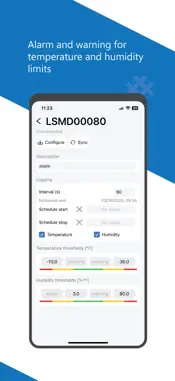
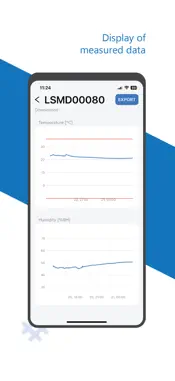
The main benefits of the LogHub Solo - compact dimensions - calibrated with certificate - digital sensors with long-term precise measurement - long battery life of up to 5 years - wireless connection via mobile app Basic description LogHub Solo Logger is a device for wireless temperature and humidity measurement. Typical application areas for this product are: pharmaceutical industry, food transport and storage, medical industry, protection of IT infrastructure and tracking in the logistics chain, as well as other processes where cost-effective monitoring of temperature and humidity is required. LogHub Solo is a battery-powered device that can be used repeatedly for various measurements (multi-use). The measurement sensors are integrated in the device (The model with an external digital sensor up to 50 cm long are also available. They can be used to measure extremely low temperatures (below -40°C), or to measure parameters in metal containers, cooling boxes, etc., where wireless communication can be problematic). The Logger Solo has an LED and one button to start the measurement and quickly indicate the measurement status using the LED. The logger enables the setting of temperature and humidity boundaries and measurement interval. Data are recorded and evaluated directly in the logger. The mobile application enables quick loading of data from loggers in proximity (current data, measurement status, number of records). Usage To activate the logger, it is necessary to remove the plastic slip from the case. Subsequently, it is possible to wirelessly connect to the logger using the mobile application, enter the necessary data and start the measurement. Place the logger at the desired measurement location. Current measured and historical data can be monitored within the range of the device using a mobile application. During transportation it is possible to check the status of the measurement or download the whole measurement data wirelessly without opening the package. The user is warned about the end of the battery life in the application. Display of loggers in range The application provides a clear list of all loggers in range, which can be filtered or sorted according to various parameters. The list shows basic information for each logger: - Logger status: started / waiting to start / finished - Current values of temperature and humidity - Measurement status: ok / warning / alarm Battery status: 0-100% Logger Detail By selecting a logger from the list of loggers, the detail of the logger is displayed: - Alarm and warning limits - Number of measured points - Measurement interval - Logger Configuration The measurement parameters can be set in the application: - Selection of variables: temperature, humidity, temperature and humidity - Warning boundaries: lower and upper - Alarm boundaries: lower and upper - Measurement interval: from several seconds to a day - Automatic measurement start: date and time - Automatic measurement end: date and time Display of measured data The measured data can be displayed directly in the application in an overview graph or they can be exported to CSV for further processing.
Technical Analysis
Package Overview Basic metadata
Bundle ID
sk.rdas.LogHubSolo Current Version 1.0
Minimum iOS 16.0
Package Size App Store Size
Package Metadata 0 / 1 version records
Detailed binary, privacy manifest, framework, and Info.plist results have not been indexed for this package yet. The verified App Store and archive metadata above remains available.
Developer Information
Known Version Records
0 version records with stored package metadata • 1 known version records
Stored metadata does not guarantee a package is currently available to download.
| Details | Version / IDs | Version date | Action |
|---|---|---|---|
| Not archived | App Store ID: 859761624 | Unknown | Request Version |