
Preview


Description
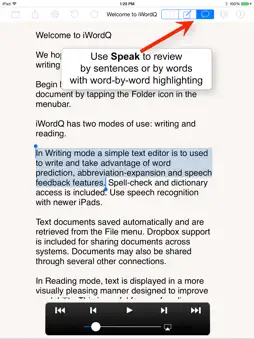
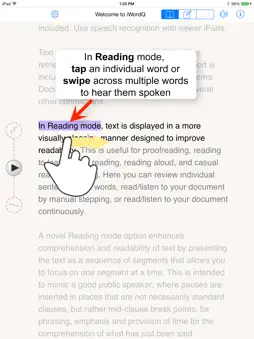
iWordQ Pro US (US English) is an easy-to-use writing and reading App featuring specialized word prediction for students in senior high school, colleges and universities as well as working professionals. In Writing mode, a simple text editor is used for writing with the support of word prediction, abbreviation-expansion and speech feedback features. Spell-check and dictionary access is included. You can also use speech recognition. In Reading mode, text is shown in a more visually pleasing manner to improve readability. This is used for proofreading, reading to learn, silent reading, reading aloud, and casual reading/listening. A novel text chunking method (patent-pending) can be selected to enhance comprehension and readability of text to allow you to focus on one text chunk at a time. WRITING MODE A simple text editor supports writing with word prediction, abbreviation expansion, speech feedback, spell-checking, dictionary access and speech recognition. Word Prediction Suggested words appear as you type. Tap a word to select it, or enable creative and phonetic spelling prediction for additional support. Usage examples help distinguish similar-sounding words, including homonyms. Predictions remain accurate when you move the cursor. Speech Feedback Touch and hold a predicted word to hear it spoken using high-quality text-to-speech. Typed and selected words can be read aloud, and completed sentences are spoken after punctuation is added and you tap the space bar. Selected text can be read with word-by-word highlighting. Double-tap to select a word or paragraph, then drag to extend the selection. Speech review controls let you move forwards or backwards by sentence or word. Abbreviation Expansion Create customized abbreviations, or text macros, to simplify writing. Abbreviations appear in the prediction list and can expand into text containing punctuation or multiple paragraphs. Sharing Documents are saved automatically and available from the File menu. You can also share through email, Facebook, Messages, the pasteboard and other apps. READING MODE The onscreen keyboard is hidden, and the current sentence appears in black while surrounding text is greyed out to improve focus. Tap another sentence to select it. Proofreading Listen to sentences to identify mistakes. Tap a word to highlight and hear it, helping you detect incorrect spelling, word forms or word choices. Swipe across several words to hear a phrase and check whether the words work well together. Reading to Learn Patented Text Chunking divides sentences into meaningful segments, adding pauses that support comprehension. Tap within a sentence to highlight and hear the relevant segment. During playback, pauses between chunks give you time to process the text. Reading Aloud Use iWordQ like a teleprompter. Read at the app’s speaking pace or at your own speed while sentences and text chunks are highlighted. Silent Reading Turn off speech feedback and read silently at the app’s pace or your own. Sentences and text chunks remain highlighted as you move through the text. Casual Reading Tap the first sentence to choose a starting point, then play sentences automatically or advance through them manually.
What's New
Version 3.5.4 2026-10-31
Minor bug fix for text going behind the on-screen keyboard on. Technical Analysis
Package Overview Basic metadata
Bundle ID
ca.quillsoft.wordq.ipad.pro.US Current Version 3.5.4
Minimum iOS 15.0
Package Size App Store Size
Package Metadata 0 / 18 version records
Detailed binary, privacy manifest, framework, and Info.plist results have not been indexed for this package yet. The verified App Store and archive metadata above remains available.
Developer Information
Known Version Records
0 version records with stored package metadata • 18 known version records
Stored metadata does not guarantee a package is currently available to download.
| Details | Version / IDs | Version date | Action |
|---|---|---|---|
| Not archived | App Store ID: 883103246 | Unknown | Paid / Arcade |
| Not archived | App Store ID: 881751282 | Unknown | Paid / Arcade |
| Not archived | App Store ID: 853526952 | Unknown | Paid / Arcade |
| Not archived | App Store ID: 838030748 | Unknown | Paid / Arcade |
| Not archived | App Store ID: 837474141 | Unknown | Paid / Arcade |
| Not archived | App Store ID: 833238245 | Unknown | Paid / Arcade |
| Not archived | App Store ID: 833082620 | Unknown | Paid / Arcade |
| Not archived | App Store ID: 827197742 | Unknown | Paid / Arcade |
| Not archived | App Store ID: 822301340 | Unknown | Paid / Arcade |
| Not archived | App Store ID: 821872231 | Unknown | Paid / Arcade |
| Not archived | App Store ID: 819968000 | Unknown | Paid / Arcade |
| Not archived | App Store ID: 817237667 | Unknown | Paid / Arcade |
| Not archived | App Store ID: 816666641 | Unknown | Paid / Arcade |
| Not archived | App Store ID: 813740263 | Unknown | Paid / Arcade |
| Not archived | App Store ID: 812579280 | Unknown | Paid / Arcade |
| Not archived | App Store ID: 812204104 | Unknown | Paid / Arcade |
| Not archived | App Store ID: 811670473 | Unknown | Paid / Arcade |
| Not archived | App Store ID: 811399292 | Unknown | Paid / Arcade |