
Preview






Description
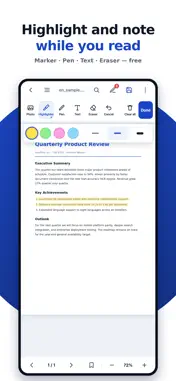
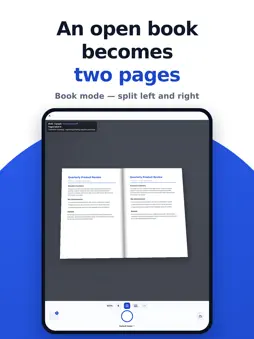
HanFlow PDF — ad-free PDF reader, editor & document scanner with AI OCR Clean and quick, with only the features you need. No ads. The interface follows your device language. ■ Document scanning · Auto-capture — hold steady over a page and it captures by itself · Book mode — one shot of an open book becomes two separate pages · Shoot at an angle; the edges are found and the perspective corrected · Five looks: document, black & white, photo and more · Photos you already took go through the same process into one PDF ■ Free features · Reading: pinch zoom, immersive mode, single-page or continuous scroll · Page thumbnails, in-document search with highlighting · Light / sepia / dark background — easier on the eyes · Annotation: highlighter, pen, text notes, eraser (4 colours, 3 widths) · Page bookmarks, favourites, sort by recent/name/size and grid view ■ Premium features (unlocked with an in-app subscription) · AI text recognition (OCR) — pull text out of scans, or make a searchable PDF · Document conversion — PDF → Word, PowerPoint · Word, PowerPoint, Excel → PDF · Save a new PDF with your annotations · Merge PDFs — combine several files in the order you choose · Page editing — rotate, delete, reorder, extract selected pages · PDF ↔ images, text extraction, rotate all, page numbers, watermark, compress · Share / export ※ One licence works with the HanFlow PDF desktop program as well ■ Private by design · No ads · Documents are never collected or transmitted, and nothing is shared with third parties for advertising or analytics · Scans and PDFs are processed on your device — nothing is uploaded · "Open with HanFlow PDF" from Files, mail and messengers Scan what is on paper, and read your PDFs the light way. ■ Subscriptions and terms · Auto-renewable subscription. It renews automatically unless cancelled at least 24 hours before the end of the current period, and payment is charged to your Apple ID account. Prices are shown on the purchase screen in the app. · Manage or cancel: Settings ▸ your Apple ID ▸ Subscriptions · Terms of Use (EULA): https://www.apple.com/legal/internet-services/itunes/dev/stdeula/ · Privacy Policy: https://hanflowpdf.com/app/privacy.html
What's New
Version 2.7.7 2026-10-31
• Hangul (HWP), PowerPoint, Excel, OpenDocument and CSV files now open as PDF much faster. • Markdown (.md) and plain text (.txt) files can now be opened as PDF... Technical Analysis
Package Overview Basic metadata
Bundle ID
com.hanflow.pdf Current Version 2.7.7
Minimum iOS 15.0
Package Size App Store Size
Package Metadata 0 / 0 version records
Detailed binary, privacy manifest, framework, and Info.plist results have not been indexed for this package yet. The verified App Store and archive metadata above remains available.
Developer Information
Known Version Records
0 version records with stored package metadata
Stored metadata does not guarantee a package is currently available to download.
| Details | Version / IDs | Version date | Action |
|---|