
Preview






Description
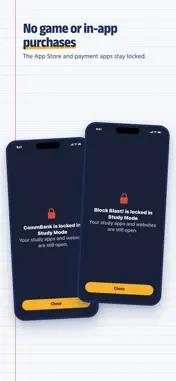
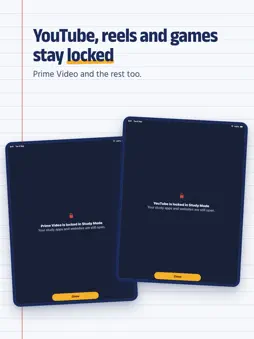
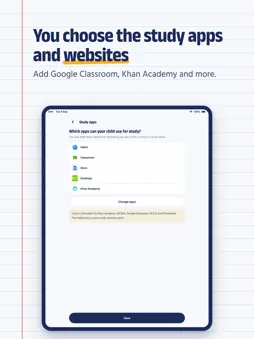
FocusEdge is a study lock and kids mode for parents who hand their own iPhone or iPad to their child for homework. Turn on Study Mode and only the study apps and websites you choose will open. YouTube, reels and games stay locked until you enter your PIN. Set an optional timer from 1 to 8 hours. Adult websites stay blocked even when Study Mode is off, using Apple's Screen Time filter. Try it free for 7 days, with no card needed. After that, FocusEdge is a yearly subscription through the App Store. STUDY MODE: ONE SWITCH, THEN HAND OVER THE PHONE • Only the study apps you choose open, such as Google Classroom, Khan Academy, Duolingo or Photomath • Only the study websites you choose open, such as Khan Academy, Wikipedia or your school's website • YouTube, reels, games, Instagram, Facebook and other social media stay locked • Set a timer from 1 to 8 hours, or leave it on until you turn it off NO GAME PURCHASES WHILE YOUR CHILD STUDIES Your phone has your chats, photos and money on it. In Study Mode your messages, photos, banking and payment apps stay locked behind your 6-digit PIN. In-app purchases are off, no new apps can be installed, and no apps can be deleted. ADULT AND OTHER UNSAFE WEBSITES STAY BLOCKED Adult websites, and well-known gambling, betting and violent websites, stay blocked at all times in Safari and other browsers, even when Study Mode is off and the phone is picked up without asking. You can also block any website yourself. ONLY YOU CAN TURN IT OFF Study Mode turns off with your 6-digit PIN, or with Face ID or Touch ID if you switch that on. If someone turns off FocusEdge's Screen Time access, we email you. SIMPLE PARENTAL CONTROL FOR A SHARED PHONE FocusEdge goes on your own iPhone or iPad, the one your child borrows. It is one app on one device: there is no second app to install on a child's phone and no child account to set up. It also works on a child's own iPhone or iPad when you hold the PIN. SET UP IN A FEW MINUTES 1. Sign in with Apple, Google or your email 2. Allow Screen Time access 3. Choose the study apps and websites 4. Choose a 6-digit PIN FORGOT YOUR PIN? We email you a code to reset it. YOUR PRIVACY FocusEdge uses Apple's Screen Time to lock apps and block websites. Apple does not let FocusEdge see which apps or websites are opened, so that is never recorded or sent anywhere. FocusEdge does not read your messages, photos or anything inside an app. SUBSCRIPTION The first 7 days are free and need no payment method. To keep using Study Mode after that, subscribe to FocusEdge yearly, an auto-renewing subscription. Payment is charged to your Apple Account when you confirm the purchase, and the subscription renews each year unless you cancel at least 24 hours before the end of the period. Manage or cancel it in Settings › your name › Subscriptions. Terms of use: https://focusedge.app/terms.html Privacy policy: https://focusedge.app/privacy.html FocusEdge is for parents and guardians aged 18 and over. Questions: [email protected]
What's New
Version 1.6 2026-10-24
• Setup is shorter: choose the study apps and websites, allow Screen Time, choose a PIN. No sign-in needed. • Your free week starts the moment setup is done. • ...• Setup is shorter: choose the study apps and websites, allow Screen Time, choose a PIN. No sign-in needed. • Your free week starts the moment setup is done. • Create your account later from the home screen, to reset a forgotten PIN by email or to subscribe. Technical Analysis
Package Overview Basic metadata
Bundle ID
app.focusedge Current Version 1.6
Minimum iOS 18.0
Package Size App Store Size
Package Metadata 0 / 0 version records
Detailed binary, privacy manifest, framework, and Info.plist results have not been indexed for this package yet. The verified App Store and archive metadata above remains available.
Developer Information
Known Version Records
0 version records with stored package metadata
Stored metadata does not guarantee a package is currently available to download.
| Details | Version / IDs | Version date | Action |
|---|