Preview





Description
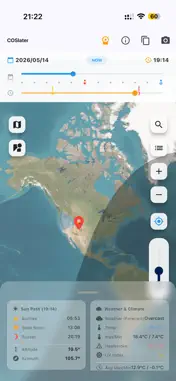
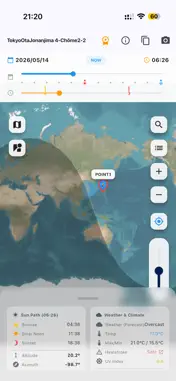
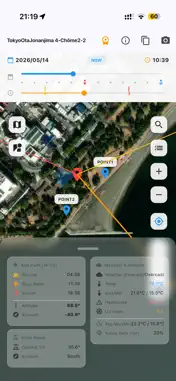
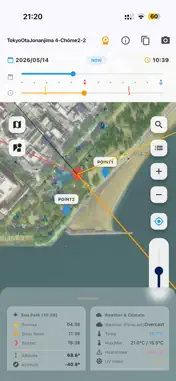
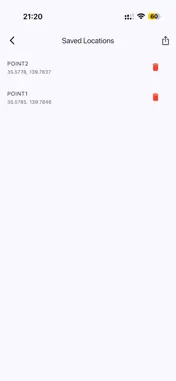
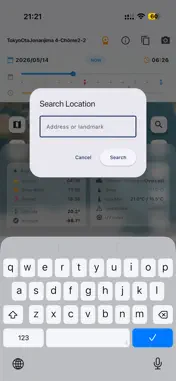
Sun Map Clock is a professional simulation tool designed to track the sun's path and shadow directions at any given location and time. By simply moving the intuitive time and date sliders, you can visualize exactly how the sun will interact with a specific area throughout the year. Perfect for construction managers, real estate agents, solar panel installers, and surveyors who need accurate, reliable site data without visiting the location. KEY FEATURES - Shadow Length & Width Simulation: Enter the height and width of an object at the pin and the shadow falls on the map as a band with its real projected length (height / tan of sun altitude) and its real width. Heights run 0.5-300 m, covering high-rise towers, and widths 0.5-500 m, covering block-scale buildings. Steps of 0.1 m let you dial in exact figures for daylight explanations, right-to-light and overshadowing studies, and row-to-row spacing of solar panels. - Interactive Sun Map: Visualize the sun's direction and shadow angles on the map, and scrub through the day with the time slider to follow the sun's path. - Time Travel Sliders: Easily slide through hours, days, and seasons to see how shadows change. Sliders show clear marks for sunrise, sunset, and solstices. When you reach the end of the slider, it smoothly moves to the next day or year. - Safety & Climate Data: Check temperature, UV index, and heat alerts for safe site management and hazard prediction (KY activities). It also shows past weather records and 5-year average data (average temperature and sunny day rate). - Solar Panel Optimization: Automatically calculate the optimal tilt and azimuth for solar panels at any location. - Multi-Site Management & CSV Export: Save multiple project locations and export comprehensive sun and climate data to CSV for your reports. - Quick Share: Take screenshots of the map and data panel to share actionable instructions instantly with your team. - Day/Night Terminator: Visualize the global day and night boundary moving in real-time as you adjust the time. - Alerts per Site: Sunrise, sunset, golden hour and "the sun gets low (long shadows)", each with its own lead time, set per saved site. The sun's position is computed on the device, so alerts fire even out of signal range. - Works Offline: Weather fetched while online is stored on the device and shown where there is no signal, together with the time it was fetched — old values are never taken for current ones. Offline storage can be switched off, shows real disk usage and can be cleared. - Units Set Separately: Temperature (°C / °F), length (m / ft) and wind speed (m/s / mph) are chosen independently, because the combination differs by country. Targeted for B2B professionals, this app bypasses complex astronomical jargon and focuses directly on actionable data for your field work. Free trial: every feature is free for 30 days, starting when you tap "Start Using Now" on the welcome screen. To keep using them after that, an auto-renewing monthly or yearly subscription is required. *** Subscription Terms: Payment is charged to your Apple Account at confirmation of purchase. The subscription renews automatically unless it is cancelled at least 24 hours before the end of the current period; the renewal is charged within 24 hours before the period ends. You can manage or cancel your subscription in your Apple Account settings. Terms of Service: https://www.apple.com/legal/internet-services/itunes/dev/stdeula/ Privacy Policy: https://qconp.com/#section-privacy-en
What's New
Version 1.3.6 2026-10-26
• At the largest text size, the date and time row on the map, the start button on the first screen, and the prices and annual badge on the subscription screen n... Technical Analysis
Package Overview Basic metadata
Bundle ID
com.qconp.sunmapclock Current Version 1.3.6
Minimum iOS 15.0
Package Size App Store Size
Package Metadata 0 / 3 version records
Detailed binary, privacy manifest, framework, and Info.plist results have not been indexed for this package yet. The verified App Store and archive metadata above remains available.
Developer Information
Known Version Records
0 version records with stored package metadata • 3 known version records
Stored metadata does not guarantee a package is currently available to download.
| Details | Version / IDs | Version date | Action |
|---|---|---|---|
| Not archived | App Store ID: 887645995 | Unknown | Request Version |
| Not archived | App Store ID: 887095654 | Unknown | Request Version |
| Not archived | App Store ID: 885175239 | Unknown | Request Version |