Preview

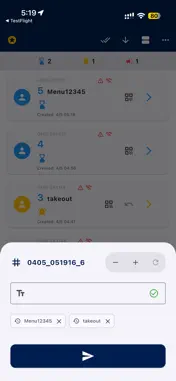
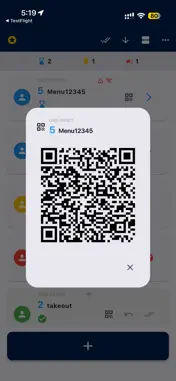

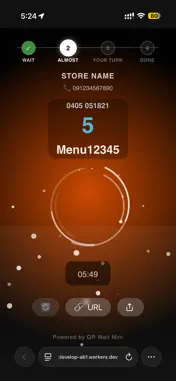





Description
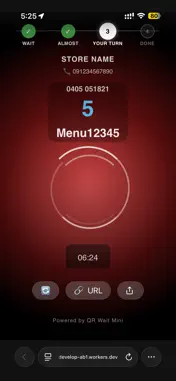
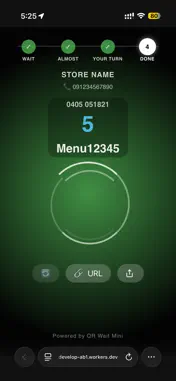
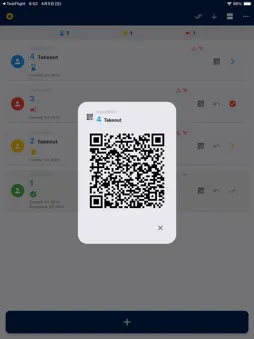
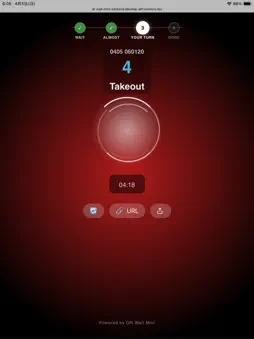
"QR Wait Mini" is the simplest smart paging system out there, for any place that keeps people waiting: restaurants, food trucks, clinics, events and more. No app! No install! No LINE! Just QR! Dead simple. No more costly hardware (pagers and coaster buzzers costing hundreds of dollars) or heavyweight queue systems costing a fortune every month. ▼ Customers just wait, with no app needed You never have to make customers install a dedicated app or add a LINE official account. They simply scan the QR code on your tablet with their phone's standard browser (Safari or Chrome) and wait. They can even step away to their car or a nearby cafe, easing crowding. ▼ It survives even if the browser closes The current status and timer start time are stored on the server. So whatever the customer does on their phone, the data never disappears unless your shop swipes it away. *To protect privacy, issued ticket data is automatically erased from the server 24 hours after it is created. The maximum wait time supported is therefore 24 hours. [How it actually behaves] 1. Opened another app / pressed the power button to dim the screen The ticket is not lost. The waiting screen uses the browser's "WakeLock API" and "silent audio playback" to keep the connection alive in the background wherever the browser allows it. When you set the status to "almost" or "calling," it sounds an alarm, and also vibrates on browsers that support vibration (Safari on iPhone does not). 2. Completely swiped the browser tab away The connection drops, so in your app the "Wi-Fi icon turns gray" and the phone won't ring. But the data is not gone. Once the customer scans your QR code again, the current status (yellow or red) and the elapsed waiting time are restored exactly. [!] Important notes This system assumes customers can always return to the browser waiting screen. If a customer fully closes the tab and never returns, or uses a device that cannot scan QR codes, the call cannot be delivered. ▼ An intuitive animated UI that crosses the language barrier The waiting screen uses a "VJ-style UI" that conveys the situation without relying on text. - Waiting (blue): a slowly rotating ring - Almost there (yellow): a ripple animation welling up from below - Your turn (red): a fiercely flashing pulse animation with an alarm Shown purely through color and animation, the status is clear even to overseas visitors who don't read English. ▼ Full support for an external storefront monitor (dual display)! Connect your iPhone or iPad to an external monitor by cable or AirPlay, and a dedicated QR code screen for customers to scan is automatically shown large on it. You manage the queue on your device while the monitor doubles as digital signage, making operations at the register far slicker. ▼ Dead-simple management in 4 steps All your staff do is tap an icon in the list. The status flow is simple enough for anyone to follow: "Waiting (blue)" -> "Almost (yellow)" -> "Calling (red)" -> "Done (green)." It also includes handy features: hiding completed entries, editing or deleting individual items, and one-tap resetting of the sequence number. ▼ Free trial Every feature is free for 60 days after you install the app. To keep using them after that, an auto-renewing monthly or yearly subscription is required. Price: US$60 per month or US$600 per year (shown in your local currency in the app before you buy). Payment is charged to your Apple Account at confirmation of purchase. The subscription renews automatically unless it is canceled at least 24 hours before the end of the current period; the renewal is charged within 24 hours before the period ends. You can manage or cancel your subscription in your Apple Account settings. Terms of Use (EULA): https://www.apple.com/legal/internet-services/itunes/dev/stdeula/ Privacy Policy: https://qconp.com/privacy
What's New
Version 1.0.17 2026-10-07
• Fixed the ticket counter going back to its old number after Clear All when the app was restarted • Fixed a ticket name made only of spaces being saved when re... Technical Analysis
Package Overview Basic metadata
Bundle ID
com.qconp.qrwaitmini Current Version 1.0.17
Minimum iOS 15.0
Package Size App Store Size
Package Metadata 0 / 8 version records
Detailed binary, privacy manifest, framework, and Info.plist results have not been indexed for this package yet. The verified App Store and archive metadata above remains available.
Known Version Records
0 version records with stored package metadata • 8 known version records
Stored metadata does not guarantee a package is currently available to download.
| Details | Version / IDs | Version date | Action |
|---|---|---|---|
| Not archived | App Store ID: 887095335 | Unknown | Request Version |
| Not archived | App Store ID: 886935556 | Unknown | Request Version |
| Not archived | App Store ID: 885442573 | Unknown | Request Version |
| Not archived | App Store ID: 885155478 | Unknown | Request Version |
| Not archived | App Store ID: 885096272 | Unknown | Request Version |
| Not archived | App Store ID: 884925456 | Unknown | Request Version |
| Not archived | App Store ID: 884421936 | Unknown | Request Version |
| Not archived | App Store ID: 884127877 | Unknown | Request Version |