
Preview




Description
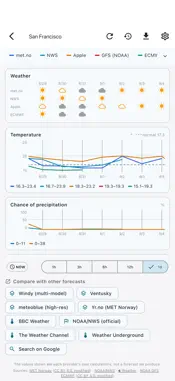
Multi Weather lines up official agency forecasts and numerical model output on one screen so you can spot where they disagree at a glance. Instead of trusting a single forecast, compare the official JMA forecast with the output of several models to make on-site Go/No-Go calls faster. ■ Official forecasts and model output together See official forecasts from JMA, MET Norway, Apple and NWS (US), alongside numerical model output from GFS, ECMWF, ICON and more — whichever are available for your location — overlaid on one timeline. Weather symbols (each agency's or model's own classification), precipitation (amount/probability), wind, temperature, cloud cover and humidity, side by side. Data sources: JMA, NOAA GFS, NWS (US), ECCC (Canada, GDPS), MET Norway, ECMWF (IFS, AIFS), ICON model (DWD), HARMONIE model (DMI), Apple Weather. ■ See the disagreement Every source is drawn on the same graph, so the hours where forecasts and model output split are visible at a glance. The way professionals read model differences — in seconds, for anyone. ■ Evidence export (CSV and PDF) Export the comparison as CSV or PDF to share. Hand a clear basis for a stop/postpone decision to clients or contractors. ■ Jump to other services Open JMA, tenki.jp, Yahoo Weather or Windy for the exact spot you're viewing, in an in-app window. ■ Built for the field For construction, civil works, ports, surveying, drones, film shoots, fishing and hiking — anything weather-dependent. Note: This app does not make its own forecast. It shows official agency forecasts (e.g. JMA) and numerical model output as provided, side by side. Numerical model output is not a forecast and may contain large errors. Final decisions are your responsibility. The first 30 days are completely free. To keep using all features afterward, an auto-renewing subscription (monthly or yearly) is required — cancel anytime. Terms of Use (EULA): https://www.apple.com/legal/internet-services/itunes/dev/stdeula/ Privacy Policy: https://qconp.com/privacy
What's New
Version 1.0.10 2026-11-03
• New "Forecast check": compares what each service forecast 24 hours ago with the nearest observations (AMeDAS/METAR) and sums up which was closest by mean erro... Technical Analysis
Package Overview Basic metadata
Bundle ID
com.qconp.multiweather Current Version 1.0.10
Minimum iOS 15.0
Package Size App Store Size
Package Metadata 1 / 1 version records
Detailed binary, privacy manifest, framework, and Info.plist results have not been indexed for this package yet. The verified App Store and archive metadata above remains available.
Developer Information
Known Version Records
1 version record with stored package metadata
Stored metadata does not guarantee a package is currently available to download.
| Details | Version / IDs | Version date | Action |
|---|---|---|---|
| 28.96 MB | v1.0.9 App Store ID: 886603431Build: 1.0.9 | 2026-10-05 09:02:51 | Get Version |