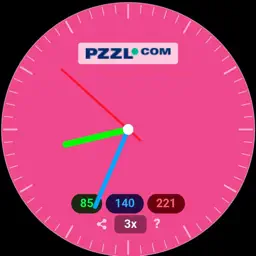
Preview


Description
Color-Clock is a unique clock that translates time into color. The more hours, the more red, more minutes more green, more seconds more blue. Every second a different color! Give your old cell phone a new life as a stylish desk clock. No sim card needed. It will run all day on airplane mode, even with the screen always on. Share a particular beautiful color as png with your friends. The RGB values will be added too, so you can use it later in your own designs. Manipulate time with the Science Fiction mode. Challenge your friends: who can be the first to share the clock showing the time from one hour ago? HOW IT WORKS The dial continuously changes color throughout the day. Red indicates the hours, green the minutes, and blue the seconds. The values range from 0 (dark) to 255 (bright) – just like in design software. For example: it is 8:40 and 20 seconds. 8 hours is one-third of 24 hours, so red is one-third of 255. 40 minutes is two-thirds of 60, so green is two-thirds of 255. And 20 seconds is one-third of 60, so blue is one-third of 255, or 85. But wait, one second later, blue is 89! Once you get used to it, you may look forward to the colors in a particular part of the day. COLOR SCHEMES Switch between six color schemes: RGB, RBG, GRB, GBR, BRG, and BGR. Each scheme assigns the three color channels to hours, minutes, and seconds in a different order, creating a completely different color palette for the same moment. FEATURES - Analog clock with colored hands that correspond to the active color scheme - RGB value display showing the exact color composition - Six color schemes to choose from - Speed modes: 3x, 15x, 60x, 300x and 500x to see colors change quickly - Freeze mode: pause to capture a color you like and share it. - Share: share the current clock as a PNG image - SF (Science Fiction) mode: switching between color schemes does not change color, but time! - Picture-in-Picture: keep the clock visible as a floating window - Always On: keep the screen active as long as the app is open - Full screen: now the clock stands out beautifully DESIGNED BY Color-Clock is designed by Peter Ritmeester / PZZL.com — known for innovative puzzles and brain games. Free to use. No ads. No data collection.
What's New
Version 1.2 2026-06-10
- New Science Fiction (SF) mode - Separate play/pause button to freeze a color - Improved speed selector - Expanded in-app help - Various design refinements Technical Analysis
Package Overview Basic metadata
Bundle ID
com.pzzl.colorclock-ios Current Version 1.2
Minimum iOS 15.0
Package Size App Store Size
Package Metadata 0 / 0 version records
Detailed binary, privacy manifest, framework, and Info.plist results have not been indexed for this package yet. The verified App Store and archive metadata above remains available.
Developer Information
Known Version Records
0 version records with stored package metadata
Stored metadata does not guarantee a package is currently available to download.
| Details | Version / IDs | Version date | Action |
|---|