Preview



Description
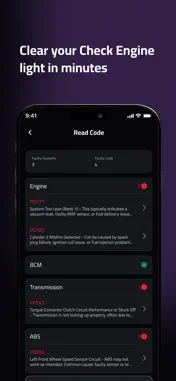
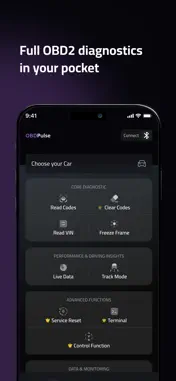
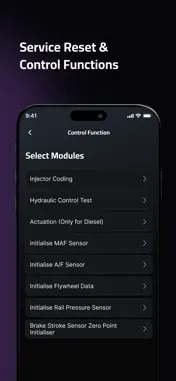
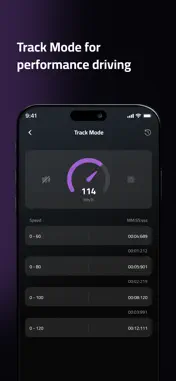
OBDPulse – Professional OBD2 Car Scanner Turn your iPhone into a powerful OBD2 diagnostic tool. OBDPulse helps you scan, diagnose, and clear your check engine light using a compatible Bluetooth Low Energy (BLE) OBD2 adapter. Whether you’re troubleshooting a warning light or monitoring your vehicle’s performance, OBDPulse gives you reliable, real-time diagnostics in one easy-to-use app. Understand your vehicle before visiting a mechanic. NEW IN THIS RELEASE AI Mechanic Ask questions about your car in plain English and get clear, informational guidance. Chats stay active for 24 hours after your last message, so you can pick up where you left off. AI Mechanic works with text and needs an internet connection. Free users get a limited number of chats, and paid plans include more. AI Mechanic provides informational guidance only. For safety-critical issues, consult a certified mechanic. Scan History & Garage Profile Review your past scans and reports in one place. Scan history is kept separately from your vehicles, so deleting a vehicle never deletes its scan records. Set up a Garage Profile once and every PDF report you share is branded automatically. Compatible Device Finder Check which Bluetooth adapters work with OBDPulse before you buy one. The list also flags clone adapters that can send incomplete or incorrect data. KEY FEATURES Read & Clear Fault Codes (DTCs) Access engine and ECU trouble codes. Clear stored codes and reset the check engine light. Live Sensor Data (PID Monitoring) View real-time data such as RPM, vehicle speed, coolant temperature, fuel trims, O2 sensor readings, throttle position, battery voltage, and more. Freeze Frame & Mode 6 See vehicle conditions at the moment a fault was triggered. Access Mode 6 data for deeper emissions diagnostics. VIN & ECU Information Retrieve VIN, ECU identifiers, and module information directly from your vehicle. O2 Sensor & Emission Readiness Monitor O2 sensor activity and check I/M readiness status to prepare for emissions testing. Service Reset & Control Functions Access supported service reset and control operations based on your vehicle and ECU compatibility. Available functions vary depending on vehicle support. Track Mode Measure and monitor acceleration and speed-related performance metrics based on available live data. Terminal Mode (Advanced Users) Send custom OBD commands directly to the vehicle’s ECU. COMPATIBILITY Requires a Bluetooth Low Energy (BLE) OBD2 adapter. Bluetooth Classic adapters are not supported. Compatible with most OBD2-compliant vehicles (typically 2000 onward, depending on region and manufacturer). PLANS Pro Plan – Full diagnostics and advanced functions Available as 1-Month and 12-Month subscriptions. Limited features available for free. IMPORTANT A supported BLE OBD2 adapter is required. OBDPulse does not support ECU tuning or remapping. Feature availability depends on vehicle make, model, year, and ECU support. SUPPORT Need assistance? Contact us at [email protected] Terms of Use: https://www.obdpulse.com/terms-of-use Privacy Policy: https://www.obdpulse.com/privacy-policy
What's New
Version 1.0.13 2026-11-03
AI Mechanic Ask questions about your car in plain English and get clear, informational guidance. Each chat stays active for 24 hours after your last message, so...AI Mechanic Ask questions about your car in plain English and get clear, informational guidance. Each chat stays active for 24 hours after your last message, so you can pick up where you left off. AI Mechanic works with text and needs an internet connection. It gives informational guidance only. For safety-critical issues, consult a certified mechanic. Garage: Scan History and Garage Profile Look back at your past scans and reports in one place. Scan History is kept separately from your vehicles, so deleting a vehicle never deletes its scan records. Set up your Garage Profile once and every PDF report you share is branded automatically. Compatible Devices Check which Bluetooth adapters work with OBDPulse before you buy one. The list also flags clone adapters that can send incomplete or incorrect data. Technical Analysis
Package Overview Basic metadata
Bundle ID
com.obd.pulse Current Version 1.0.13
Minimum iOS 15.0
Package Size App Store Size
Package Metadata 1 / 10 version records
0.0 / 5.0 (0 ratings)
Detailed binary, privacy manifest, framework, and Info.plist results have not been indexed for this package yet. The verified App Store and archive metadata above remains available.
Developer Information
Known Version Records
1 version record with stored package metadata • 10 known version records
Stored metadata does not guarantee a package is currently available to download.
| Details | Version / IDs | Version date | Action |
|---|---|---|---|
| 86.24 MB | v1.0.9 App Store ID: 884203065Build: 1.0.9 | 2026-04-07 00:46:28 | Get Version |
| Not archived | App Store ID: 883854464 | Unknown | Request Version |
| Not archived | App Store ID: 883354036 | Unknown | Request Version |
| Not archived | App Store ID: 877943984 | Unknown | Request Version |
| Not archived | App Store ID: 877908999 | Unknown | Request Version |
| Not archived | App Store ID: 877575733 | Unknown | Request Version |
| Not archived | App Store ID: 877405488 | Unknown | Request Version |
| Not archived | App Store ID: 877161344 | Unknown | Request Version |
| Not archived | App Store ID: 877105544 | Unknown | Request Version |
| Not archived | App Store ID: 875888500 | Unknown | Request Version |