
Preview




Description
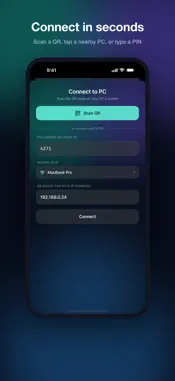
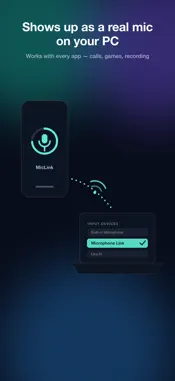
Turn your iPhone into a wireless microphone for your computer. Microphone Link streams your iPhone's mic to your Mac over Wi-Fi and registers it as a real system microphone — so it appears in the input list of every app: video calls, streaming, screen recording, voice memos, anything that uses a mic. HOW IT WORKS 1. Install the free companion app on your Mac (https://miclink.eggmango.com) 2. Scan the QR code shown on your Mac's screen 3. Select "Microphone Link" as the microphone in any app — done WHY YOU'LL LIKE IT • One-scan pairing — scan the QR on your PC and you're connected. No IP addresses, no account, no setup. • Real microphone device — not a browser trick. Your computer sees a native input device that works everywhere. • Clear voice — 48 kHz stereo audio over the efficient Opus codec. • Three latency modes — Low latency (~50 ms) for real-time use, Balanced (~100 ms) for calls, High quality for recording. • Private by design — audio travels only over your local network and never touches the internet. Pairing is protected by a PIN shown on your computer's screen; the wrong PIN gets no audio. • Auto-discovery — your iPhone finds nearby computers on the same Wi-Fi and lists them. Can't see the screen? Type the PIN instead. • Live level meter and mute — see your input level at a glance and mute instantly. • Keeps streaming in the background while you use other apps. WHAT YOU NEED • iPhone with iOS 16 or later • Mac with macOS 13 or later, Window PC and the free Microphone Link desktop app • Both devices on the same Wi-Fi network Visit https://miclink.eggmango.com/
What's New
Version 1.1 2026-08-08
What’s New: • Improved local network connection stability. • General performance enhancements and stability improvements. • Minor bug fixes. Technical Analysis
Package Overview Basic metadata
Bundle ID
com.purplenight.miclink Current Version 1.1
Minimum iOS 16.0
Package Size App Store Size
Package Metadata 1 / 2 version records
Detailed binary, privacy manifest, framework, and Info.plist results have not been indexed for this package yet. The verified App Store and archive metadata above remains available.
Price History (USA store)
3 recorded price change points. These are historical observations, not a guarantee of the current price.
| Recorded at | Price | Currency |
|---|---|---|
| 3.99 | USD | |
| 2.99 | USD | |
| 3.99 | USD |
Developer Information
Known Version Records
1 version record with stored package metadata • 2 known version records
Stored metadata does not guarantee a package is currently available to download.
| Details | Version / IDs | Version date | Action |
|---|---|---|---|
| 1.67 MB | v1.1 App Store ID: 889393394Build: 1.1 | 2026-08-08 14:15:40 | Paid / Arcade |
| Not archived | App Store ID: 887719086 | Unknown | Paid / Arcade |