
Preview










Description
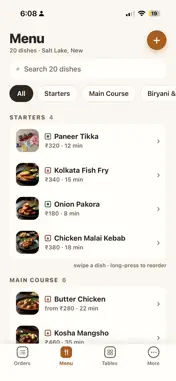
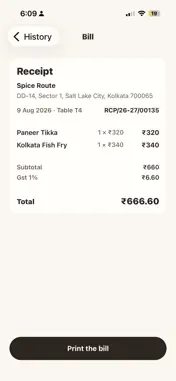
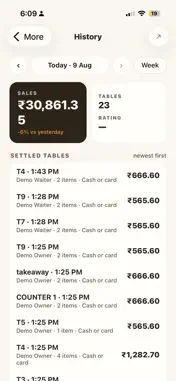
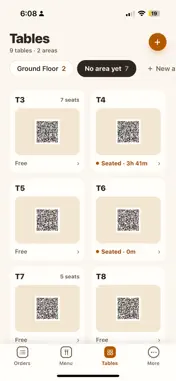
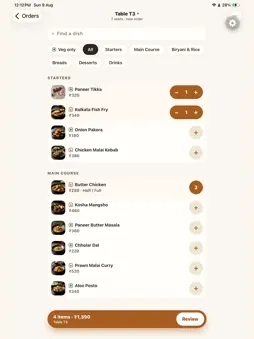
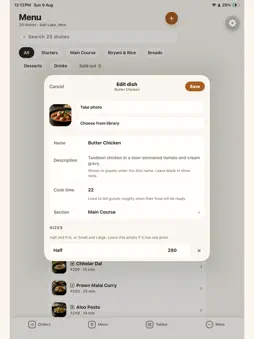
Run your restaurant's floor from your phone. TablID Console is the staff side of TablID — the QR dine-in system where guests scan the code on the table, see your food in photos, and order from their seat. No app for them to install. No commission on any order, ever. EVERY TABLE ON ONE SCREEN • Free, seated, ordering, waiting to pay — at a glance • Seat a walk-in, move a party, add seats, split or merge a bill • Take the order yourself when a guest would rather just tell you ORDERS ARRIVE LIVE • A new order sounds on your phone wherever you are in the restaurant • Accept, mark ready, or cancel a single dish • The kitchen slip (KOT) prints itself the moment you accept YOUR MENU, EDITED IN SECONDS • Mark a dish sold out and it disappears from every guest's phone instantly • Photos, portions, prices, categories — all from the phone in your hand BILLING THAT CLOSES THE LOOP • A running bill per table, GST-ready tax invoices, a printed bill on settle • UPI, cash or card — you take the money exactly the way you already do • Day history, staff logins and guest feedback in one place PRINTS ON PAPER Works with the Bluetooth thermal printer beside your till (58 mm or 80 mm rolls), or your phone's own print screen if you'd rather not pair one. Built for restaurants, cafés, dhabas and cloud kitchens in India. We're setting up our first restaurants now. TablID takes no commission.
What's New
Version 1.0.2 2026-10-29
Bug fixes and printing improvement Technical Analysis
Package Overview Basic metadata
Bundle ID
com.tablid.console Current Version 1.0.2
Minimum iOS 16.4
Package Size App Store Size
Package Metadata 0 / 0 version records
Detailed binary, privacy manifest, framework, and Info.plist results have not been indexed for this package yet. The verified App Store and archive metadata above remains available.
Developer Information
Known Version Records
0 version records with stored package metadata
Stored metadata does not guarantee a package is currently available to download.
| Details | Version / IDs | Version date | Action |
|---|