
Preview





Description
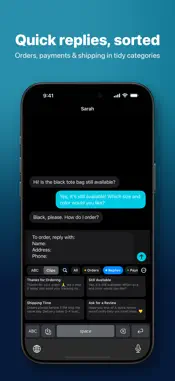
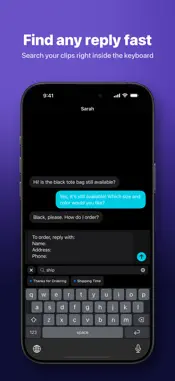
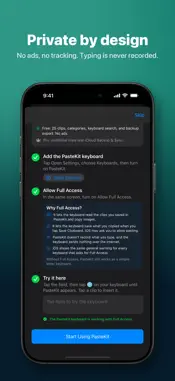
Stop retyping the same messages. Save your go-to replies, addresses, payment details, and text snippets once, then insert them from the PasteKit keyboard in any app that supports custom keyboards. Made for people who send the same messages every day: online sellers answering buyers, freelancers sharing rates and details, and support teams handling common questions. No ads, and up to 25 clips free. QUICK REPLIES FROM YOUR KEYBOARD • Tap a text clip to insert it straight into the chat or text field. • Tap an image clip to copy it, then paste it where you need it. iOS keyboards can't insert images directly. • The keyboard opens straight to your clips and remembers your category, filter, layout, and scroll position. • Search your saved clips right inside the keyboard. • Clips appear in the same order as in the app. ORGANIZE WITH CATEGORIES (NEW AND FREE) • Create colored categories such as Orders, Shipping, or Payments. • Filter clips by category in the app and switch categories with tabs in the keyboard. • Move clips between categories, pin the ones you use most, and arrange clips in your own order. • Give clips optional titles so they're easy to spot. SAVE WITHOUT LEAVING YOUR CHAT • Copy text or an image, then tap Save Clipboard in the PasteKit keyboard. No need to open the app. • Optional: turn on "Auto-save when keyboard opens" and new text or images you copy are saved when the PasteKit keyboard appears. It's off by default. • Share text, links, and images to PasteKit from the Share Sheet and choose a category. • Use the Home Screen widget for quick actions. Save Clipboard and auto-save require Allow Full Access. YOUR CLIPS, YOUR CONTROL • Clips stay on your device unless you turn on iCloud Backup & Sync (Pro). • The PasteKit keyboard does not log or send what you type. • Export all your clips to a JSON backup file and import them anytime, free. • If clips can't be saved permanently, PasteKit warns you clearly. FREE AND PRO • Free: up to 25 saved clips, plus categories, keyboard search, Save Clipboard, and export/import. No ads. • See how many of your 25 free clips you've used. Saved clips are never locked. • PasteKit Pro: unlimited clips and iCloud Backup & Sync. Choose monthly, yearly, or lifetime. QUICK SETUP The built-in setup guide checks whether the keyboard is added and Full Access is on, explains Full Access in plain language, and gives you a field to try it out. 1. Open Settings → General → Keyboard → Keyboards → Add New Keyboard, then choose PasteKit. 2. Tap PasteKit and turn on Allow Full Access so the keyboard can show your saved clips. 3. While typing, tap the globe key to switch to PasteKit. Available in English, Bahasa Indonesia, and Korean. Privacy Policy: https://pastekit.ihwan.id/privacy/ Terms of Use: https://www.apple.com/legal/internet-services/itunes/dev/stdeula/
What's New
Version 1.1.0 2026-10-18
What's new in PasteKit 1.1 • Categories: create colored categories, filter clips in the app, and switch with tabs in the keyboard. Free for everyone. • Search y... Technical Analysis
Package Overview Basic metadata
Bundle ID
id.ihwan.Clipboard Current Version 1.1.0
Minimum iOS 17.0
Package Size App Store Size
Package Metadata 0 / 0 version records
Detailed binary, privacy manifest, framework, and Info.plist results have not been indexed for this package yet. The verified App Store and archive metadata above remains available.
Developer Information
Known Version Records
0 version records with stored package metadata
Stored metadata does not guarantee a package is currently available to download.
| Details | Version / IDs | Version date | Action |
|---|