
Preview




Description
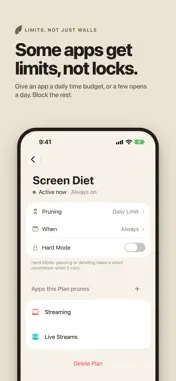
Plan your screen time like you plan your week. Prune brings the familiar feel of a calendar to managing your phone. Choose the apps and websites you want to manage, decide when your plans apply, and see your schedule laid out visually. Plan a focused afternoon, a quieter evening, or a routine that repeats throughout your week. With your plans in one clear view, it’s easy to see what happens when—and make changes as your life changes. Your days aren’t all the same. Your screen time plans can reflect that. START WITH FREE • Unlimited one-time plans. Create a plan for a study session, an afternoon of work, or time with family. • One recurring schedule. Set up a plan that repeats on the days and times you choose. • App and website blocking. Choose what to block while your plan is active. • Daily Limits. Set how much time you want to allow each day. • Open Limits. Set a daily allowance for opening selected apps. • A visual calendar. See your plans laid out across your week so you can understand your schedule at a glance. MORE FLEXIBILITY WITH PREMIUM • Multiple recurring schedules. Create separate routines for different parts of your week. • Location-based blocking. Choose locations where a plan turns on automatically. • Always-on plans. Keep a plan running indefinitely, with no schedule at all. • Never Allowed. Build a list of apps that stays blocked without needing a plan. COMING SOON: VINE Build a private circle with people you choose. Support for more than one Vine will be a Premium feature. Vine is not included in this release. Set the plan. Prune follows it. Make room for what matters. Prune is free to download and use with the features listed above. Premium features require a paid subscription. Privacy policy: https://app.termly.io/policy-viewer/policy.html?policyUUID=bff3810f-4353-4670-aafd-fafef2c3c113 Terms & Conditions: https://app.termly.io/policy-viewer/policy.html?policyUUID=aeeaabff-3abe-4cc3-8654-f63daca04fcb Questions? [email protected]
What's New
Version 1.2.0 2026-10-13
HARD MODE (Prune Pro) Make a Plan harder to back out of. With Hard Mode on, anything that would weaken a running Plan waits behind a short countdown first. Tha... Technical Analysis
Package Overview Basic metadata
Bundle ID
life.prune.screentime Current Version 1.2.0
Minimum iOS 26.5
Package Size App Store Size
Package Metadata 0 / 0 version records
Detailed binary, privacy manifest, framework, and Info.plist results have not been indexed for this package yet. The verified App Store and archive metadata above remains available.
Developer Information
Known Version Records
0 version records with stored package metadata
Stored metadata does not guarantee a package is currently available to download.
| Details | Version / IDs | Version date | Action |
|---|