
Preview






Description
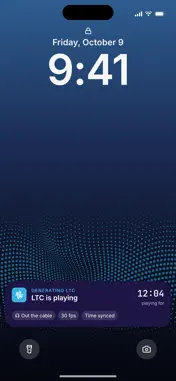
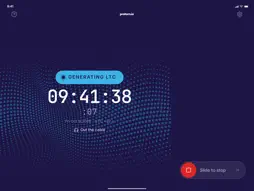
Protern Clock puts a precise time of day on every clip you film with a video camera, from the phone you already carry. A camera stamps each clip with its own clock: set once, drifting since, and only ever to the whole second. That is fine for watching. It is not enough to line the clip up with anything else: an athlete's sensor data, a second camera, or the phone footage from the top of the course. Protern Clock gives the camera a time it can trust, accurate to a hundredth of a second. TWO WAYS TO PUT THE TIME ON THE CAMERA LTC Audio. Plug the phone into the camera's mic input with a 3.5 mm cable, press Start, set the phone down beside the camera, and film. The phone sends the time as an audio timecode signal (linear timecode, or LTC, the broadcast standard) and the camera records it on the audio track. The timecode keeps running with the screen off. QR Clock. For a camera with no mic input. The phone shows the time as a QR code that refreshes every frame. Film the phone screen for a few seconds at the start of each clip, then the athlete. Protern Video reads the time from those frames. WHAT PROTERN VIDEO DOES WITH IT Import the clips and they behave like clips filmed on a phone. Each one sorts into the right session on the right day. It lines up with the athlete's Protern Sensor data to a hundredth of a second, so speed, time, and line sit on the frame they belong to. The run names itself when the athlete wore a sensor. And it joins other cameras and phones in one multi-cam run: a single feed that switches from camera to camera at the right instant, or angles side by side, in sync. PROTERN CLOCK AND TIMELINK TimeLink is Protern's LTC generator as a dedicated device, for the camera that films all day. Protern Clock puts the same timecode on the camera from your phone. Most teams use both: TimeLink on the main camera, Protern Clock on the second camera, the borrowed camera, or the camera with no mic input. SETTINGS Frame rate of 24, 25, 29.97, or 30. Timecode on the left, right, or both audio channels. The date embedded in the timecode. The time shows on screen while it runs, so you can check it against the camera. BEYOND PROTERN Any app that reads SMPTE linear timecode can use the signal, including Dartfish and Telemetry Overlay, so the same clip lines up with other sensor data in other analysis and overlay tools. REQUIREMENTS LTC Audio needs a wired 3.5 mm audio connection from the phone to the camera's mic input. An adapter may be needed depending on the phone. Bluetooth audio does not carry the timecode. QR Clock needs no cable. Reading QR Clock needs Protern Video 2.3.15 or later.
What's New
Version 2.1.2 2026-10-09
Easier to tell when LTC is playing One big Play button to start, then a large running timecode that shows where the sound is going: out the cable or the phone s... Technical Analysis
Package Overview Basic metadata
Bundle ID
com.proskida.protern-clock Current Version 2.1.2
Minimum iOS 16.1
Package Size App Store Size
Package Metadata 0 / 3 version records
Detailed binary, privacy manifest, framework, and Info.plist results have not been indexed for this package yet. The verified App Store and archive metadata above remains available.
Developer Information
Known Version Records
0 version records with stored package metadata • 3 known version records
Stored metadata does not guarantee a package is currently available to download.
| Details | Version / IDs | Version date | Action |
|---|---|---|---|
| Not archived | App Store ID: 860353493 | Unknown | Paid / Arcade |
| Not archived | App Store ID: 853575102 | Unknown | Paid / Arcade |
| Not archived | App Store ID: 853330084 | Unknown | Paid / Arcade |