Preview





Description
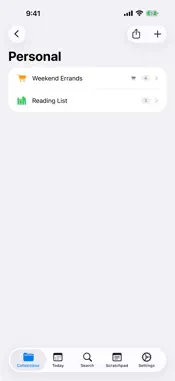
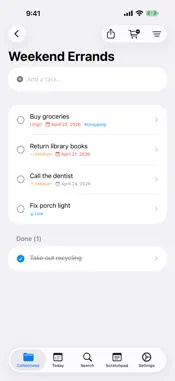
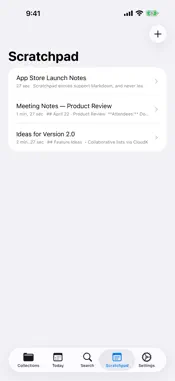
TaskScratch is a task manager built on a simple promise: you pay once, you own it forever. No subscription. No "Pro" upgrade that changes the deal. No bait-and-switch. The price you see is the price you pay, and it never expires. YOUR TASKS, YOUR DEVICES, YOUR DATA TaskScratch syncs across iPhone, iPad, and Mac through your personal iCloud account. Your tasks never touch our servers, because we don't have any. No account to create, no third-party cloud service, no data harvesting. Just your Apple ID and end-to-end encryption courtesy of iCloud. ORGANIZE YOUR WAY Create collections for every part of your life: Personal, Work, Family, Travel. Each collection holds multiple lists, and each list holds tasks with priorities, due dates, subtasks, and tags. Sort by priority, due date, name, newest, oldest, or drag to reorder manually. MARKDOWN NOTES ON EVERY TASK Add rich notes to any task with a formatting toolbar: bold, italic, headings, bullet lists, numbered lists, checklists, code blocks, and links. Preview your notes as beautifully rendered text, or expand to a full-screen editor for longer writing. Lists auto-continue as you type. EXPORT AND SHARE IN OPEN FORMATS Share any list or entire collection as plain text or Markdown. Send via iMessage, Mail, AirDrop, or any app on your device. Your data is never locked in. Export a grocery list to a friend or back up your entire project plan in a format any text editor can read. SCRATCHPAD: PRIVATE BY DESIGN A local-only notepad built for sensitive content. Passwords, credentials, private notes, code snippets, anything you need to jot down but never want in the cloud. Your scratchpad is stored only on your device. It does not sync to iCloud. It does not appear in backups. It does not leave your hands. BUILT FOR APPLE TaskScratch is a native SwiftUI app, not a web wrapper, not a cross-platform port. On Mac, it lives in your menu bar with quick access to today's tasks, hides to the background when you close the window, and comes back when you need it. On iPhone, it feels like it belongs. WHAT YOU GET - Collections, lists, tasks, subtasks, and tags - Markdown notes with toolbar and live preview - Seven sort options including priority, due date, and manual reorder - Show or hide completed tasks - Today view with overdue, due today, and this week - Search across everything: titles, notes, subtasks, and tags - iCloud sync across all your Apple devices - Share lists and collections as plain text or Markdown - Scratchpad that is local-only, never synced, never backed up - macOS menu bar app with today's tasks at a glance - Dark mode and Dynamic Type support - No ads, no analytics, no tracking NO SUBSCRIPTION. NO TRICKS. NO ASTERISKS. We believe software should be something you buy, not something you rent. TaskScratch will never move to a subscription model. Future updates are included. The app you buy today is the app you keep forever.
What's New
Version 1.1.0 2026-04-23
NEW • Due-date reminders — get a local notification when a task is due. Toggle in Settings > Notifications. • Scratchpad Lock — keep your local notes behind Fac... Technical Analysis
Package Overview Basic metadata
Bundle ID
DougEubanks.TaskScratch Current Version 1.1.0
Minimum iOS 17.6
Package Size App Store Size
Package Metadata 0 / 2 version records
Detailed binary, privacy manifest, framework, and Info.plist results have not been indexed for this package yet. The verified App Store and archive metadata above remains available.
Developer Information
Known Version Records
0 version records with stored package metadata • 2 known version records
Stored metadata does not guarantee a package is currently available to download.
| Details | Version / IDs | Version date | Action |
|---|---|---|---|
| Not archived | App Store ID: 884830806 | Unknown | Request Version |
| Not archived | App Store ID: 884745036 | Unknown | Request Version |