
Preview








Description
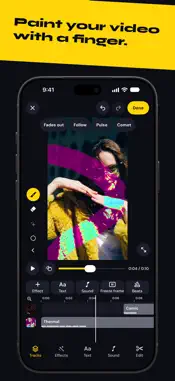
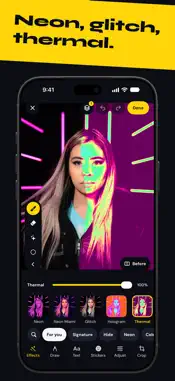
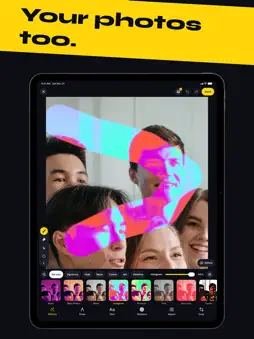
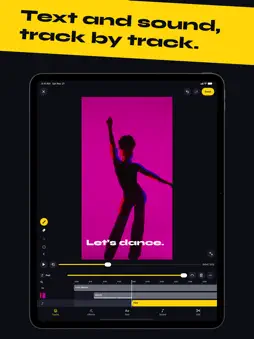
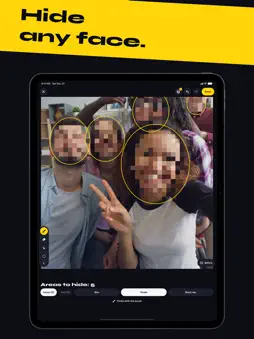
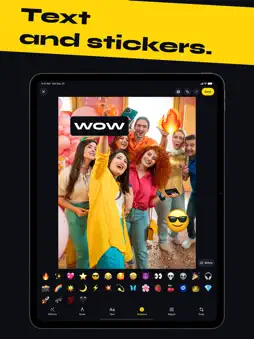
Paint any effect with one finger, on your photos and your videos. Blur a face that moves, turn the sky neon, make the effect pulse to the beat. VIDEO Touch and hold: the video plays and you paint the effect. Lift your finger: it stops. - The blur follows faces through the whole video. Tap a face to hide or show it. - Put the effect on the subject only, or on the background. - The effect pulses with the rhythm: Draw Filters finds the beats in the sound, or you tap them yourself. - Tracks for effects, text and sound. Add an app sound, a file or the sound from another video. - Animated text, stickers, cut, speed and crop. - Export up to 1080p, then share or save your video. - Detection can miss a face: check your video before you share it. HIDE Face, license plate, text: cover what shouldn't show before you post. - Draw Filters finds the faces and text in your photo on its own. - Tap an area to keep it or drop it. - Pick blur, pixels or a black bar. - Use the brush for anything it missed, like a plate. CREATE Over 100 effects to paint exactly where you want them. - Neon, glitch, thermal, hologram, VHS, liquid metal, comic, Neon Miami and Sunset Drive. - AI styles: Starry night, Brushwork, Mosaic. - Smart selection isolates the subject or the background. - Stack effects as layers and fine-tune each one. YOUR REPLAY On a photo, Draw Filters replays your brushstroke as a vertical 9:16 video, ready to post. - Four reveals: stroke, curtain, flash, before/after. - This replay is silent, so you add your own sound in the app you post with. An edited video has its own sound tracks: the original sound and the ones you add. ALSO IN THE EDITOR Text styles, stickers, pens, crop, brightness, contrast, saturation, warmth, sharpness, vignette, grain. YOUR PHOTOS AND VIDEOS STAY WITH YOU Detection, face tracking and AI styles run on your device. Your photos and videos are never sent to a server. By default, saved photos drop their metadata, such as location. FREE AND PRO Try every effect for free. Blur, pixels, black bar, neon and glitch are always free. A photo with a Pro effect or text style saves at a lower resolution with a watermark. Free replays carry a watermark. An edited video exports at up to 1080p, with a watermark only if it uses a Pro effect or feature. Pro removes the watermark, gives you full resolution and 1080p replays, and unlocks every effect and text style. In video, Pro adds effects that follow the sound, several beat tracks and saved recipes, plus 4K and up to 3 minutes when your device and your video allow it. Get Pro with a subscription or a one-time payment (Lifetime). Subscriptions renew automatically unless canceled at least 24 hours before the end of the current period. You can manage or cancel them in your App Store account settings. Terms of Use: https://drawfilters.prismatic-apps.com/en/terms Privacy Policy: https://drawfilters.prismatic-apps.com/en/nda
What's New
Version 2.1 2026-11-25
Draw Filters now does video. - Paint while your video plays: touch and hold, it plays; lift your finger, it stops. - Hide: the blur follows faces through the w...Draw Filters now does video. - Paint while your video plays: touch and hold, it plays; lift your finger, it stops. - Hide: the blur follows faces through the whole video. - The effect on the subject, or on the background. - The effect pulses with the rhythm of the sound, found by the app or tapped by you. - Tracks: effects, text and sound, with app sounds included. - Export up to 1080p, then share from “Your video is ready.” - Two new effects: Neon Miami and Sunset Drive. - iPad and iPhone Duo: refined layouts, photo editor included. Technical Analysis
Package Overview Basic metadata
Bundle ID
com.prismatic-apps.drawfilters Current Version 2.1
Minimum iOS 18.1
Package Size App Store Size
Package Metadata 0 / 4 version records
Detailed binary, privacy manifest, framework, and Info.plist results have not been indexed for this package yet. The verified App Store and archive metadata above remains available.
Developer Information
Known Version Records
0 version records with stored package metadata • 4 known version records
Stored metadata does not guarantee a package is currently available to download.
| Details | Version / IDs | Version date | Action |
|---|---|---|---|
| Not archived | App Store ID: 875020797 | Unknown | Request Version |
| Not archived | App Store ID: 874509120 | Unknown | Request Version |
| Not archived | App Store ID: 874372877 | Unknown | Request Version |
| Not archived | App Store ID: 873865089 | Unknown | Request Version |