
Preview



Description
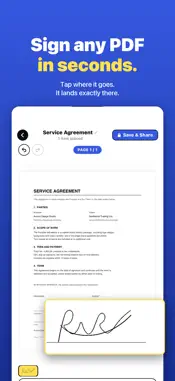
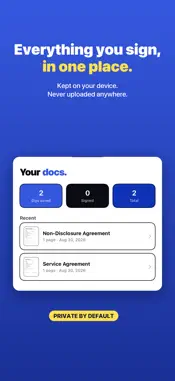
Sign on PDF – Sign Documents Use this PDF signer to add your signature to any document in seconds no printing, no scanning, no hassle. Sign contracts, fill forms, and scan paperwork right from your iPhone, with your documents kept private and secure on your device. The all-in-one PDF signer and document signer for everyday paperwork work contracts, HR forms, school permission slips, leases, and more. Fast, simple, and built to save you time. HOW IT WORKS 1. Import a PDF or scan a paper document 2. Tap to place your signature, text, or date 3. Save and share done in seconds TOP FEATURES • PDF signer — add signatures, text, and dates to any PDF in seconds • Document signer for contracts, forms, and agreements • Reusable signatures — save multiple signatures and apply them instantly • Create your signature — draw, type, or import your own • Built-in scanner — capture paper documents and turn them into PDFs • Document management — view, organize, and access all your files in one place • Private by design — your documents stay protected on your device • Clean, user-friendly interface built for speed POPULAR USE CASES • Sign business contracts and agreements • Fill and sign HR or onboarding forms • Sign school and permission forms • Complete lease and rental documents • Scan and sign printed paperwork on the go WHY CHOOSE SIGN ON PDF Sign on PDF – Sign Documents brings every essential PDF tool into one simple app. From managing and scanning to signing and sharing, everything is designed for speed, privacy, and ease of use. GET STARTED Download Sign on PDF – Sign Documents and sign your first document in seconds. Experience a smarter way to manage, sign, and scan your PDF documentsTitle: Savory All Access • Length: 1 year • Price: $5.99 per week, $39.99 per year and $79.99 Lifetime (auto-renews) • Terms of Use: https://www.apple.com/legal/internet-services/itunes/dev/stdeula/ • Privacy Policy https://docs.google.com/document/d/1BEjrJbCCzoT3zg93KfoluUAz3SbvsSlI/edit?usp=share_link&ouid=105049775202487025199&rtpof=true&sd=true
What's New
Version 1.2 2026-08-31
Bug fixes and performance enhancement Technical Analysis
Package Overview Basic metadata
Bundle ID
Sign-on-pdf-Sign-Documents Current Version 1.2
Minimum iOS 17.6
Package Size App Store Size
Package Metadata 0 / 2 version records
Detailed binary, privacy manifest, framework, and Info.plist results have not been indexed for this package yet. The verified App Store and archive metadata above remains available.
Known Version Records
0 version records with stored package metadata • 2 known version records
Stored metadata does not guarantee a package is currently available to download.
| Details | Version / IDs | Version date | Action |
|---|---|---|---|
| Not archived | App Store ID: 885740314 | Unknown | Request Version |
| Not archived | App Store ID: 884647336 | Unknown | Request Version |