Preview



Description
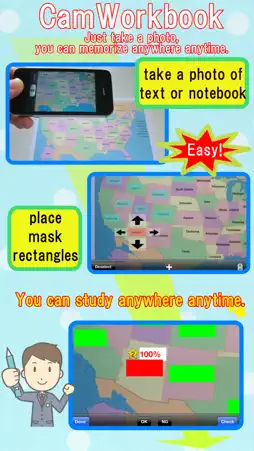
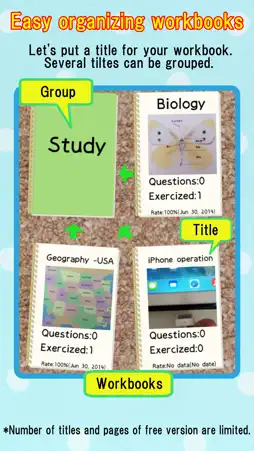
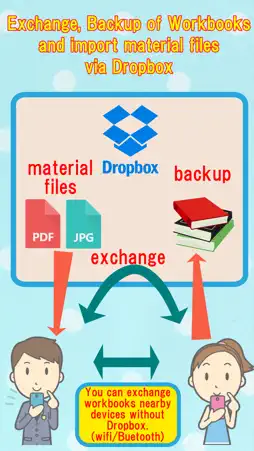
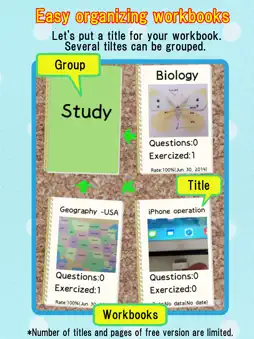
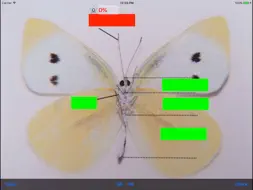
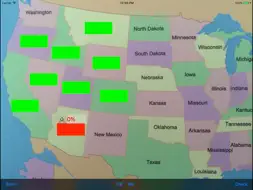
Just take a photo of textbooks, notebooks or blackboards, these photos become your workbooks. Anywhere anytime you are in the study room. Once you made workbooks by putting mask rectangles on the photos, you can practice the workbooks anytime anywhere only with your iPhone. The photos are came from not only iPhone camera, photo album but also jpeg files or pdf files via iTunes & Dropbox. You can share the workbooks with your friend by using nearby communicaton of iPhone & Dropbox. You can also backup the workbooks using Dropbox. Functions: 1.Practices Workbooks are listed on a "workbooks screen". Please select one workbook and choose "Practice" or "Practice (Weakpoints)". (1)Practice You should answer all questions in the workbook. If you have already memorized the question, you should touch "OK" button. If not, you should touch "NG" button. Then, the workbook proceeds next question. You would like to confirm an answer of the question before going to next question, you should touch "Check" button. Then the answer can be seen & confirmed. (2)Practice (Weakpoints) If you can not answer a question as "OK" three times in a row, the question is recorded as weak points question. By using this Practice (Weakpoints) mode, you can practice focusing on the weak points question effectively. 2. Edit & Others Making direction of workbook. (1)Add new workbook in a workbook list By touching "+" button on the upper-right corner on "workbooks screen", new workbook are added. (2)Set name for the new workbook Please set new name at "workbook name" field on "Edit & Others screen". (3)Add Photo or Files Please take a photo of textbooks, notebooks or blackboards for the workbook, by push "+" button. You can also use jpeg file or pdf file via iTunes/Dropbox. (4)Place mask rectangles on the photo After selecting the photo file and pushing "+" button on the bottom of the screen, new mask rectangle is added on the photo image. You can move & resize the rectangle by touching the screen. The rectangles are asked as questions in the order they were added. You can change the order by touching "order" button. One question may have two rectangles by inserting new line into the question part. In this case, after touching "order" button, you can unite two rectangles as one question by touching "unite" button. 3. Other functions (a)remove a workbook By touching a trash button on "Edit & Others screen", the selecting workbook will be deleted. (b)change the order of the photo files By touching "Edit" button of "Edit & Others screen" and dragging photo files, you can change the order. (c)remove a photo file By touching "Edit" button of "Edit & Others screen" and selecting photo files, you can delete the file. (d)rotate a photo By touching "90Deg. Rotate" button of "Edit & Others screen" and selecting photo files, you can rotate the photo in 90 degree. *You can not rotate the photo file which has mask rectangles. You should remove all the rectangles before you rotate it. *You can not rotate PDF file either. 4. Upgrading functions (a)No page & workbook limitation Before you buy "Default upgrade function", the workbooks are limited less than 5 and each workbook are limited less than 5 pages. Once you buy the upgrade, these limitation will be deactivated. (b)Workbook can be shared through nearby communication Please turn on Bluetooth. Two iPhones which already installed "CamWorkbook " can share workbooks via nearby communication. On the sending iPhone, select a workbook which you want to send ,push "Edit & Others", and choose "Send to nearby" on the Action menu. On the receiving iPhone, push a "+" button on the upper-right corner of the "workbooks screen", and choose "Receive From Nearby". (c)Communication with Dropbox
What's New
Version 3.0 2020-06-01
-bugfix Technical Analysis
Package Overview Basic metadata
Bundle ID
com.gmail.NakagawaTakashiJp.PhotoDrill Current Version 3.0
Minimum iOS 11.0
Package Size App Store Size
Package Metadata 1 / 9 version records
0.0 / 5.0 (0 ratings)
Detailed binary, privacy manifest, framework, and Info.plist results have not been indexed for this package yet. The verified App Store and archive metadata above remains available.
Developer Information
Known Version Records
1 version record with stored package metadata • 9 known version records
Stored metadata does not guarantee a package is currently available to download.
| Details | Version / IDs | Version date | Action |
|---|---|---|---|
 5.49 MB | v3.0 App Store ID: 836214813Build: 2 | 2020-06-01 01:57:18 | Get Version |
| Not archived | App Store ID: 825493570 | Unknown | Request Version |
| Not archived | App Store ID: 821505081 | Unknown | Request Version |
| Not archived | App Store ID: 613602916 | Unknown | Request Version |
| Not archived | App Store ID: 335942637 | Unknown | Request Version |
| Not archived | App Store ID: 126442635 | Unknown | Request Version |
| Not archived | App Store ID: 12461441 | Unknown | Request Version |
| Not archived | App Store ID: 11892096 | Unknown | Request Version |
| Not archived | App Store ID: 11049833 | Unknown | Request Version |