Preview



Description
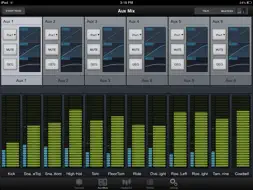
SL Remote-AI for iPad® provides remote control of nearly all of the mixing functions of PreSonus StudioLive™ AI-series mixers. SL Remote-AI connects wirelessly to any StudioLive AI-series mixer on the same wireless network, freeing the sound person to move around the venue while making adjustments to the mix and empowering musicians to take control of their monitor mixes. Multiple iPads running SL Remote-AI can simultaneously control the same StudioLive AI-series mixer, and it can operate simultaneously with Virtual StudioLive-AI (Mac®/Windows®), QMix™-AI (iPhone®/iPod touch®), and hardware control. SL Remote-AI requires an iPad and StudioLive AI-series mixer connected to the same wireless router-based network. SL Remote-AI is not compatible with classic StudioLive models (16.0.2, 16.4.2, or 24.4.2). Features: • Provides wireless control over any StudioLive AI-series digital mixer • Overview page displays levels, mutes, panning, EQ curves, and Fat Channel processing for multiple channels at once • Subgroup, main, and digital-return assign control for all channels • Dynamics and EQ control for all channels, auxes, subgroups, and mains • Aux and FX Mix Send control for all channels • FX type recall and parameter control including tap tempo • Aux page shows the levels, panning, GEQ, and Fat Channel processing for the aux and internal FX buses • GEQ page lets you adjust the Main-bus graphic EQ • GEQ Draw mode allows you to draw GEQ curve • Channel Zoom page shows every parameter for a single channel • Control any StudioLive AI mixer on the wireless network from one iPad • Multiple iPads can control the same StudioLive AI mixer • Remotely recall scenes stored on your StudioLive AI-series mixer • Channel and bus naming • Talkback On/Off • Talkback assignments • Remote control over VSL-AI’s Smaart System Check Wizards (requires VSL-AI connected via FireWire to an AI-series StudioLive mixer) • Set permissions on your StudioLive AI-series mixer so SL Remote-AI can control one or all aux mixes, complete FOH control, or lock out a user entirely • Offline demo mode REQUIREMENTS: Compatible with iPad only. Requires iOS 6 or later. iPad must be connected to the same wireless network as a StudioLive AI-series mixer running firmware version 5651 or later.
What's New
Version 1.2.1 2014-12-08
Improved fader interaction Various bug fixes NOT COMPATIBLE WITH iOS 11+ Technical Analysis
Package Overview Basic metadata
Bundle ID
com.PreSonus.SLRemote-AI Current Version 1.2.1
Minimum iOS 6.0
Package Size Latest Recorded Package Size
Package Metadata 1 / 4 version records
Detailed binary, privacy manifest, framework, and Info.plist results have not been indexed for this package yet. The verified App Store and archive metadata above remains available.
Developer Information
Known Version Records
1 version record with stored package metadata • 4 known version records
Stored metadata does not guarantee a package is currently available to download.
| Details | Version / IDs | Version date | Action |
|---|---|---|---|
 36.56 MB | v1.2.1 App Store ID: 837160106Build: 30264 | 2020-07-30 16:37:58 | Get Version |
| Not archived | App Store ID: 749083545 | Unknown | Request Version |
| Not archived | App Store ID: 120242639 | Unknown | Request Version |
| Not archived | App Store ID: 21363110 | Unknown | Request Version |