
Preview



Description
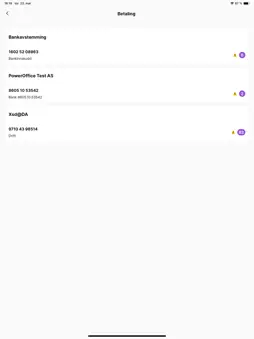
This app is for training and education in PowerOffice Go. Contact your accountant if you want access. For more information, and an overview of all accountants offering PowerOffice Go, see our website: Poweroffice.no Dashboard: Displays a selection of financial reports for your company. Here you can see widgets for Accounts Receivable, Accounts Payable, Revenue, and Expenses. The accounting widgets are clickable, allowing you to see more details. For example, in Accounts Receivable, you can click to see issued invoices. The dashboard includes a time widget summarizing your worked hours and remaining time for the day, along with quick access to frequently used functions and time registration. Timesheet: With PowerOffice Go timesheet on your mobile, it is easy to register the hours continuously when you are on the Go. - Hours with actual time - Hours with a stopwatch - Time off (Time in lieu) - The app remembers your frequently used hours - Approve hours per day or per week PowerOffice Go timesheet is closely integrated with PowerOffice Go accounting and payroll. This means that billable hours are invoiced easily, and hours and overtime work is included in the salary calculation completely automatically. Holiday and leave: Get a complete overview of your holiday and leave. Plan and register your holiday directly in the app. - Holiday balance - Flextime balance - Absence including sick child days As a manager, you also get the opportunity to approve absence directly. Expenses: Travel expenses Filling out travel expense claims is simple. Start the claim as you leave home and register receipts, mileage, and allowances. Receipts are scanned for date, amount, and currency. The mileage feature calculates distances, tolls, and ferry fees automatically. Expenses can be submitted and paid immediately after the trip. PowerOffice Go stays updated with current regulations and integrates seamlessly with PowerOffice Go Payroll. Expenses With PowerOffice Go, you can easily take photos of your receipts and send them in for bookkeeping and payment. Receipts are scanned for date, amount and currency. Pay Slip: View your pay slip directly on your mobile. The PowerOffice Go app provides an overview of your latest pay, previous salary, and key figures. You can also export the pay slip as a PDF if needed. Invoices: Create new sales orders and send invoices directly from the app. This feature allows you to include comments and attachments, to easily share all relevant information with your customers. Editing product lines within the app lets you adjust the invoices to accurately reflect the agreed services or products. You can also create new customers directly during the invoicing process. Use the search function to automatically retrieve data, or add new customers manually. Voucher: The "Voucher" menu allows for easy submission of receipts and other supporting documentation. This documentation is sent into journal entry to be recorded in the accounting. Employees and non-employees can submit documentation and receipts across clients. Chat: Chat with your coworkers and your accountant. Approval: Approve an invoice, expenses and other vouchers. In journal approval, all approval requests are listed under their respective clients. You can approve directly from this list, or see details to approve, reject, forward or return. Payment: You will be notified of approved vouchers that are ready for payment. Turn off the notification from the clients you do not want to be notified of. When you authorise one or more payments, the files are transferred to the bank and paid on the due date. Documents: Get an overview of your own and your company's documents that you have access to. View and add new ones directly from your mobile. In General: Easy and secure login with Face ID, Touch ID or another screen lock. New functionality will be included continuously.
What's New
Version 26.47.0 2026-11-18
- Fixed overdue payments not showing the warning icon in the payments list - Fixed a crash when closing the sign-in page without logging in (iOS) - Updated time...- Fixed overdue payments not showing the warning icon in the payments list - Fixed a crash when closing the sign-in page without logging in (iOS) - Updated time approvals when returning to the app - Fixed time approval affecting rows from another week - Reduced crashes in the document scanner when memory was low (iOS) - Fixed absence overview to include absences up to 12 months back - Changed 'Til stede i dag' to a toggle in the filter and removed 'Fraværende' - Fixed calendar scrolling past selectable dates - Fixed read-only users seeing edit options on order lines - Fixed absence filters to always display in the same order even when active - Fixed quantity changes on order lines to autosave reliably - Fixed the approval weeks widget showing next week - Updated full-screen sheets to keep title and content visible in landscape (iOS) - Updated app to follow the system light/dark theme - Fixed flexitime balance to match between Approval of hours, Register time off, Vacation and absence - Fixed 'Approve week' on the bulletin board to open the approval directly - Updated home cards to refresh when the last item is handled - Updated full-screen dialogs to open as pages with a back arrow - Fixed checkbox crowding the document name - Updated loading screens to show an outline of the content instead of a generic placeholder - Fixed a crash when opening client invitations (iOS) - Improved client invitation text when inviter is unknown - Updated week and today widgets to update after approving a week - Built with iOS 27.1 SDK and added native support for iPhone Duo (iOS) Technical Analysis
Package Overview Basic metadata
Bundle ID
net.poweroffice.goedu Current Version 26.47.0
Minimum iOS 15.0
Package Size App Store Size
Package Metadata 0 / 0 version records
Detailed binary, privacy manifest, framework, and Info.plist results have not been indexed for this package yet. The verified App Store and archive metadata above remains available.
Developer Information
Known Version Records
0 version records with stored package metadata
Stored metadata does not guarantee a package is currently available to download.
| Details | Version / IDs | Version date | Action |
|---|