
Preview




Description
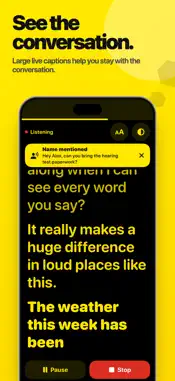
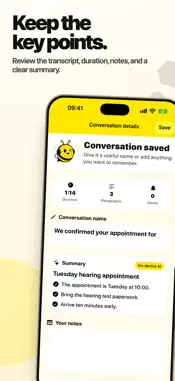
See nearby speech as large, easy-to-read captions. Live Captions HearBee is built for Deaf and hard-of-hearing people, with a simple design, complete scrollback, and private on-device speech recognition. Every feature is free. There is no subscription and no feature paywall. KEY FEATURES ▸ Live captions in real time See speech as it happens with large text and high-contrast reader themes. ▸ 100% on-device Audio stays on your iPhone. No accounts, no uploads, no cloud processing. ▸ Built for everyday conversations Use it at home, in meetings, at appointments, in cafes, or anywhere speech is hard to follow. ▸ Save session history Keep recent conversations as text and open them again later when you need to check details. ▸ Export transcripts Share saved sessions as plain text or .srt files. ▸ Name and question alerts Surface the moments that matter when someone says your name or asks a question. ▸ See nearby sound alerts Notice labelled alerts for selected sounds such as a doorbell, knocking or a dog barking while captions are running. Choose which sounds matter to you in Settings. ▸ Conversation summaries Create a useful title and key-point summary on supported devices using Apple's on-device intelligence. ▸ Reader personalization Choose from multiple high-contrast themes and larger caption sizes. Scroll back through earlier words without losing the rest of the conversation. ▸ Hearing tools Boost quiet voices through connected headphones, connect your Apple Hearing Test audiogram, and continue captions from the Lock Screen. GETTING STARTED Allow microphone and speech recognition access, choose a supported spoken language, and tap Start captions. Initial speech-model preparation may need an internet connection. Recognition runs on your iPhone once the required model is installed. OPTIONAL TIPS If HearBee helps you, Settings includes optional one-time tips at several price points. Tips do not unlock features or additional access. Terms of Use (EULA): https://www.apple.com/legal/internet-services/itunes/dev/stdeula/ Privacy Policy: https://www.cong-le.com/apps/live-captions-hearbee/privacy.html
What's New
Version 1.3 2026-10-29
A clearer reader on iPhone Duo and in landscape. Captions recover more clearly when recognition stops. Conversation notes stay within reach while you type. Larg... Technical Analysis
Package Overview Basic metadata
Bundle ID
com.congle.TEAMCONG.SubtitlesHearingImpaired Current Version 1.3
Minimum iOS 26
Package Size App Store Size
Package Metadata 0 / 0 version records
Detailed binary, privacy manifest, framework, and Info.plist results have not been indexed for this package yet. The verified App Store and archive metadata above remains available.
Developer Information
Known Version Records
0 version records with stored package metadata
Stored metadata does not guarantee a package is currently available to download.
| Details | Version / IDs | Version date | Action |
|---|