
Preview








Description
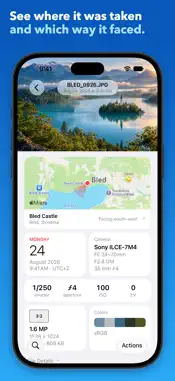
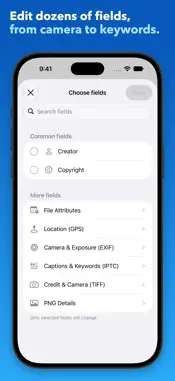
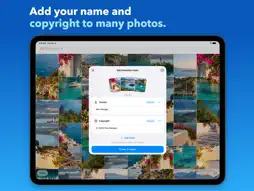
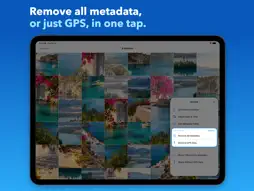
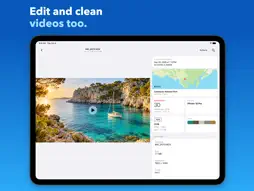
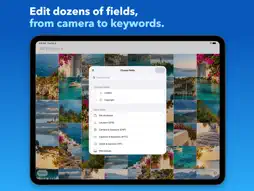
See everything stored in your photos and videos, and change it. Metadata Pro shows every field in a file and lets you edit those fields on one photo or many, in the app or from the Share button in Photos. It's a one-time purchase, with no subscription, ads, in-app purchases, or account. SEE EVERY DETAIL • Open any photo or video to see every detail stored in its file, from camera settings to location and dates. • See on a map where a photo was taken and, when the file records it, which way the camera faced. • Search by field name or value, and copy any value. • See whether a photo's file says it was made or edited with AI, the AI tool it names, and any Content Credentials (C2PA). • On iOS 27 and later, see the caption, keywords, and star rating the Photos app keeps for each photo. EDIT FIELDS ON ONE PHOTO OR MANY • Add your name and copyright to a whole batch at once. • Edit dozens of EXIF, TIFF, IPTC, GPS, and PNG fields, including date taken, lens, serial numbers, keywords, captions, and star ratings. • On videos, edit the make, model, software, description, copyright, creation date, and location. • On iOS 27 and later, captions, keywords, and star ratings you change here update in the Photos app too, so Photos shows and searches them. • Clear a single value and keep the rest. • Save edited copies and leave your originals alone, or update the originals in your library. • Save fields and values as a template for the next batch, or start one from a photo you already have. FIX DATES AND PLACES IN YOUR LIBRARY For photos and videos, one or many: • Adjust Date & Time: move the time by an amount, or correct a time zone left wrong on a camera. Check the preview before you save. • Set Precise Location: search for a place, move the map, or type coordinates. These change the date and place your Photos library shows. To change what's stored inside a photo's file, use Edit Metadata Fields. SHARE OR SAVE WITHOUT THE DETAILS • Share Without GPS Data sends a copy without its location or place names. • Share Without Any Metadata sends a copy with no camera, date, or location details. • Remove GPS Data and Remove All Metadata add the copy to your library instead, in one tap. Choose Update originals under Save as to clean the originals themselves; Revert in Photos brings the metadata back. • All of these work on videos too. Copies leave your original as it is. In the app, JPEG copies keep their exact picture data; other formats, and JPEGs shared from Photos, may be re-encoded. IN THE PHOTOS APP Six actions appear under the Share button in Photos, so you don't have to switch apps. They work on up to 20 photos at a time: • View All Metadata • Edit Metadata Fields • Set Precise Location • Adjust Date & Time • Share Without GPS Data • Share Without Any Metadata GOOD TO KNOW • Under the Share button in Photos, Edit Metadata Fields and the two Share Without actions take photos only. For videos, use them in the app. • Copies made without metadata or GPS data leave out a video's subtitles and other extra tracks. • RAW files can't be edited. • Updated photos are saved as JPEG, and videos are always saved as MOV. • Live Photos become still photos when you edit their fields or share or save them without metadata. • On iOS 26 and earlier, caption and keyword edits change only the file, not the Photos app. • The AI label shows only what a file says about itself. Many AI-made images carry no label, Content Credentials are read but not verified, and invisible watermarks such as SynthID can't be detected. PRIVACY Your photos are never uploaded or copied from this app to any server or cloud. Maps and place names come from Apple Maps, which receives a photo's coordinates. Usage and crash data never include your photos, file names, or metadata values, and you can turn them off in Settings. If you use Photo Metadata EXIF Viewer, Photo GPS Remover, or Photo Metadata EXIF Remover, Metadata Pro does what they do and adds editing.
What's New
Version 11.3 2026-11-14
• The app is now also in Arabic, Italian, Portuguese (Brazil), Indonesian, and Polish. • WebP photos: removing their metadata or GPS data, and saving edited cop...• The app is now also in Arabic, Italian, Portuguese (Brazil), Indonesian, and Polish. • WebP photos: removing their metadata or GPS data, and saving edited copies, no longer fails. New in 11.2: • The app is now also in Japanese, Korean, Chinese (Simplified and Traditional), and French. New in 11.1: • Videos: edit their make, model, software, description, copyright, creation date, and location, save or share them without any metadata or GPS data, and update the originals. Their picture and sound are copied as they are. • Remove All Metadata and Remove GPS Data are back: they add a clean copy to your library in one tap, without opening the share sheet. Choose Update originals under Save as to clean the originals instead; Revert in Photos brings the metadata back. • Captions, keywords, and star ratings: on iOS 27, changing Image Description, IPTC Keywords, or the new Star Rating field also updates the photo's caption, keywords, and rating in the Photos app, on one photo or many. • Edited copies keep the caption, keywords, and rating the original has in Photos. • On iOS 27, the photo page shows the caption, keywords, and star rating the Photos app keeps for a photo. • File Details shows whether a photo's file says it was made or edited with AI, the AI tool it names, and any Content Credentials (C2PA), which aren't verified. Version 11 is a complete redesign. • New photo page: the photo, a map showing where it was taken and which way the camera faced, tiles for the date, camera, exposure, file, and colors, then every metadata group. Search by field name or value. • New editor: edit fields on one photo or many, then save edited copies or update the originals. • Files that can't be saved are now listed, and you can retry them. • Templates replace metadata schemas. Save fields and values, or start from a photo's details, and use them on the next batch. • Adjust Date & Time: move the time by an amount or correct a time zone, with a preview before you save. • Set Precise Location: search for a place, move the map, or type coordinates. • Six actions now appear under the Share button in Photos. • New library with albums, Select, and video playback. • New layouts for iPad and iPhone Duo, and dark mode. • New welcome screen and How To guide. What changed: • Exporting metadata is replaced by starting a template from a photo. Technical Analysis
Package Overview Basic metadata
Bundle ID
com.platinumcityllc.metadatapro Current Version 11.3
Minimum iOS 17.0
Package Size App Store Size
Package Metadata 0 / 36 version records
3.8 / 5.0 (124 ratings)
Detailed binary, privacy manifest, framework, and Info.plist results have not been indexed for this package yet. The verified App Store and archive metadata above remains available.
Developer Information
Known Version Records
0 version records with stored package metadata • 36 known version records
Stored metadata does not guarantee a package is currently available to download.
| Details | Version / IDs | Version date | Action |
|---|---|---|---|
| Not archived | App Store ID: 867295752 | Unknown | Paid / Arcade |
| Not archived | App Store ID: 838267286 | Unknown | Paid / Arcade |
| Not archived | App Store ID: 838161891 | Unknown | Paid / Arcade |
| Not archived | App Store ID: 838066015 | Unknown | Paid / Arcade |
| Not archived | App Store ID: 837242715 | Unknown | Paid / Arcade |
| Not archived | App Store ID: 836638261 | Unknown | Paid / Arcade |
| Not archived | App Store ID: 834314801 | Unknown | Paid / Arcade |
| Not archived | App Store ID: 833417685 | Unknown | Paid / Arcade |
| Not archived | App Store ID: 833149208 | Unknown | Paid / Arcade |
| Not archived | App Store ID: 832978297 | Unknown | Paid / Arcade |
| Not archived | App Store ID: 832749068 | Unknown | Paid / Arcade |
| Not archived | App Store ID: 831927749 | Unknown | Paid / Arcade |
| Not archived | App Store ID: 831299421 | Unknown | Paid / Arcade |
| Not archived | App Store ID: 829333808 | Unknown | Paid / Arcade |
| Not archived | App Store ID: 825657550 | Unknown | Paid / Arcade |
| Not archived | App Store ID: 825412130 | Unknown | Paid / Arcade |
| Not archived | App Store ID: 825267990 | Unknown | Paid / Arcade |
| Not archived | App Store ID: 825186300 | Unknown | Paid / Arcade |
| Not archived | App Store ID: 825091861 | Unknown | Paid / Arcade |
| Not archived | App Store ID: 824398384 | Unknown | Paid / Arcade |
| Not archived | App Store ID: 824384586 | Unknown | Paid / Arcade |
| Not archived | App Store ID: 823895103 | Unknown | Paid / Arcade |
| Not archived | App Store ID: 823404417 | Unknown | Paid / Arcade |
| Not archived | App Store ID: 823316896 | Unknown | Paid / Arcade |
| Not archived | App Store ID: 823031161 | Unknown | Paid / Arcade |
| Not archived | App Store ID: 821096796 | Unknown | Paid / Arcade |
| Not archived | App Store ID: 820556853 | Unknown | Paid / Arcade |
| Not archived | App Store ID: 820419261 | Unknown | Paid / Arcade |
| Not archived | App Store ID: 820282448 | Unknown | Paid / Arcade |
| Not archived | App Store ID: 819623187 | Unknown | Paid / Arcade |
| Not archived | App Store ID: 818914096 | Unknown | Paid / Arcade |
| Not archived | App Store ID: 818786277 | Unknown | Paid / Arcade |
| Not archived | App Store ID: 818516765 | Unknown | Paid / Arcade |
| Not archived | App Store ID: 817947682 | Unknown | Paid / Arcade |
| Not archived | App Store ID: 816541051 | Unknown | Paid / Arcade |
| Not archived | App Store ID: 444512633 | Unknown | Paid / Arcade |