Preview




Description
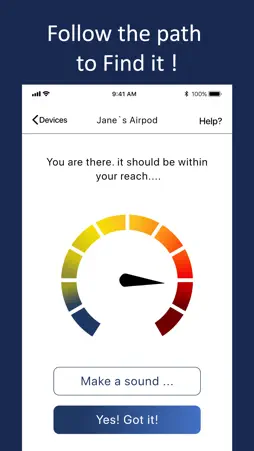
Δ Find your lost Headphones, Fitbit, Fitness Tracker, Earbuds and many more Bluetooth devices... Δ The radar will locate BLE devices in your area Δ Then you can find your device by using the proximity signal More info: 1. Start the application and watch the radar find the Bluetooth device around you. 2. Select your device and walk in the direction that increases the intensity signal. That is the zone where you need to head to. 3. Walk slowly and take your time. You'll find it! Extra: you can also give your device a custom name instead of the automatic system number. You are not the first one to loose your earbuds or Bluetooth device. It happens all the time. So breathe deeply and use the app to find it back. Download and start looking for your device now. Do not wait before it runs out of battery! Disclaimer: - The radar is powerful. If it uncover too many devices, we suggest you power OFF as many Bluetooth devices as possible so you can focus on the devices you look for. - Your Bluetooth device need to be powered, ON and within a detectable range. So walk around until you think the radar located your device. - BLE stands for Bluetooth Low Energy. It is a communication protocol used by many devices to convey information wirelessly. - The app works with many different devices. If it does work with a particular one, contact us and we'll have a look. - We are not linked with any companies mentioned here in any way. We only tested the app with these devices. - Fitbit® is a registered trademark or trademark of Fitbit, Inc. and/or its affiliates in the United States and other countries. - Extended use of this app can decrease battery life rapidly. SUBSCRIPTION: We offer 2 auto-renewing subscriptions: - Length: weekly and monthly - Payment will be charged to iTunes Account at confirmation of purchase - You will be able to access the Premium features of the app for the duration of the subscription - Subscription automatically renews for the same price and duration period as the original period unless auto-renew is turned off at least 24-hours before the end of the current period - The account will be charged for renewal within 24-hours prior to the end of the current period at the cost of the chosen package. - Subscriptions may be managed by the user and auto-renewal may be turned off by going to the user's iTunes Account Settings after purchase - No cancellation of the current subscription is allowed during the active subscription period - You may cancel a subscription during its free trial period via the subscription setting through your Apple account. This must be done 24 hours before the end of the subscription period to avoid being charged. Please visit https://support.apple.com/en-us/HT202039 for more information on how to proceed. - You may turn off the auto-renewal of your subscription via your Apple Account Settings. However, you are not able to cancel the current subscription during its active period - Any unused portion of a free-trial period will be forfeited when the user purchases a subscription. Privacy Policy: https://planecubes.com/privacy/ Terms of Use: https://planecubes.com/terms/
What's New
Version 1.1.4 2026-09-16
Performance improvements Technical Analysis
Package Overview Basic metadata
Bundle ID
.com.find.my.bluethooth.headphones Current Version 1.1.4
Minimum iOS 15.0
Package Size App Store Size
Package Metadata 1 / 14 version records
Detailed binary, privacy manifest, framework, and Info.plist results have not been indexed for this package yet. The verified App Store and archive metadata above remains available.
Developer Information
Known Version Records
1 version record with stored package metadata • 14 known version records
Stored metadata does not guarantee a package is currently available to download.
| Details | Version / IDs | Version date | Action |
|---|---|---|---|
| 28.06 MB | v1.1.4 App Store ID: 870955532Build: 1.1.4 | 2026-09-16 17:05:47 | Get Version |
| Not archived | App Store ID: 870207570 | Unknown | Request Version |
| Not archived | App Store ID: 869647479 | Unknown | Request Version |
| Not archived | App Store ID: 869617522 | Unknown | Request Version |
| Not archived | App Store ID: 868900277 | Unknown | Request Version |
| Not archived | App Store ID: 861478760 | Unknown | Request Version |
| Not archived | App Store ID: 841694360 | Unknown | Request Version |
| Not archived | App Store ID: 840159180 | Unknown | Request Version |
| Not archived | App Store ID: 836580665 | Unknown | Request Version |
| Not archived | App Store ID: 835669101 | Unknown | Request Version |
| Not archived | App Store ID: 835087240 | Unknown | Request Version |
| Not archived | App Store ID: 834575529 | Unknown | Request Version |
| Not archived | App Store ID: 834232530 | Unknown | Request Version |
| Not archived | App Store ID: 832983927 | Unknown | Request Version |