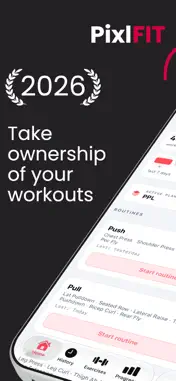
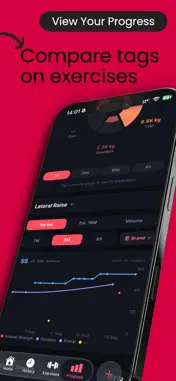
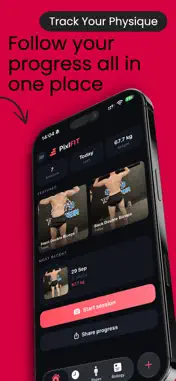
PixlFIT is a workout tracker that does the basics properly - log sets, build plans, see your progress - and one thing most trackers skip entirely: it knows a Hammer Strength chest press isn't a barbell bench, and a barbell bench isn't an incline machine. Most apps lump all of that under one exercise name. PixlFIT doesn't. Tag every exercise by brand, type and variation, and track a separate history for each one. Your numbers stay accurate, your PRs stay real, and your training data finally reflects what you actually did. THE TAGGING SYSTEM IS THE POINT Track separate weight history per machine brand, type and variation - not just per exercise name Smart defaults remember your last setup, so logging is fast even with full detail Build custom tag groups for whatever matters to you See PRs the moment you hit them, tracked against the right machine, not a generic average BUILT FOR HOW YOU ACTUALLY TRAIN Plans and routines you can build once, reuse, or share with a training partner in one tap History with proper filters - combine tags, exclude others, open any past workout for the full breakdown Repeat a past workout with a clean slate, ready for fresh numbers A keypad built for the gym: fast, accurate, no fumbling PixlFIT is for people who already track their training and want a system that matches the precision they put into it. https://www.apple.com/legal/internet-services/itunes/dev/stdeula/
What's New
Version 3.0.3 2026-11-01
Your Apple Watch now keeps in step with your iPhone and the Lock Screen: the same set, the same numbers and the same rest. NEW ON THE WATCH • A new Edit set sc...Your Apple Watch now keeps in step with your iPhone and the Lock Screen: the same set, the same numbers and the same rest. NEW ON THE WATCH • A new Edit set screen, with weight and reps side by side. The Digital Crown turns the weight, or the reps once you tap them. It now moves the weight by your keypad weight step (set in PixlFIT on your iPhone), and - and + by 0.5, the other way round from before. Save is the tick at the top right • The tick button spins while your tap goes to your iPhone, and a second tap while it spins does nothing, so a slow iPhone no longer means two sets ticked • Away from your iPhone it says "Waiting for iPhone". Your tap lands on the set you tapped once your iPhone is back in reach, and the watch moves on when your iPhone answers • Hold Finish with nothing ticked and it says "Nothing ticked yet" and keeps your workout going, instead of throwing it away • Warm-up and drop sets are labelled, and set numbers match your iPhone • A quick workout shows on the watch as soon as you start it REST TIMER • One rest for your iPhone, your watch and the Lock Screen. A rest started on any of them shows on all three, your iPhone's rest bar included • Typing, adding a set, picking an exercise on the watch or unlocking your iPhone no longer cancels a rest or cuts it short • The watch buzzes when a rest or a timed set runs out, whichever page it's on • Unticking a set only ends the rest that set started • In a workout long enough to scroll, your sets stay put as the rest bar comes and goes. Scrolled to the very top, a new rest bar arrives just above the screen: pull down to see it TICKS FROM THE WATCH • A tick lands on the set it was tapped on, even when it reaches your iPhone late, and its rest counts from your tap • Ticks log what you've typed on your iPhone, even with the keypad still open • Edit set saves only what you changed, on the set you opened it on: change the reps and a 21.25 kg weight stays 21.25 TIMED SETS • Stop on the watch logs the time you actually did, with heart rate, and starts your rest. It no longer ticks the next set • With your iPhone locked through a plank, the watch buzzes at the end and your rest counts from there • Starting a timed set ends the rest that's running, and the Lock Screen keeps the set's countdown until it ends WATCH AND PHONE IN STEP • Numbers you type on your iPhone reach the watch a moment after you stop, not only when the keypad closes, and a note such as a seat setting now shows there too • Replace an exercise and the watch shows the new exercise's last-time numbers • An exercise you pick in the watch's list stays picked when you reorder on your iPhone • If PixlFIT is closed mid-workout, by iOS or by you, reopening it keeps your watch's workout, heart rate and Apple Health workout going, with supersets in order • Lock Screen ticks and skips reach the watch, and watch ticks reach the Lock Screen, even when PixlFIT isn't open FINISH • A set ticked on the watch just before Finish is in the review, even one that waited for your iPhone • After Finish the watch stays on "Workout complete" while you review, and holding Finish on the watch again no longer resets the review or the name you've typed • Finish on the watch works with PixlFIT closed: the review is waiting when you open it HEART RATE • Heart rate reaches your iPhone from every watch page, even when it holds steady, so each timed set gets its average and max STABILITY • Fixed a crash on the iPhone when returning to a timed set that ran out while the logger was minimised, and a possible crash on the watch as a rest ends Plus fixes and improvements.
Technical Analysis
Package Overview Basic metadata
Bundle IDuk.co.pixlfit.pixlfit
Current Version3.0.3
Minimum iOS26.5
Package SizeApp Store Size
Package Metadata0 / 0 version records
Detailed binary, privacy manifest, framework, and Info.plist results have not been indexed for this package yet. The verified App Store and archive metadata above remains available.