
Preview








Description
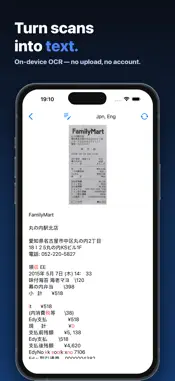
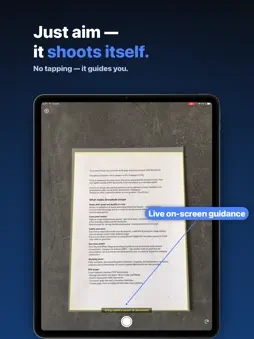
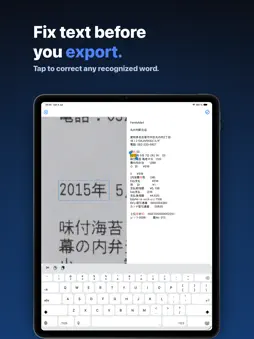
EasyScan scans one document page at a time with the camera, corrects the perspective and image quality, and exports the result as a PDF, TIFF, PNG, JPEG, or plain-text file. It is also the demo app for Pixelnetica's Document Scanning SDK (DSSDK) and shows the SDK working in a real app. Capture The camera shows a live edge overlay and captures automatically when it detects a steady, well-framed page. A manual shutter, tap-to-focus, and torch are on the capture screen. You can also bring in one photo at a time from your library and process it the same way. Editing Adjust the detected corners, crop, correct the perspective, deskew, and rotate the page. Choose the output mode: Original, Color, Grayscale, or Black & White. Export - PDF, with five compression presets from Lossless to Extreme. - Searchable PDF: recognized text is embedded as a real text layer you can search and copy. - TIFF (G4), PNG, JPEG, and plain text (TXT). Files are shared through the standard iOS share sheet, or opened from the Files app. Text recognition (OCR) Text recognition runs on the device. After a scan, the recognized text opens in an editable view for correction before you export it. A language picker sets the recognition language; language packs download when you first select one. Offline text-orientation detection is included and needs no download. On-device processing Scanning, image processing, and text recognition run on your device. No account or sign-in is required. Language packs are downloaded only when you choose to add one. Document Scanning SDK EasyScan is built on Pixelnetica's DSSDK and demonstrates its edge detection, perspective correction, deskew, color processing, and on-device OCR. Developers can find documentation through the link on this page, and the app's complete source code is published as a sample on GitHub: https://github.com/Pixelnetica/apple-ios-pdf-ocr-document-scanner
What's New
Version 3.0.2 2026-08-01
Fixed a problem with automatic capture. If AutoShot caught your document the instant the camera opened, the scan worked but an error message could still appear.... Technical Analysis
Package Overview Package analysis available
Bundle ID
com.pixelnetica.DSSDK-app Current Version 3.0.2
Minimum iOS 16.3
Package Size App Store Size
Package Metadata 2 / 4 version records
DocScanningSDK
com.pixelnetica.DocScanningSDK v1.0iOS 8.0+7.39 MB
4.0 / 5.0 (1 ratings)
Developer Information
Known Version Records
2 version records with stored package metadata • 4 known version records
Stored metadata does not guarantee a package is currently available to download.
| Details | Version / IDs | Version date | Action |
|---|---|---|---|
 56.87 MB | v3.0.2 App Store ID: 887530951Build: 3.0.2 | 2026-08-01 07:15:14 | Get Version |
| 9.4 MB | v2.4.1 App Store ID: 834896292Build: 7 | 2020-02-27 08:43:28 | Get Version |
| Not archived | App Store ID: 833018866 | Unknown | Request Version |
| Not archived | App Store ID: 831068526 | Unknown | Request Version |