Preview



Description
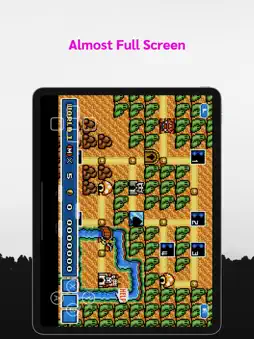
Why ROM Emulator not others similar? 1.SwiftUI design, simple & clean, to play or not to play ROM files is easier than ever. 2.Almost fullscreen, especially useful when you play games on iPhone, enjoy the large screen. 3.With game controllers or without game controllers is both a great emulator to play .GBA games. This tool is a bit magical, because with it, you can play childhood games on your phone or tablet, such as Super Mario that you once played. Note that this tool does not provide any games itself, it is just a tool that gives you the ability to play those games. Without this tool, if you want to play those GBA and GBC game packages, you may have to install an emulator on your computer, or use a game console directly? According to the latest rules, it is allowed to build an emulator platform (se pc emulator) on a mobile phone or tablet, which makes it possible to play these games on a mobile phone or tablet, because we only need to build an emulator. Although we tested and found that the emulator built by this tool can run most classic games, some are still not supported. The main game files supported by this tool are .gbc, .gb, and .gba. Some .nds game files may also be playable, but they have not been tested because they are not the main types supported by this tool. Note that the back button is the only button you need to pay attention to, because when you find that you cannot enter the game, clicking it can navigate you to the previous interface, which is the return of the navigation bar. Then, you can try to open other game files. X,Y may not have any effect on some games, if the start button does not work, you can press A or press B to start the game. This application does not guarantee that you can play all .gba files, but most .gba, .gbc, .gb files should be playable. This app doesn't require any internet, it's completely an offline app!
What's New
Version 8.1.0 2025-03-10
Fixed a bug where pressing the ThumbSticks and arrow keys simultaneously would cause the game character to lose control Version 8.0.3 2025-03-04
last update we support landscape and portrait mode, while there're some bugs for portrait mode this version is a quick fix for it You could just change the scre...last update we support landscape and portrait mode, while there're some bugs for portrait mode this version is a quick fix for it You could just change the screen orientation lock by clicking the lock icon if you see there's black space, that's just 2D game resolution is different with your screen resolution, so there will be some space left in black Version 8.0.1 2025-03-03
When a physical game controller is connected, only a game controller icon will now be displayed Click the icon to show or hide the back button Adopts a new syst...When a physical game controller is connected, only a game controller icon will now be displayed Click the icon to show or hide the back button Adopts a new system interface, which should theoretically support most game controllers Game controllers will now support more actions than on-screen virtual controls Such as L/R, left and right rotation buttons, etc. The new version will have better support for game controllers The new version requires you to rotate the screen yourself to decide whether to play the game in landscape or portrait mode. The virtual controller only supports horizontal screen But after connecting to the physical controller, the experience is very good regardless of horizontal or vertical screen. Version 7.0.1 2025-02-23
fixes some known issues Version 6.0.1 2025-01-02
add some languages support update App Icons for iOS 18 dark mode optimizations for screen UI game controllers effects, make it play games more comfortable add s...add some languages support update App Icons for iOS 18 dark mode optimizations for screen UI game controllers effects, make it play games more comfortable add supports for physical game controllers add layout settings for game controllers positions Version 5.0.1 2024-10-10
update the screenshots fixed some known issues Version 4.0.1 2024-10-04
update the screenshots to let user know it is a game emulator which could play retro games add supports for more GBA rom files fixed some known issues Version 3.0.1 2024-09-27
App Store User Reviews
MyNamJeff67 2025-11-04
Crashes & Overpriced
Crashed 5 minutes into use. Has significantly less features than other free emulators on the app store. Not worth $1, let alone $5.
Technical Analysis
Package Overview Basic metadata
Bundle ID
com.soulyin.pcrom Current Version 8.1.0
Minimum iOS 16.0
Package Size App Store Size
Package Metadata 0 / 9 version records
1.0 / 5.0 (1 ratings)
Detailed binary, privacy manifest, framework, and Info.plist results have not been indexed for this package yet. The verified App Store and archive metadata above remains available.
Related Apps


More by Ping Yan


Developer Information
Known Version Records
0 version records with stored package metadata • 9 known version records
Stored metadata does not guarantee a package is currently available to download.
| Details | Version / IDs | Version date | Action |
|---|---|---|---|
| Not archived | App Store ID: 888047043 | Unknown | Paid / Arcade |
| Not archived | v8.1.0 App Store ID: 873088351Build: 8.1.0 | 2025-03-10 04:02:16 | Paid / Arcade |
| Not archived | v8.0.3 App Store ID: 872950122Build: 8.0.3 | 2025-03-04 16:51:59 | Paid / Arcade |
| Not archived | v8.0.1 App Store ID: 872914987Build: 8.0.1 | 2025-03-03 14:59:27 | Paid / Arcade |
| Not archived | v7.0.1 App Store ID: 872722046Build: 7.0.1 | 2025-02-24 00:19:50 | Paid / Arcade |
| Not archived | v6.0.1 App Store ID: 871385200Build: 6.0.1 | 2025-01-02 11:05:29 | Paid / Arcade |
| Not archived | v5.0.1 App Store ID: 869610566Build: 5.0.1 | 2024-10-10 14:36:05 | Paid / Arcade |
| Not archived | v4.0.1 App Store ID: 869411635Build: 4.0.1 | 2024-10-04 18:55:34 | Paid / Arcade |
| Not archived | v3.0.1 App Store ID: 868647893Build: 3.0.1 | 2024-09-27 21:30:47 | Paid / Arcade |