Preview





Description
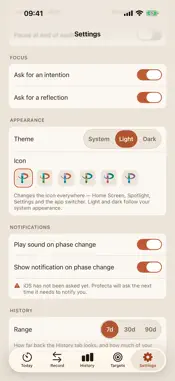
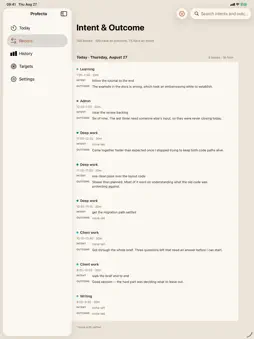
Profecta is a time tracker and focus timer for iPhone and iPad. It keeps the clock, and the record of where your hours actually went, project by project. TWO WAYS TO KEEP TIME 1. Blocks counts down through work-and-break intervals of the lengths you choose. Before a block starts Profecta can ask what you intend to get done; when it ends, how it went. 2. Continuous has no block length and no breaks. The clock counts up on the project you are on, and switching projects closes one stretch and opens the next, so the day comes out gapless without you having to remember to press anything. Both modes write to the same record, projects, History and Targets. WHERE THE TIME ACTUALLY WENT Every block is logged against a project. Switch projects in the middle of one and Profecta splits it, so the time lands on what you were really doing rather than on what you named first. PROJECTS YOU ARE WAITING ON In Continuous mode a blocked project can be parked. It accrues nothing and sits in its own list, one tap from being picked up again, with the reason you parked it. It is what you are waiting on rather than what you gave up on, and it clears at the end of the day. ON YOUR WRIST Profecta for Apple Watch puts the running session on your wrist: the countdown, its phase, the project you are on, where the day's targets stand, and Start, Pause and Skip. The iPhone stays the one thing writing your history, so there is no second record to reconcile. Complications put the same countdown on the watch face. WITHOUT UNLOCKING ANYTHING A Live Activity carries the running block to the Lock Screen, the Dynamic Island, and StandBy on a charging phone. Its buttons pause, resume and skip a break. They cannot skip a work block: a button you can press by accident should not throw away time you spent. PLAN THE DAY, OR DON'T Set a target for each project in the morning and Profecta shows progress as bullet charts: what you planned, what you have done, whether you passed it. Projects worked on without a target get their own list. Targets are optional. WHAT YOU MEANT, BESIDE WHAT CAME OF IT Every block you wrote an intention or a reflection for, newest first, both halves shown and labeled. Where a half was never written the card says so. Search never leaves your device. HISTORY YOU CAN READ A chart of the last 7, 30 or 90 days, one bar per day, each bar subdivided by project color. Tap a day to see where its hours went, down to the blocks and what you wrote at the time. Export any range as CSV or JSON. ON IPHONE AND ON IPAD Five tabs on iPhone. On iPad, a sidebar beside the pane you are reading. The same record either way, and the same record as the Mac app if you turn on sync. YOUR DATA STAYS YOURS There is no account, no server of ours, no analytics, no telemetry, and no crash reporter. Sessions are written as plain text, one JSON object per line, one file per day, and are still readable in ten years without this app. If you turn on iCloud sync, your sessions travel through your own private iCloud database, between your own devices. They are not sent anywhere else, and nobody else can read them. Sync is off until you turn it on. DETAILS - Work, short break and long break durations, and the number of blocks before a long break, are configurable. - Optional pause at the end of each interval instead of rolling into the next. - A sound and a notification on each phase change, both optional. A block that ends in the background still tells you. - Choose the app icon: six palettes drawn from the project colors. - System, light and dark appearance. - Requires iOS 17 or later; the watch app, watchOS 10 or later.
What's New
Version 1.1.0 2026-09-13
Profecta is a time tracker and focus timer for iPhone and iPad that keeps a per-project record of the work you do. This release puts it on your wrist, on your L... Technical Analysis
Package Overview Basic metadata
Bundle ID
com.pinecrownstudios.profecta Current Version 1.1.0
Minimum iOS 17.0
Package Size App Store Size
Package Metadata 0 / 0 version records
Detailed binary, privacy manifest, framework, and Info.plist results have not been indexed for this package yet. The verified App Store and archive metadata above remains available.
Known Version Records
0 version records with stored package metadata
Stored metadata does not guarantee a package is currently available to download.
| Details | Version / IDs | Version date | Action |
|---|