
Preview






Description
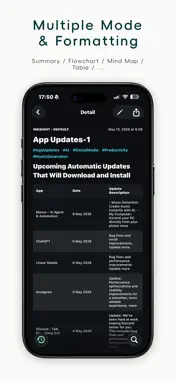
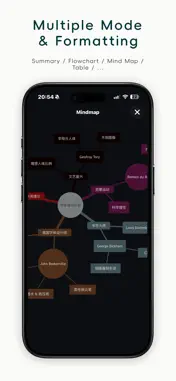
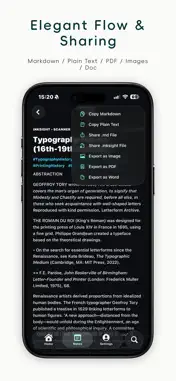
Capture image insights instantly. Transform them into fluid digital assets. Is your camera roll overflowing with book excerpts, presentation slides, restaurant menus, or user manuals that you can never find when you actually need them? Have they simply become a digital wasteland—unsearchable and forgotten? Inksight is a "local-first" smart image capture and text structuring utility crafted specifically for digital minimalists. We break the barrier of unstructured, unindexed digital noise by intelligently recognizing image content and transforming it into structured, open-format text that blends seamlessly into your personal workflow. Why Inksight? Subtracted Design, Pure Focus: We reject bloated super-apps. By focusing entirely on a brilliant core experience, Inksight offers thoughtful constraints that protect you from choice overload, allowing you to focus immediately on what's important. Data Sovereignty, Local-First: Your data belongs entirely to you. All captured content is stored safely on your device in open Markdown format. No forced cloud syncing, no arbitrary lock-ins—just total freedom to migrate whenever you want. Native Experience, Minimalist Aesthetic: Beautifully aligned with native Apple design standards, we leave the complexity to the underlying engine and give you back an interface that breathes. Core Capabilities Multi-Channel Capture: Easily ingest visual data via batch photo imports, instant camera snapshots, or system-wide sharing extensions from other applications. Smart Formatting & Structuring: Say goodbye to messy, chaotic raw text blocks. Inksight automatically formats layouts based on your context, supporting automated naming conventions and structured tag bindings. Elegant Data Flow & Integration: Bridge the gap with your local knowledge base. Instantly sync with tools like Obsidian, or export your documents into Markdown, PDF, Word, or beautifully formatted images. The Digital Workflow Lifecycle Capture: Batch import or snap real-world fragments (books, slides, receipts, or menus). Process: Intelligently format, summarize, condense, or translate text, saving it directly to local files. Flow: View instantly within the app, share across formats, or index directly into your Obsidian vault. Contact & Support We highly value the feedback of independent thinkers and creators. If you have any suggestions, bug reports, or simply want to talk about your digital workspace setup, feel free to reach out:
What's New
Version 1.1.5 2026-09-01
Now it is compatible with the iOS 18 system version. Technical Analysis
Package Overview Basic metadata
Bundle ID
com.piggem.grepvision Current Version 1.1.5
Minimum iOS 18.0
Package Size App Store Size
Package Metadata 0 / 0 version records
Detailed binary, privacy manifest, framework, and Info.plist results have not been indexed for this package yet. The verified App Store and archive metadata above remains available.
Developer Information
Known Version Records
0 version records with stored package metadata
Stored metadata does not guarantee a package is currently available to download.
| Details | Version / IDs | Version date | Action |
|---|