
Preview
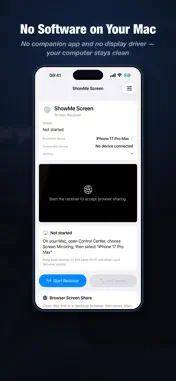


Description
Turn your device into a wireless display with ShowMe Screen. View a screen shared from a compatible device, a desktop browser, or another phone’s camera. • Screen Mirroring: on a compatible device, open Control Center and select this receiver. Keep both devices on the same Wi-Fi. • Browser sharing: open the sharing link on a computer, then choose a screen, window or browser tab. An internet connection is required. • Camera sharing: open the link on another phone and allow camera access in its browser. • Adjust the display to fit or fill, or use full screen. Keep ShowMe Screen open while receiving. Allow Local Network access for nearby device discovery. Browser sharing uses encrypted connections and may use a relay if a direct connection is unavailable. No account is required.
What's New
Version 0.3.0 2026-10-31
More languages and region-appropriate wording. Improved readability on small screens and with larger text, plus right-to-left layout for Arabic, Hebrew and Urdu...More languages and region-appropriate wording. Improved readability on small screens and with larger text, plus right-to-left layout for Arabic, Hebrew and Urdu. Technical Analysis
Package Overview Basic metadata
Bundle ID
store.chatgptapp.showmescreen Current Version 0.3.0
Minimum iOS 17.0
Package Size App Store Size
Package Metadata 0 / 0 version records
Detailed binary, privacy manifest, framework, and Info.plist results have not been indexed for this package yet. The verified App Store and archive metadata above remains available.
Developer Information
Known Version Records
0 version records with stored package metadata
Stored metadata does not guarantee a package is currently available to download.
| Details | Version / IDs | Version date | Action |
|---|