
Preview



Description
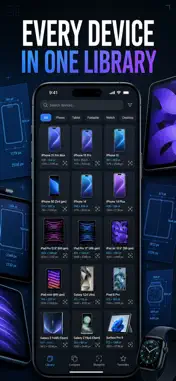
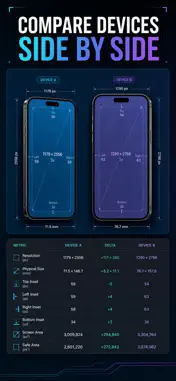
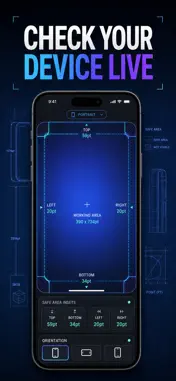
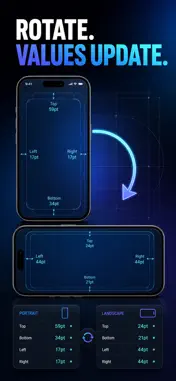
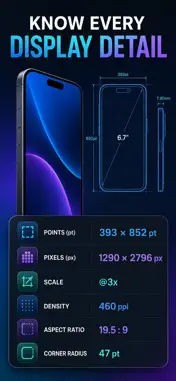
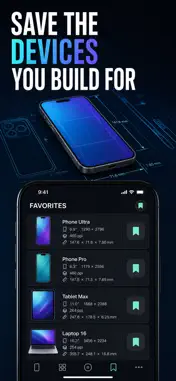
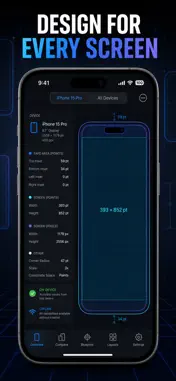
查一組 iPhone 或 iPad 的 safe area insets,不該需要開三個瀏覽器分頁再翻一串論壇討論。Safe Area 直接給你每款機型的 top、bottom、leading、trailing 精確數值 — 畫在裝置藍圖上、以 pt 標示、點一下就能複製。 多數規格表只是一整面數字,看不出那些數字落在哪裡。這裡不一樣:每款裝置都有等比例縮放的藍圖,標出 status bar、notch 或 Dynamic Island,並把 safe region 與 inset 區域畫出來,讓你看見版面限制,而不是硬背。Live 分頁讀出你手上這台 iPhone 的真實 insets;Compare 把任意兩款裝置並排,差值幫你算好。整套資料內建在 App 裡,離線也能用 — 需要連網的參考工具,就不算參考工具。 內容包含 - 精確的 safe area insets:18 組 iPhone 與 iPad 設定檔(13 款 iPhone、5 款 iPad)的 top、bottom、leading、trailing,單位為 pt - 每款機型的縮放藍圖,標示 safe region、inset 區域,以及 status bar、notch 或 Dynamic Island 分類 - 可信賴的螢幕數據:pt 與 px 尺寸、扣掉 inset 後的可用區域、圓角半徑、@2x/@3x scale、長寬比、ppi 像素密度、對角線尺寸與推出年份 - 裝置詳細頁的 Portrait / Landscape 切換,同一款機型兩組數值都直接換算好 - Live 分頁:透過 GeometryReader 讀出目前這台裝置的實際 safe area insets,加上 UIScreen 的 pt、px、scale 與目前方向 - Compare 分頁(Premium):兩款裝置並排,自動算出 top inset、bottom inset、螢幕寬度、螢幕高度、圓角半徑與可用高度的差值 - 點任一列數值即可複製到系統剪貼簿,直接貼進你的 layout - 以名稱搜尋裝置,All / iPhone / iPad 篩選標籤,常用機型加入書籤後以橫向清單置頂,資料保存在本機 適合誰用 - 寫 SwiftUI 或 UIKit 版面、不希望在任何機型上被裁切的 iOS 開發者 - 需要依真實硬體邊界建立畫板的行動裝置設計師 - 要把 viewport 對齊 notch 與 home indicator 的跨平台(Flutter / React Native)團隊 - 想搞懂為什麼內容老是被 Dynamic Island 擋住的人 為什麼不直接搜尋就好 因為網路上一半的數字停留在上個世代機型,另一半是沒有出處的截圖。這裡的數值依機型整理,同時標出 top feature、推出年份與螢幕尺寸;Learn 分頁另有 6 篇可展開的說明文章,解釋 safe area 到底是什麼、insets 與座標的差別,以及哪些 SwiftUI modifier 會遵守它 — .safeAreaInset(edge:)、.ignoresSafeArea(),還有在 GeometryReader 裡讀取 safeAreaInsets,都附上 SwiftUI 程式碼範例,並列出 Apple HIG、SwiftUI 文件、Apple Design Resources 與 WWDC 出處。把你實際會出貨的那幾款機型加入書籤,別再重複搜尋。 專業工具,省下的是計費工時 一次量錯 inset,換來的是重做版面、重新送測。把每款裝置的確切數字放在手邊,永遠比翻論壇快。 隱私 一切都在裝置上執行。沒有帳號、不需註冊,沒有廣告、沒有分析工具、沒有追蹤,不會有任何資料離開你的手機。完整裝置資料庫內建於 App 中,飛航模式下照樣可用。 完整權限 Premium 解鎖完整 18 組裝置資料庫、Compare 並排比較工具與全部細節數值。提供三種方案:週訂閱(com.levi.safearea.weekly)、年訂閱(com.levi.safearea.yearly),以及一次付清的終身版(com.levi.safearea.lifetime,非消耗性項目)。訂閱會自動續訂,直到你在 Apple ID 設定中取消;終身版為單次付款,不會續訂。 其他 深色主題、觸覺回饋、StoreKit 2 購買與恢復購買,設定頁顯示 Premium 狀態與版本資訊,並可開啟每日 19:00 的本機提醒通知。 打開 Live 分頁,幾秒內量出自己這台裝置,從此不用再猜 inset。 Terms of Use (EULA): https://web-levi.web.app/terms Privacy Policy: https://web-levi.web.app/privacy-policy 有任何問題? [email protected]
What's New
Version 1.1.1 2026-08-19
錯誤修正與效能改進。 Technical Analysis
Package Overview Basic metadata
Bundle ID
com.levi.safearea Current Version 1.1.1
Minimum iOS 17.0
Package Size App Store Size
Package Metadata 1 / 1 version records
Detailed binary, privacy manifest, framework, and Info.plist results have not been indexed for this package yet. The verified App Store and archive metadata above remains available.
Developer Information
Known Version Records
1 version record with stored package metadata
Stored metadata does not guarantee a package is currently available to download.
| Details | Version / IDs | Version date | Action |
|---|---|---|---|
| 4.74 MB | v1.1.1 App Store ID: 886028615Build: 1.1.1 | 2026-08-19 07:36:31 | Get Version |