
Preview






Description
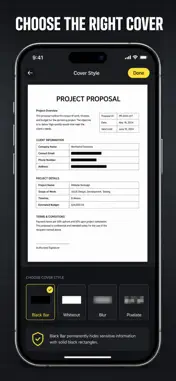
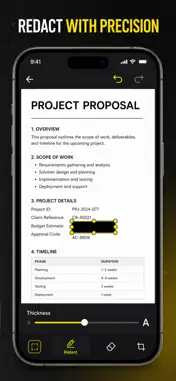
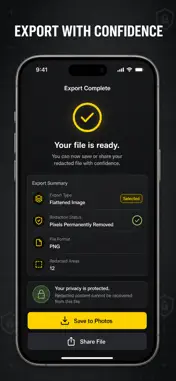
Black out sensitive information on any photo, screenshot or PDF before you send it. Cover names, account numbers, addresses and faces with an opaque bar, a blur or a pixel block, then export a flattened copy where the hidden pixels are genuinely gone — not a layer someone can peel off. Most people scribble over a screenshot with the built-in markup pen and hope for the best. Redact Photo is built for the job: on-device text recognition reads the page and offers one-tap bars over every line that looks like an email, a phone number, a card number, a date or a full name, so you never miss the one detail you scrolled past. Multi-page PDFs open page by page, and every export is re-rendered at full native resolution with the covered area destroyed in the pixels themselves. WHAT YOU GET - Sensitive lines found for you: on-device text recognition flags emails, phone numbers, card and ID numbers, dates and names, and bars them with one tap - Opaque black or white-out bars that cover pixels instead of shading them - Blur or pixelate any region you drag — faces, signatures, logos, whole paragraphs - A whole PDF handled in one sitting: every page opens as an editable page, and the finished file goes back out as a single multi-page PDF - Exports that survive scrutiny: full-resolution flattening, so zooming, brightening or re-editing the file reveals nothing - A record of what you sent: finished exports are kept in a Documents gallery on your device so you can re-share the safe copy later PERFECT FOR - Anyone sending a bank statement, payslip or invoice to an accountant, landlord or lender - Support and ops teams sharing screenshots of real customer accounts - Journalists, lawyers and HR staff handling contracts, filings and case paperwork - Anyone posting a screenshot publicly and needing names, handles and numbers off it first WHY NOT JUST USE THE BUILT-IN MARKUP PEN? The system pen has no blur, no pixelate and no idea what is sensitive — you are eyeballing every line yourself, at whatever precision your finger allows. A highlighter stroke is translucent, so the text underneath is still readable. Redact Photo gives you true opaque bars, blur and pixelate regions with pinch-to-zoom precision, undo and redo on every page, automatic suggestions from on-device text recognition, and multi-page PDF handling the Photos app simply does not do. PRIVACY Everything runs on your device. Your photos, your PDFs, the recognized text and every export stay on your iPhone — nothing is uploaded, there is no account to create, and no tracking or analytics SDK is bundled in the app. FULL ACCESS Redact Photo unlocks with a purchase. Full access covers every markup tool including blur and pixelate, watermark-free full-resolution export, bulk save of all pages, and share-as-PDF for multi-page documents. Choose the plan that fits: weekly, yearly, or a one-time lifetime purchase that never renews. Subscriptions renew automatically unless cancelled at least 24 hours before the end of the current period; manage or cancel anytime in your App Store account settings. Open the last screenshot you were about to send, tap Auto, and see what it catches. Terms of Use (EULA): https://web-levi.web.app/terms Privacy Policy: https://web-levi.web.app/privacy-policy Questions? [email protected]
What's New
Version 1.1.1 2026-08-17
Bug fixes and performance improvements. Technical Analysis
Package Overview Basic metadata
Bundle ID
com.levi.whiteout Current Version 1.1.1
Minimum iOS 18.0
Package Size App Store Size
Package Metadata 0 / 3 version records
Detailed binary, privacy manifest, framework, and Info.plist results have not been indexed for this package yet. The verified App Store and archive metadata above remains available.
Developer Information
Known Version Records
0 version records with stored package metadata • 3 known version records
Stored metadata does not guarantee a package is currently available to download.
| Details | Version / IDs | Version date | Action |
|---|---|---|---|
| Not archived | App Store ID: 889166118 | Unknown | Request Version |
| Not archived | App Store ID: 888440399 | Unknown | Request Version |
| Not archived | App Store ID: 886257721 | Unknown | Request Version |